
super-table
 super-table copied to clipboard
 verbb
verbb
Upload location with variable not working with matrix -> ST -> asset field, with prepopulated rows
Description
In an ST->asset field, when using a variable in the upload location path, the asset modal turns up empty when clicking "add an asset", despite the path already containing files. Only happens with the prepopulated rows of the ST (i.e. if Min rows>0 or if the field is a static field).
Steps to reproduce
-
Create a matrix field, add a block with an ST field, add an asset field to the ST. Check the "Restrict uploads to a single folder?" and set the upload path to {owner.owner.slug}. Set the "Min rows" value of the ST to 1. Add the matrix field to an entry type.
-
Create a new entry. Give it a random title. Add a matrix block. Click "Add an asset" to the prepopulated row of the ST. Upload a file in the modal. Save the entry. The entry is saved, the folder {owner.owner.slug} is created and contains the uploaded file. Everthing is fine so far.
-
Edit the entry. Add a new matrix block. Click "Add an asset" to the prepopulated row of the ST. The file modal is empty, but it should show the contents of the newly created folder with the file we added in (2).
-
Add another row to the ST in the matrix block created in (3). Click "Add an asset". The file modal shows the contents of the {owner.owner.slug} folder with the file we uploaded in (2)!. So this bug only occurs with the prepopulated rows of the ST. This is especially a problem with static ST fields, since they only have a single prepopulated row.
This bug also occurs without putting the ST field inside a matrix field, but it is harder to reproduce, since the (in that case) {owner.slug} folder must already be created and contain files.
Additional info
- Plugin version: 2.3.0
- Craft version: 3.3.4.1

Having a similar problem where using the type variable inside an Assets upload location path will use super table field information instead of entry information.
So for example I want my uploads to go into a folder labeled with the entry type and then the post date. But if I enter {type|kebab}/{postDate|date('Y-m-d')} into the Upload Location box, upon saving the entry a folder is created using the ID (the database table ID, not the element ID) of the first Super Table row (32/2019-10-01). Similarly, if I enter {type.handle|kebab}/{postDate|date('Y-m-d')}, I get a folder with the field handle plus the Super Table row index (my-field-0/2019-10-01).
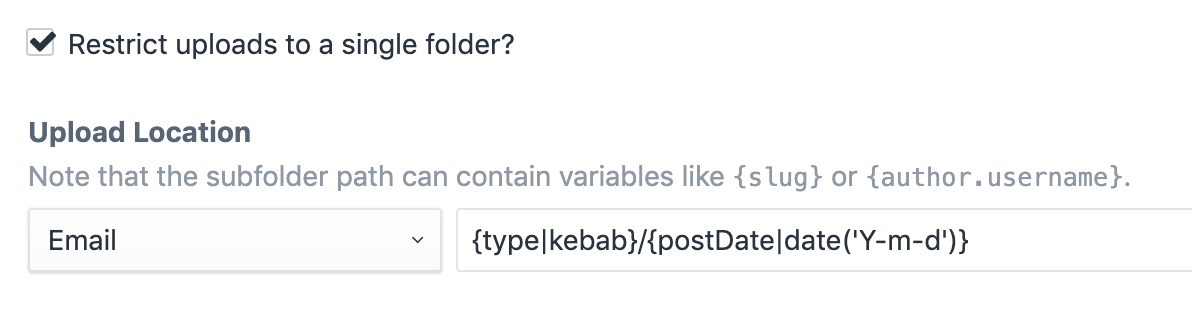
So something is re-routing Craft's native type variable when used in an upload location. Unlike the OP this happens for me whether or not the field is marked as static, has a row limit, or has no row limit.
Craft 3.3.6 Super Table 2.3.0

@kgrote I do not think this is related to my original issue. You probably need to prefix your type and postDate variables with "owner." if the asset field is inside a ST like this: {owner.type|kebab}/{owner.postDate|date('Y-m-d')}
I think I'm experiencing the same issue as @stefanmf. I have a Matrix field containing a SuperTable static field containing a Matrix with an Assets field (triple nested, I know that is asking for trouble).
The asset field is restricted to a single folder like so {owner.owner.owner.projectId}-{owner.owner.owner.slug} (the folder already exists in the Assets folder tree).
When adding a new Matrix->ST->Matrix block, the Assets file modal can't find the specified single folder and falls back to the generic Temporary uploads folder.
However, after the entry is saved, the Assets file modal behaves as expected on all existing blocks/rows. But when adding a new block, until saved, the same issue occurs.
For plain single level Matrix blocks in the same entry, the Assets field modal works as expected, opening the single folder specified ({owner.projectId}-{owner.slug}).
My hunch is that the ST-field (and/or also the Matrix-field) can't be referenced as an {owner} in the file path until the entry is saved and the fields properly exist.
In my case, since I'm not using any fields data in my restricted assets location, a way to reference the entry-level directly (e.g. replacing {owner.owner.owner.slug} with {entry.slug}) would be a solution.
As an extra note; I have the mmikkel/cp-field-inspect plugin installed and have noticed that the small cogwheels are not displayed on new Super Table field blocks until the entry is saved. Might be related. Or not.
And finally, thank you for providing a fantastic plugin!
Additional info
- Plugin version: 2.3.0
- Craft version: 3.3.8

@svale This sounds exactly like my problem. Regarding your solution by replacing {owner.owner.owner.slug} with {entry.slug}, to my understanding this will not work since you can't reference the entry in an ST or Matrix field? I just tried this and it throws an "Invalid subpath" error on save, even though the path exists. Have you made this work for you somehow?
@stefanmf Ah, no sorry, the {entry.slug} thing was just me floating an idea on how it perhaps could be solved - if we could reference the entry directly. But then, maybe the issue really should be raised for the Asset-field in the craft-cms repo. If not Super Table somehow automagically can "translate" owner.owner[.owner] to entry :)
Lets hope verbb / @engram-design has som illuminating input!