

 ventoy
[issue]: VentoyPlugson does not create the correct file name and/or file extension for its resulting json file if the ISO partition is formatted as Ext4, causing the aforementioned json file to not be read
Official FAQ
- [X] I have checked the official FAQ.
Ventoy Version
1.0.80
What about latest release
Yes. I have tried the latest release, but the bug still exist.
Try alternative boot mode
Yes. I have tried them, but the bug still exist.
BIOS Mode
Both
Partition Style
MBR
Disk Capacity
8GB, 128GB
Disk Manufacturer
Unirex (8GB), Samsung (128GB; SATA SSD)
Image file checksum (if applicable)
Yes.
Image file download link (if applicable)
I just used the normal Linux download for Ventoy (and yes, I checked the SHA256)
What happened?
Simply put, if your Ventoy ISO partition is formatted as Ext4, then VentoyPlugson will end up not creating the correct file name and/or file extension for its resulting json file; this obviously causes the aforementioned json file to not be read.


The log is pretty bare and doesn't look to indicate much to me, but I'll upload it anyway:
You really might just have to test it out yourself - I tried it with two very different drives and both behaved the same way. You don't even have to do anything fancy, e.g. it can be a completely empty drive with no ISOs and, for VentoyPlugson, you similarly only have to change a single setting from the defaults.
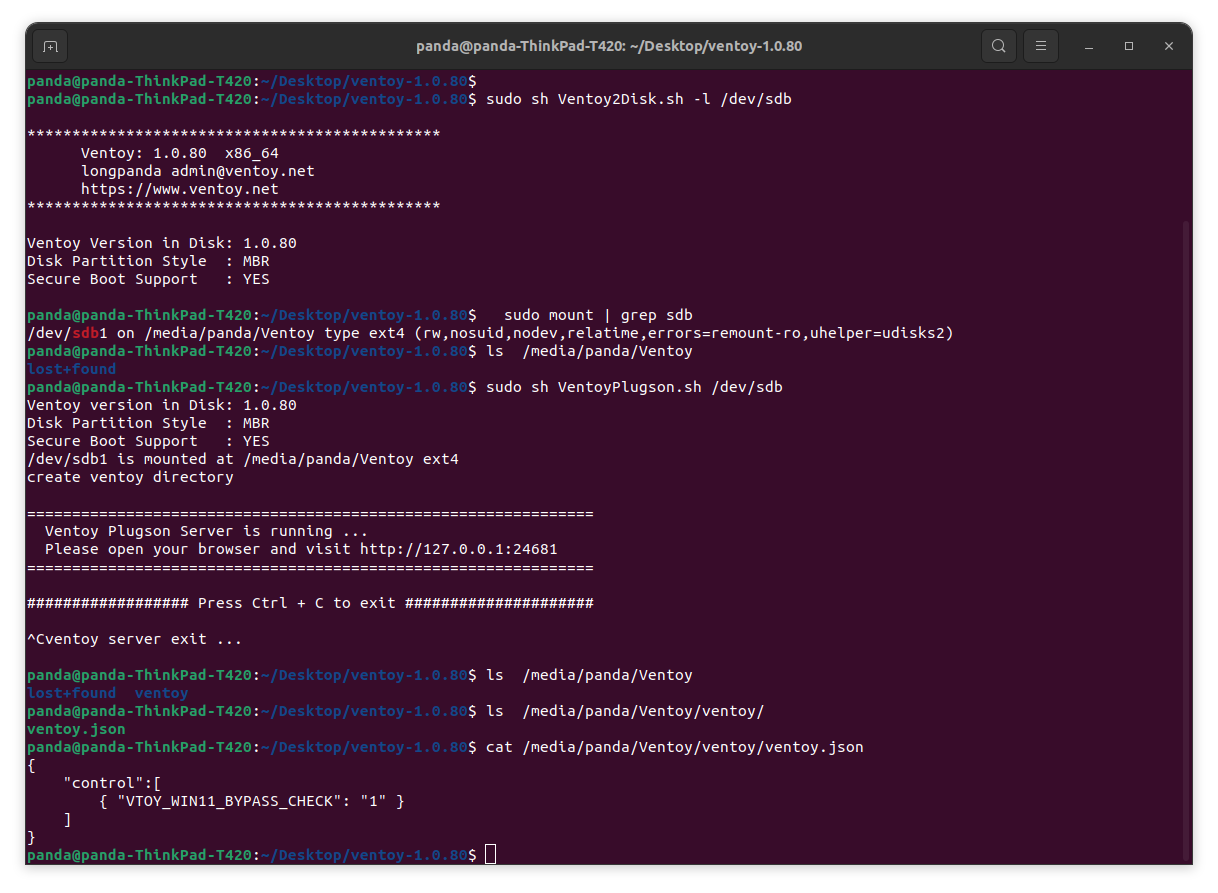
Well then the next thing is maybe the OS and/or browser makes a difference? For the 8GB USB drive I was using Linux Mint 20.3 Xfce (installed) paired with the Pale Moon browser while, for the 128GB SSD, I was using Linux Mint 21 Cinnamon (live ISO) paired with its pre-installed Firefox browser.
By the way, the Mint 21 and 128GB drive were also tested on a Thinkpad T420, so that's another variable we can rule out.
Maybe you just pulled out the USB drive without doing a sync or eject first?

Well this is interesting - when I used the exact same mounting options as you, it at least made it half of the way there. Previously, on the 8GB + Mint 20.3 scenario, it kept creating a file named venwhile, when I used your exact mounting options, it at least creates a file named ventoybut still with no file extension.
These were the default mounting options:
nosuid,nodev,nofail,noauto,x-gvfs-show
Also it can't be due to removing the USB drive because I would check the "ventoy" directory for the supposed json file before unmounting the drive.
That does remind me though - for the testing in VentoyPlugson, what I go is simply change any of the settings in "Global Configuration", most easily the win11 check since it's right at the top of the page.