

 vaticle
MacOS M1 chip support
Description
Trying to run typedb server after installing it on Mac OS as instructed by https://docs.vaticle.com/docs/running-typedb/install-and-run#using-homebrew results in the error described below.
Possibly related to #6255
Environment
- OS: Mac OS BigSur (11.5.2)
- TypeDB version: 2.4.0
- TypeDB client: console
- Other environment details:
Reproducible Steps
Steps to create the smallest reproducible scenario:
-
brew tap vaticle/tap -
brew install vaticle/tap/typedb -
typedb server
Expected Output
Since I'm new to typedb I don't really know how the desired result should look like. I'm guessing the terminal telling me that the server start without any problems?
Actual Output
================================================================
     ________ __      __ _____    _______  _____    _____
    |__    __|\  \  /  /|   _  \ |   _   ||   _  \ |   _  \
       |  |    \  \/  / |  | |  ||  | |__||  | |  ||  | |  |
       |  |     \    /  |  |/  / |  |___  |  | |  ||  |/  /
       |  |      |  |   |   __/  |   ___| |  | |  ||   _  \
       |  |      |  |   |  |     |  |  __ |  | |  ||  | |  |
       |  |      |  |   |  |     |  |_|  ||  |/  / |  |/  /
       |__|      |__|   |__|     |_______||_____/  |_____/

                    A STRONGLY-TYPED DATABASE
================================================================

Exception in thread "main" java.lang.UnsatisfiedLinkError: /private/var/folders/ry/bnfxqrqd1bd4mxtvgvnsr9j80000gn/T/librocksdbjni18708461303295440.jnilib: dlopen(/private/var/folders/ry/bnfxqrqd1bd4mxtvgvnsr9j80000gn/T/librocksdbjni18708461303295440.jnilib, 1): no suitable image found.  Did find:
	/private/var/folders/ry/bnfxqrqd1bd4mxtvgvnsr9j80000gn/T/librocksdbjni18708461303295440.jnilib: mach-o, but wrong architecture
	/private/var/folders/ry/bnfxqrqd1bd4mxtvgvnsr9j80000gn/T/librocksdbjni18708461303295440.jnilib: mach-o, but wrong architecture
	at java.base/jdk.internal.loader.NativeLibraries.load(Native Method)
	at java.base/jdk.internal.loader.NativeLibraries$NativeLibraryImpl.open(NativeLibraries.java:384)
	at java.base/jdk.internal.loader.NativeLibraries.loadLibrary(NativeLibraries.java:228)
	at java.base/jdk.internal.loader.NativeLibraries.loadLibrary(NativeLibraries.java:170)
	at java.base/java.lang.ClassLoader.loadLibrary(ClassLoader.java:2389)
	at java.base/java.lang.Runtime.load0(Runtime.java:755)
	at java.base/java.lang.System.load(System.java:1953)
	at org.rocksdb.NativeLibraryLoader.loadLibraryFromJar(NativeLibraryLoader.java:79)
	at org.rocksdb.NativeLibraryLoader.loadLibrary(NativeLibraryLoader.java:57)
	at org.rocksdb.RocksDB.loadLibrary(RocksDB.java:69)
	at org.rocksdb.RocksDB.<clinit>(RocksDB.java:38)
	at com.vaticle.typedb.core.rocks.RocksTypeDB.<clinit>(RocksTypeDB.java:47)
	at com.vaticle.typedb.core.rocks.RocksFactory.typedb(RocksFactory.java:34)
	at com.vaticle.typedb.core.server.TypeDBServer.<init>(TypeDBServer.java:88)
	at com.vaticle.typedb.core.server.TypeDBServer.<init>(TypeDBServer.java:72)
	at com.vaticle.typedb.core.server.TypeDBServer.runServer(TypeDBServer.java:244)
	at com.vaticle.typedb.core.server.TypeDBServer.main(TypeDBServer.java:225)
Additional information
Just starting to get my feed wet with typedb => sorry in case I might have overlooked something totally obvious to the "familiar user" ;-)

Hi!
Can you take a look at the issue you linked (ie., #6255 ) and see if you can extract anything useful for you?
While we haven't created an M1 specific distribution, we've got someone running TypeDB on M1 successfully in the team without problem.
Is it possible that you need to enable the Rosetta translation layer for TypeDB, perhaps?

@rappster we would suggest you try installing Java 11 distribution for x86_84 (old Mac CPU architecture), activate it system-wide and try starting TypeDB again.

@rappster on your situation? Did you get to try any of the above suggestions?

We currently rely on Rosetta translation for TypeDB to run correctly on an M1 MacBook. You need to install a JDK that targets the architecture that TypeDB supports, which is x64. If it doesn't, an UnsatisfiedLinkError is thrown at startup.
For example, to install from AdoptOpenJDK:
- Visit https://adoptopenjdk.net/releases.html to browse AdoptOpenJDK releases
- Select
OpenJDK 11with operating systemMacOSand architecturex64 - Download and install the Java binary displayed in the list below
- Verify that Java was installed correctly by running
java --version; the output should match the downloaded JDK version

I checked java --version openjdk version "11.0.15" 2022-04-19 OpenJDK Runtime Environment Homebrew (build 11.0.15+0) OpenJDK 64-Bit Server VM Homebrew (build 11.0.15+0, mixed mode)
I can't start typeDB on M1 chip.
What should I do next to run typeDB on M1 chip?

@wchwang , does your installed JDK target the x64 architecture?
We currently rely on Rosetta translation for TypeDB to run correctly on an M1 MacBook. You need to install a JDK that targets the architecture that TypeDB supports, which is
x64. If it doesn't, anUnsatisfiedLinkErroris thrown at startup.For example, to install from AdoptOpenJDK:
- Visit https://adoptopenjdk.net/releases.html to browse AdoptOpenJDK releases
- Select
OpenJDK 11with operating systemMacOSand architecturex64- Download and install the Java binary displayed in the list below
- Verify that Java was installed correctly by running
java --version; the output should match the downloaded JDK version
@alexjpwalker Yes I installed JDK x64 architecture.
I installed TypeDB using brew without Rosetta option on Terminal.
Do we need to install TypeDB with Rosetta or not?
@wchwang , does your installed JDK target the
x64architecture?We currently rely on Rosetta translation for TypeDB to run correctly on an M1 MacBook. You need to install a JDK that targets the architecture that TypeDB supports, which is
x64. If it doesn't, anUnsatisfiedLinkErroris thrown at startup. For example, to install from AdoptOpenJDK:
- Visit https://adoptopenjdk.net/releases.html to browse AdoptOpenJDK releases
- Select
OpenJDK 11with operating systemMacOSand architecturex64- Download and install the Java binary displayed in the list below
- Verify that Java was installed correctly by running
java --version; the output should match the downloaded JDK version
I installed TypeDB using brew without Rosetta option on Terminal.
Do we need to install TypeDB with Rosetta or not?
@wchwang TypeDB should be installed with Rosetta too.
MacBook M1 users have previously had success running TypeDB with the following JDK: https://github.com/adoptium/temurin11-binaries/releases/download/jdk-11.0.14.1%2B1/OpenJDK11U-jdk_x64_mac_hotspot_11.0.14.1_1.tar.gz. This is OpenJDK x64 v11.0.14 provided by adoptium. You could try installing that particular JDK.
We've only tested running on an M1 MacBook in recent versions of TypeDB. If you're on an old version, maybe try upgrading to the current latest release of TypeDB?
It's also possible that Rosetta is disabled on your machine. If this is the case you'd need to enable it. Apple have documentation on Rosetta at https://support.apple.com/en-gb/HT211861:
Installing Rosetta If you have a Mac with Apple silicon, you'll be asked to install Rosetta the first time you open an app built for an Intel-based Mac. Click Install, then enter your user name and password to allow the installation process to proceed.
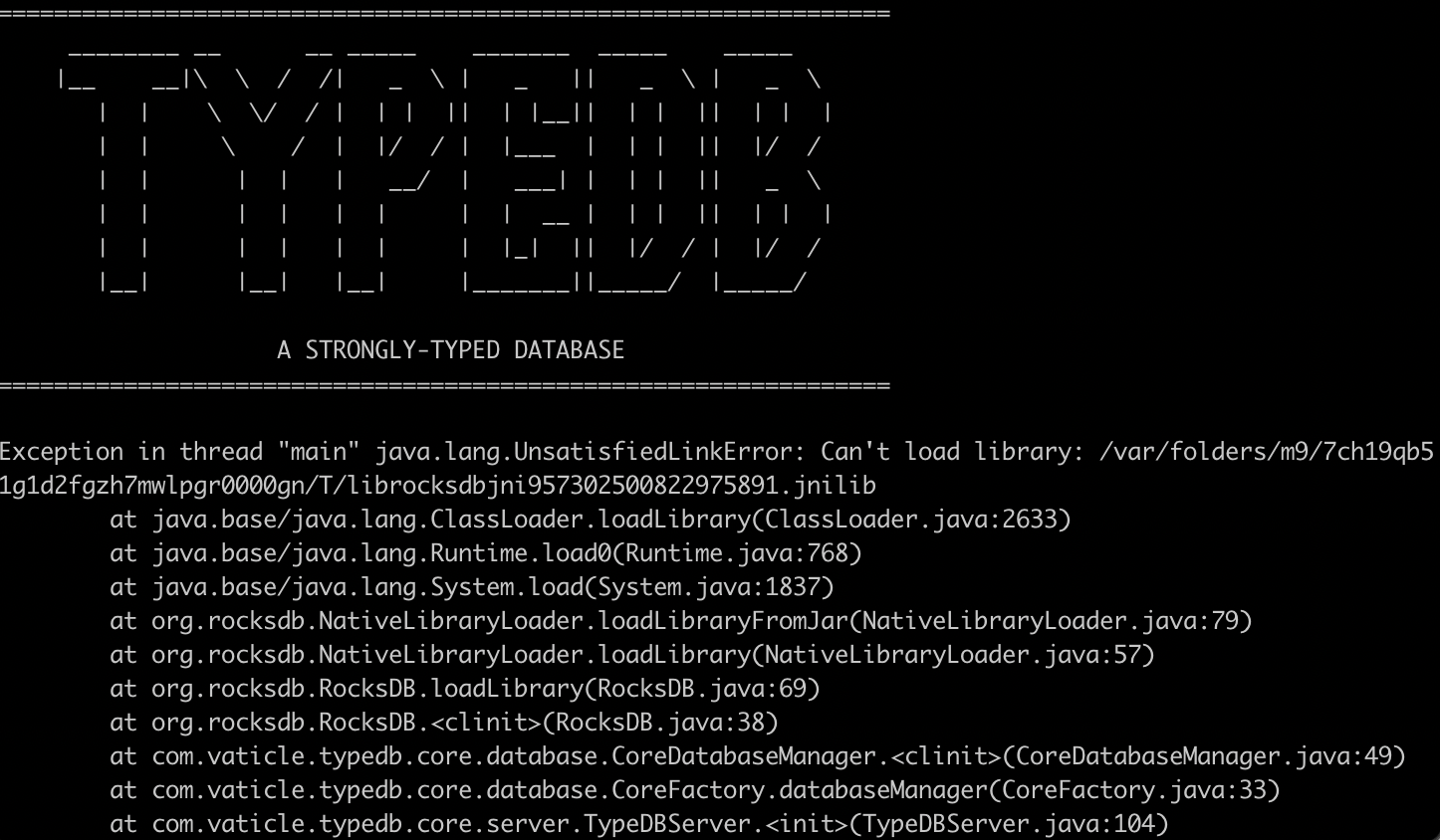
Same problem here
Exception in thread "main" java.lang.UnsatisfiedLinkError: Can't load library: /var/folders/4s/gsy92jhj6lsc82g_xtf89_s40000gp/T/librocksdbjni931099557008885710.jnilib
	at java.base/java.lang.ClassLoader.loadLibrary(ClassLoader.java:2633)
	at java.base/java.lang.Runtime.load0(Runtime.java:768)
	at java.base/java.lang.System.load(System.java:1837)
	at org.rocksdb.NativeLibraryLoader.loadLibraryFromJar(NativeLibraryLoader.java:79)
	at org.rocksdb.NativeLibraryLoader.loadLibrary(NativeLibraryLoader.java:57)
	at org.rocksdb.RocksDB.loadLibrary(RocksDB.java:69)
	at org.rocksdb.RocksDB.<clinit>(RocksDB.java:38)
	at com.vaticle.typedb.core.database.CoreDatabaseManager.<clinit>(CoreDatabaseManager.java:49)
	at com.vaticle.typedb.core.database.CoreFactory.databaseManager(CoreFactory.java:34)
	at com.vaticle.typedb.core.server.TypeDBServer.<init>(TypeDBServer.java:104)
	at com.vaticle.typedb.core.server.TypeDBServer.<init>(TypeDBServer.java:81)
	at com.vaticle.typedb.core.server.TypeDBServer.runServer(TypeDBServer.java:270)
	at com.vaticle.typedb.core.server.TypeDBServer.main(TypeDBServer.java:248)
➜  ~ java --version
openjdk 11.0.14.1 2022-02-08
OpenJDK Runtime Environment Temurin-11.0.14.1+1 (build 11.0.14.1+1)
OpenJDK 64-Bit Server VM Temurin-11.0.14.1+1 (build 11.0.14.1+1, mixed mode)
on mac with M1 Max
Any solutions?

Same problem here
... Any solutions?
@FedeCampe did you try any of the suggestions @alexjpwalker made above?

I have just confirmed on a new MacBook Pro with M1 Max chip, that @alexjpwalker's suggestion above works perfectly (with a slight update: download from adoptium.net instead of adoptopenjdk.net
First, make sure Rosetta library is installed. Then, install Java 11 for MacOS x64 (even though your machine is actually aarch64):
- Make sure you've uninstalled your Java installation
- Go to: https://adoptium.net/en-GB/temurin/releases/?version=11
- Choose: operating system
macOS, architecturex64, package typeJDK, version11 - Download the
pkginstaller -- the simpler installer wizard - Verify that your java installation is done by running
java -version, and see:
openjdk version "11.0.16.1" 2022-08-12
OpenJDK Runtime Environment Temurin-11.0.16.1+1 (build 11.0.16.1+1)
OpenJDK 64-Bit Server VM Temurin-11.0.16.1+1 (build 11.0.16.1+1, mixed mode)
You should now be able to run ./typedb server and launch TypeDB.
I will now close this issue and mark it solved.
NO
(base) ➜  ~ java --version
openjdk 11.0.19 2023-04-18
OpenJDK Runtime Environment Temurin-11.0.19+7 (build 11.0.19+7)
OpenJDK 64-Bit Server VM Temurin-11.0.19+7 (build 11.0.19+7, mixed mode)
(base) ➜  ~ typedb server

================================================================
     ________ __      __ _____    _______  _____    _____
    |__    __|\  \  /  /|   _  \ |   _   ||   _  \ |   _  \
       |  |    \  \/  / |  | |  ||  | |__||  | |  ||  | |  |
       |  |     \    /  |  |/  / |  |___  |  | |  ||  |/  /
       |  |      |  |   |   __/  |   ___| |  | |  ||   _  \
       |  |      |  |   |  |     |  |  __ |  | |  ||  | |  |
       |  |      |  |   |  |     |  |_|  ||  |/  / |  |/  /
       |__|      |__|   |__|     |_______||_____/  |_____/

                    A STRONGLY-TYPED DATABASE
================================================================

Exception in thread "main" java.lang.UnsatisfiedLinkError: /private/var/folders/w3/mhh3_kws0r7f5ny7ttts_r700000gn/T/librocksdbjni13569397768440276894.jnilib: dlopen(/private/var/folders/w3/mhh3_kws0r7f5ny7ttts_r700000gn/T/librocksdbjni13569397768440276894.jnilib, 0x0001): tried: '/private/var/folders/w3/mhh3_kws0r7f5ny7ttts_r700000gn/T/librocksdbjni13569397768440276894.jnilib' (mach-o file, but is an incompatible architecture (have (x86_64), need (arm64e)))
	at java.base/jdk.internal.loader.NativeLibraries.load(Native Method)

@FedericoCampe8 I see you're starting the server with a typedb server command, not ./typedb. If you've installed TypeDB via homebrewery, the default binary overrides JAVA_HOME with Homebrewery Java:
$ cat /opt/homebrew/Cellar/typedb/2.16.1/bin/typedb
#!/bin/bash
JAVA_HOME="/opt/homebrew/opt/openjdk/libexec/openjdk.jdk/Contents/Home" exec "/opt/homebrew/Cellar/typedb/2.16.1/libexec/typedb"  "$@"
Directly running /opt/homebrew/Cellar/typedb/2.16.1/libexec/typedb server should work (replace 2.16.1 with the version you have installed):
$ java --version
openjdk 11.0.18 2023-01-17
OpenJDK Runtime Environment Temurin-11.0.18+10 (build 11.0.18+10)
OpenJDK 64-Bit Server VM Temurin-11.0.18+10 (build 11.0.18+10, mixed mode)

$ /opt/homebrew/Cellar/typedb/2.16.1/libexec/typedb server

================================================================
     ________ __      __ _____    _______  _____    _____
    |__    __|\  \  /  /|   _  \ |   _   ||   _  \ |   _  \
       |  |    \  \/  / |  | |  ||  | |__||  | |  ||  | |  |
       |  |     \    /  |  |/  / |  |___  |  | |  ||  |/  /
       |  |      |  |   |   __/  |   ___| |  | |  ||   _  \
       |  |      |  |   |  |     |  |  __ |  | |  ||  | |  |
       |  |      |  |   |  |     |  |_|  ||  |/  / |  |/  /
       |__|      |__|   |__|     |_______||_____/  |_____/

                    A STRONGLY-TYPED DATABASE
================================================================

12:53:57.922 [main] INFO com.vaticle.typedb.core.server.TypeDBServer - TypeDB Server is now running and will keep this process alive.
12:53:57.928 [main] INFO com.vaticle.typedb.core.server.TypeDBServer - You can press CTRL+C to shutdown this server.
12:53:57.928 [main] INFO com.vaticle.typedb.core.server.TypeDBServer -
12:53:57.928 [main] INFO com.vaticle.typedb.core.server.TypeDBServer - version: 2.16.1
12:53:57.928 [main] INFO com.vaticle.typedb.core.server.TypeDBServer - listening to address: 0.0.0.0:1729
12:53:57.928 [main] INFO com.vaticle.typedb.core.server.TypeDBServer - data directory configured to: /opt/homebrew/var/typedb/data
12:53:57.928 [main] INFO com.vaticle.typedb.core.server.TypeDBServer - bootup completed in: 3045 ms

For any future visitors, please note that TypeDB 2.19.0 supports both Mac and Linux arm architectures natively, and no longer requires any workarounds. For mac, you can now install java and typedb via brew without issues.
