

 variar
Feature request: Supports double-click highlighting for selected keywords
I've been using the latest version of klog recently and the experience is excellent, Highlighters is also very friendly for users.
But I want to make another feature request to differentiate it from highlighter(highlighter -> configure highlighter), could we support double-clicking a keyword to highlight? Double-click highlighting does not conflict with highlighters.
Of course, double-click highlights can have a different color than highlighters, which can have a default color scheme.
If supported, we can select a keyword to highlight at any time without reconfiguring or de-configuring through the highlighter.

I've been using the latest version of klog recently and the experience is excellent,
Highlightersis also very friendly for users.But I want to make another feature request to differentiate it from highlighter(highlighter -> configure highlighter), could we support double-clicking a keyword to highlight? Double-click highlighting does not conflict with highlighters.
Of course, double-click highlights can have a different color than highlighters, which can have a default color scheme.
If supported, we can select a keyword to highlight at any time without reconfiguring or de-configuring through the highlighter.
Let me add an attached screenshot to express my thoughts more clearly:
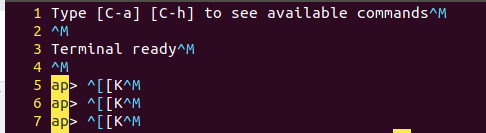 please refer to my screenshot above, the focus is on the position of lines 5,6,7, as you see, when I double-click to select "ap" in the fifth line, it will highlight all the keywords with "ap". However, according to my current testing, the current klogg is not supported.
