

 valor-software
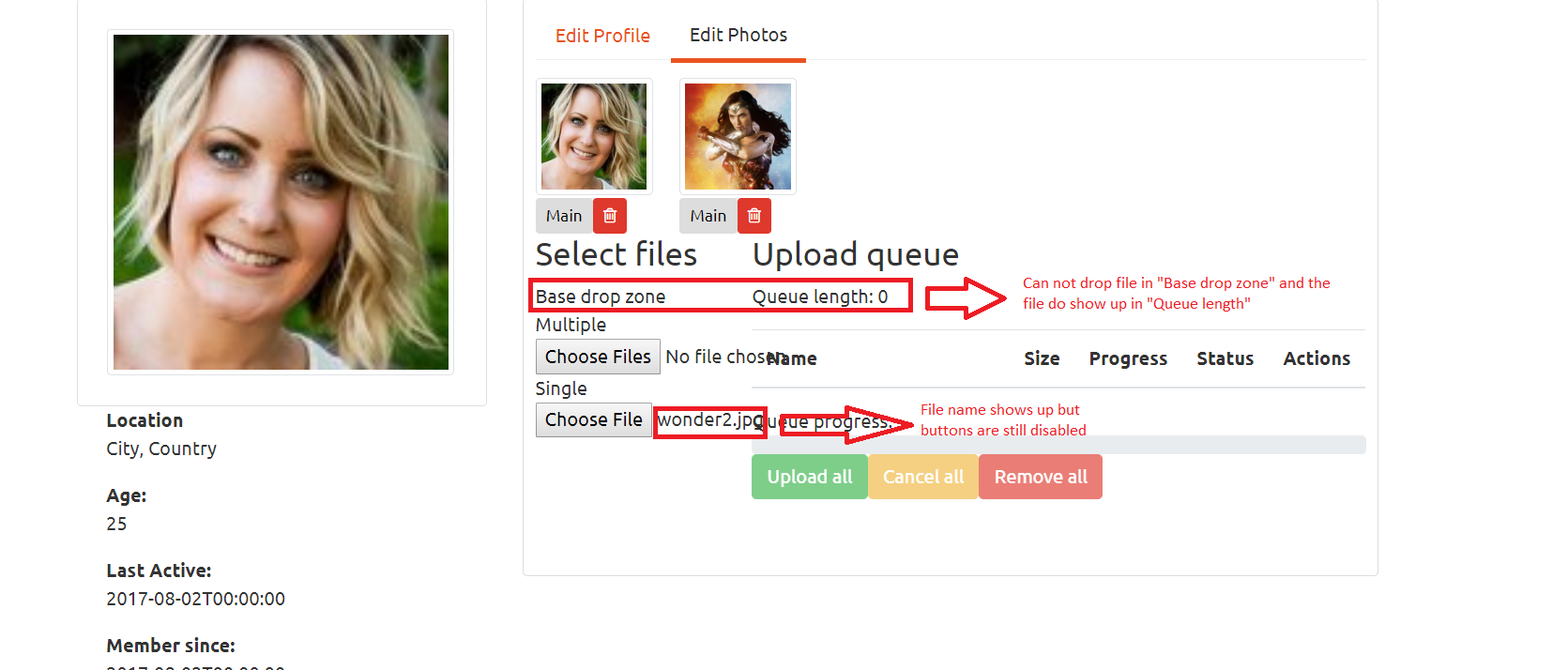
I am dropping file and using button to upload file but no event fires and the buttons "Upload All", "Cancel all", "Remove all" remain disabled.
Hi I am trying to make it work but nothing is happening. I have already uninstalled and then installed the package again. I have gone through the code but nothing is happening. This is code for photo-editor.component.html `
<div class="col-md-3">

    <h3>Select files</h3>

    <div ng2FileDrop
         [ngClass]="{'nv-file-over': hasBaseDropZoneOver}"
         (fileOver)="fileOverBase($event)"
         [uploader]="uploader"
         class="well my-drop-zone">
        Base drop zone
    </div>

    Multiple
    <input type="file" ng2FileSelect [uploader]="uploader" multiple  /><br/>

    Single
    <input type="file" ng2FileSelect [uploader]="uploader" />
</div>

<div class="col-md-9" style="margin-bottom: 40px">

    <h3>Upload queue</h3>
    <p>Queue length: {{ uploader?.queue?.length }}</p>

    <table class="table">
        <thead>
        <tr>
            <th width="50%">Name</th>
            <th>Size</th>
            <th>Progress</th>
            <th>Status</th>
            <th>Actions</th>
        </tr>
        </thead>
        <tbody>
        <tr *ngFor="let item of uploader.queue">
            <td><strong>{{ item?.file?.name }}</strong></td>
            <td *ngIf="uploader.options.isHTML5" nowrap>{{ item?.file?.size/1024/1024 | number:'.2' }} MB</td>
            <td *ngIf="uploader.options.isHTML5">
                <div class="progress" style="margin-bottom: 0;">
                    <div class="progress-bar" role="progressbar" [ngStyle]="{ 'width': item.progress + '%' }"></div>
                </div>
            </td>
            <td class="text-center">
                <span *ngIf="item.isSuccess"><i class="glyphicon glyphicon-ok"></i></span>
                <span *ngIf="item.isCancel"><i class="glyphicon glyphicon-ban-circle"></i></span>
                <span *ngIf="item.isError"><i class="glyphicon glyphicon-remove"></i></span>
            </td>
            <td nowrap>
                <button type="button" class="btn btn-success btn-xs"
                        (click)="item.upload()" [disabled]="item.isReady || item.isUploading || item.isSuccess">
                    <span class="glyphicon glyphicon-upload"></span> Upload
                </button>
                <button type="button" class="btn btn-warning btn-xs"
                        (click)="item.cancel()" [disabled]="!item.isUploading">
                    <span class="glyphicon glyphicon-ban-circle"></span> Cancel
                </button>
                <button type="button" class="btn btn-danger btn-xs"
                        (click)="item.remove()">
                    <span class="glyphicon glyphicon-trash"></span> Remove
                </button>
            </td>
        </tr>
        </tbody>
    </table>

    <div>
        <div>
            Queue progress:
            <div class="progress" style="">
                <div class="progress-bar" role="progressbar" [ngStyle]="{ 'width': uploader.progress + '%' }"></div>
            </div>
        </div>
        <button type="button" class="btn btn-success btn-s"
                (click)="uploader.uploadAll()" [disabled]="!uploader.getNotUploadedItems().length">
            <span class="glyphicon glyphicon-upload"></span> Upload all
        </button>
        <button type="button" class="btn btn-warning btn-s"
                (click)="uploader.cancelAll()" [disabled]="!uploader.isUploading">
            <span class="glyphicon glyphicon-ban-circle"></span> Cancel all
        </button>
        <button type="button" class="btn btn-danger btn-s"
                (click)="uploader.clearQueue()" [disabled]="!uploader.queue.length">
            <span class="glyphicon glyphicon-trash"></span> Remove all
        </button>
    </div>

</div>
This is for its ts
`import { Component, Input, OnInit } from '@angular/core'; import { FileUploader } from 'ng2-file-upload'; import { Photo } from 'src/app/_models/Photo'; import { environment } from 'src/environments/environment'; import { AuthService } from 'src/app/_services/auth.service'; import { UserService } from 'src/app/_services/user.service'; import { AlertifyService } from 'src/app/_services/alertify.service';
@Component({ selector: 'app-photo-editor', templateUrl: './photo-editor.component.html', styleUrls: ['./photo-editor.component.css'] }) export class PhotoEditorComponent implements OnInit { @Input() photos: Photo[]; uploader: FileUploader; hasBaseDropZoneOver = false; baseUrl = environment.apiUrl;
constructor(private authService: AuthService, private userService: UserService, private alertify: AlertifyService) { }
ngOnInit() { this.initializeUploader(); }
fileOverBase(e: any): void { console.log('file event fired'); this.hasBaseDropZoneOver = e; }
initializeUploader() { this.uploader = new FileUploader({ url: this.baseUrl + 'users/' + this.authService.decodedToken.nameid + '/photos', authToken: 'Bearer ' + localStorage.getItem('token'), isHTML5: true, allowedFileType: ['image'], removeAfterUpload: true, autoUpload: false, maxFileSize: 10 * 1024 * 1024 });
this.uploader.onAfterAddingFile = (file) => {file.withCredentials = false; };
} } `


Hello,
I'm also struggling with this exact problem. Nothing fires. I'm using Angular 6 and have tried every example on the whole interwebs.... I even found one example indicating to install this:
$npm install rxjs-compat --save
Wondering if the project is in decline and we should just move on....
Thanks


I had the issue when I wrongly defined the file extension filter
this.uploader = new FileUploader({
			filters: [{
				name: 'extension',
				fn: (item: any): boolean => {
							return false;
				}
			}]
		});
so you should try to remove : allowedFileType: ['image'],
