valinet
Start menu Windows 10 multiple extraneous Terminal -Entries
With the Start-Menu in Win10 mode multiple extraneous PowerShell/Terminal entries appear.
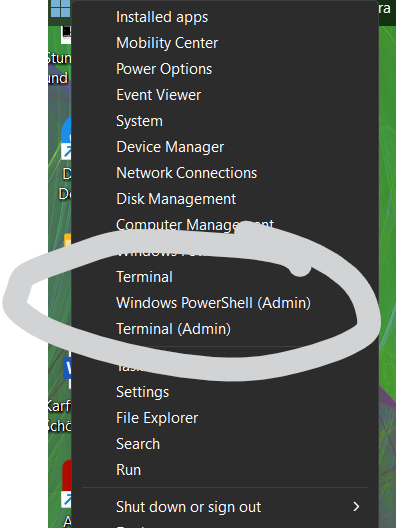
Probably due to updates of Powershell. Switching to Win11 start and back to Win10 solves this.

I have this issue as well. When I uninstall EP this is what my win+X menu looks like
This is what it looks like with EP installed.
I am on Windows 11 Home 22621.1848. I am using Windows 10 Taskbar Style.

Might be because windows 10 had the option Windows PowerShell (Admin), while windows 11 has Terminal (Admin). Try setting it back to windows 11, restart file explorer, and see if Windows PowerShell (Admin) is still there.

I use 🪟+X A a lot in my workflow, and the multiple terminal entries on the W10 taskbar make that shortcut not work. Which makes it unsuable for me.

Might be because windows 10 had the option Windows PowerShell (Admin), while windows 11 has Terminal (Admin). Try setting it back to windows 11, restart file explorer, and see if Windows PowerShell (Admin) is still there.
Yes this works, but it defeats the purpose of me using EP, which is to give me the Windows 10 taskbar.
Might be because windows 10 had the option Windows PowerShell (Admin), while windows 11 has Terminal (Admin). Try setting it back to windows 11, restart file explorer, and see if Windows PowerShell (Admin) is still there.
Yes this works, but it defeats the purpose of me using EP, which is to give me the Windows 10 taskbar.
Then you've confirmed this is a bug that should be fixed with explorer patcher. Now you wait to see for it to get fixed.
I got the Win+XI/A shortcuts working using the windows 10 taskbar in windows 11 in a roundabout hacky way. You have to rename the Powershell entries to "pwsh" using a win+x editing tool like winaero's.
The menu now looks like this, note the underlines:
Seems like the "Terminal" entries are added by the win10 taskbar, and are hardcoded, not respecting the AppData\Local\Microsoft\Windows\WinX shortcut names.