

 vaadin
Provide a possibility to hide required indicator when label is hidden
Description
We hide components from of a FormItem by using formItem.getChildren()
Unfortunately, the newly added required indicator is not slotted. So for example, if all children are hidden in Vaadin 14 the FormItem had a height of 0 now as the required indicator stays the FormItem keeps the height.
Expected outcome
Required Indicator should be slotted.
Minimal reproducible example
As described
Steps to reproduce
As described
Environment
Vaadin version(s): 23 OS: Windows 11
Browsers
Issue is not browser related

Just to clarify, the problem can be reproduced in the web component using the following code:
<vaadin-form-item>
  <label slot="label" hidden>First name</label>
  <vaadin-text-field required hidden></vaadin-text-field>
</vaadin-form-item>
We could update the component to detect whether the element in the label slot gets hidden by hidden attribute and hide the required indicator in that case. I'd say the has-label attribute would be also beneficial for styling.
However, I still don't understand the reason for hiding all the children while keeping the vaadin-form-item itself visible.
Is that done on purpose, to ensure the form item still takes width without showing the content?

Is that done on purpose, to ensure the form item still takes width without showing the content?
Yes, that's exactly the reason. The layout for the user must be the same even if certain elements are hidden.
The reason why we need to have it height 0 is that if a whole line in a FormLayout is hidden the line shouldn't use any space.
Unless I'm mistaken, even if the required indicator and label weren't there, the FormItem would still have height because of the margin applied to the label part, so you would still need to apply CSS to the FormItem to make it 0 height. And if you're doing that, you might as well hide the required indicator the same way.

No, it has a height of 0 when the required-indicator is hidden.
I currently use this
:host([theme~="hidden"]) [part='required-indicator']::after {
	display: none;
}
Are you using labels-on-top or labels-aside? I haven't tested with labels-on-top, but with labels-aside I'm still seeing a 20px height (with Lumo defaults) with both field and label hidden:
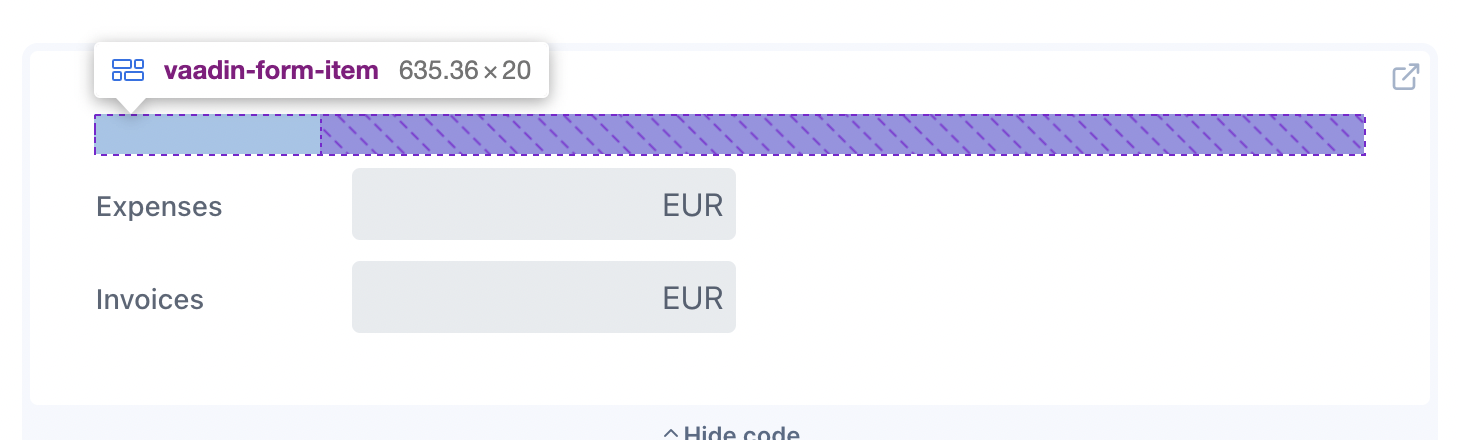
And if you're using labels-on-top, my question would be why you're wrapping them with FormItem at all.
