uxsolutions
How to show hover on week and Post Monday of week
hi, this is great! 👍
- How to show hover of week - horizontal row
- How to POST Ajax Monday date of the selected week
like this

thanks

For the hover part, this css piece of code should do the trick:
.datepicker table tbody tr:hover td {
  background-color: #eee;
}
If I get correctly what you want to do, you want select a week rather than a specific day ?
I dont think that the component can do such thing on it own.
What you'll have to do is catch the change event, then change the date at that moment.
But to be honest I don't feel like it would be the more qualitative way for you.
What you should do it select the whole week, so it will be nicer visually.
Here some implementation: https://jsfiddle.net/g52aa07L/15/

I had the same issue.
Is there an option to make the calendar with Hide/Collapse/Open/Close/Sticky pin, where user can select if he wants to see the mini calendar all the time, or hide/open like you have it? - maybe a toggle switch Open/Close
For me I am struggling with the AJAX Post for the **date** value or Week Number to a Controller-Action, when the Input date-value (date only, or the week number) has changed.

I tried this but it was not sending the data for me
container.on('changeDate', function () {
    setDates(datepicker.getDate());
            var date =    datepicker.getDate();   // $("#dateBox").val();
               $("#belowContainer").load('@(Url.Action("Getcourses","Home",null, Request.Url.Scheme))?dateVal=' + date );
@weedkiller Replace date with dates[0].
The date from the datepicker will still be the selected one, not the first of the week.
Something like this: https://jsfiddle.net/g52aa07L/16/
@papyr I'm not sure to understand your issue.
your example works for me or the range option is fine too..
<div class="input-daterange input-group" id="datepicker">
    <input type="text" class="input-sm form-control" name="start" />
    <span class="input-group-addon">to</span>
    <input type="text" class="input-sm form-control" name="end" />
</div>

$('#BootstrapWeekRow .input-daterange').datepicker({
    todayBtn: "linked",
    clearBtn: true,
    orientation: "top auto",
    daysOfWeekHighlighted: "1,2,3,4,5",
    calendarWeeks: true,
    beforeShowDay: function (date){
                  if (date.getMonth() == (new Date()).getMonth())
                    switch (date.getDate()){
                      case 4:
                        return {
                          tooltip: 'Example tooltip',
                          classes: 'active'
                        };
                      case 8:
                        return false;
                      case 12:
                        return "green";
                  }
                },
    defaultViewDate: { year: 1977, month: 04, day: 25 }
});
@Azaret on the change/selection inside date picker.
- Some users want calendar open, others want it closed, is there a toggle/radio option to leave the calendar in open state showing the highlighted row?
- POST on datepicker change: I also want to trigger an AJAX post with the val of the date or week selected, weed killers sample did not work trigger for me.
- I think you're looking for the
autoclose. - If you want to do a regular ajax call and you copy/pasted weedkiller code, it makes sense, he is using specific ASP.NET ajax call I think. You can learn on how make ajax call with jQuery on their website.
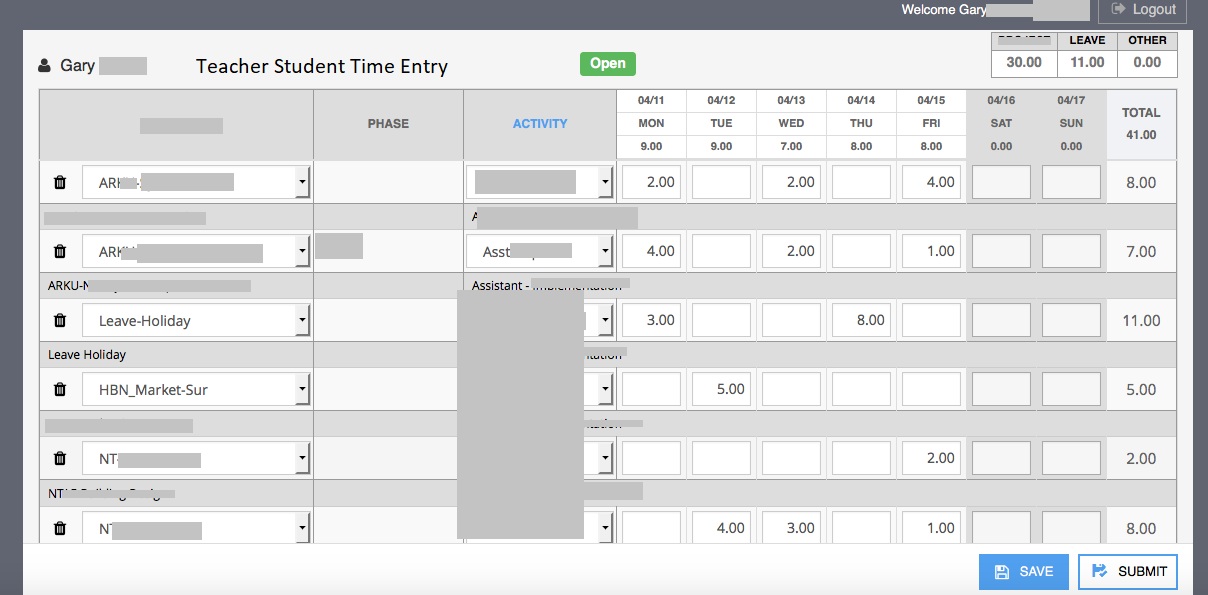
Hey just wanted to return back to this. I am trying to retro fit your component into a Teacher/Student Class weekly time card entry.
Is there a good example for just hours in a row and ensuring all the hours/total in the row dont exceed 24 hrs or 40 hrs