

 uxmal
uxmal
Enhancements to Reko main dialog
See attached screen shot with comments on possible enhancements regarding displayed information in Reko main dialog.
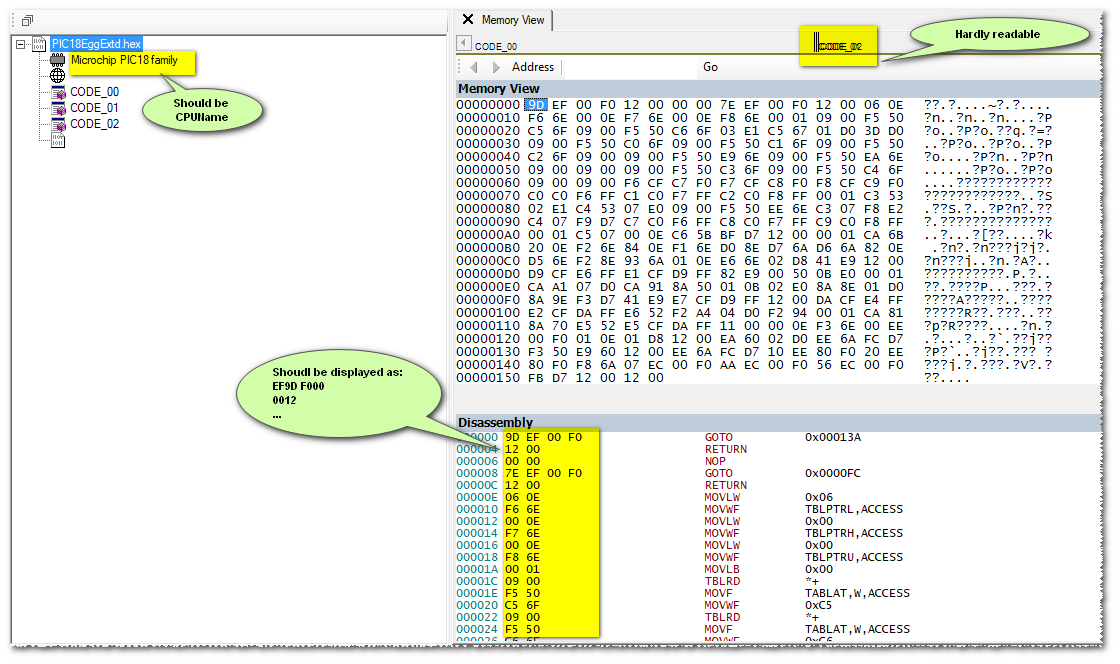 That is:
- Whenever specific processor information are provided to Reko (CPU Name, Execution mode, ...) one should be able to see it in the TreeView
- The memory segments can have very different sizes. Graphic should permit logarithmic expansion (similar to what disk tools show with disk partitions)
- Whenever a processor memory segment's granularity is not byte-size, the display of corresponding memory content should adapt. (e.g. 16-bit instructions code segment should display 16-bit words while, for the exact same processor, an other memory segment which is supposedly byte-sized should display 8-bit bytes).

As for 2) the image map view is zoomable (hard to discover, I agree). Use the scroll wheel of your mouse or using the numeric pad + / - keys to zoom in and out. A logarithmic view is in the works, but is not highly prioritized.

Thanks, However my point with the memory display concerns each segment's granularity (not the processor's generic granularity, which implicitly is referring to code-segment - the instructions stream). For PIC, the "granularity" is expressed by two items (referring to 'IPICMemTrait' in 'IPICDescriptor.cs') : the word-size of the memory segment and the location-size. They differ depending on the PIC family and for each PIC on the nature of the memory segment (code, Data EEPROM, Configuration Fuses, …). Anyway not a high-priority item.