
ReoGrid
 ReoGrid copied to clipboard
 unvell
Scroll jump during cell drag
I have a problem when dragging cells out of visible range. If I drag a cell to the left once the cursor passes the first visible column it then jumps to Column A.
Attached is a screenshot from your wonderful demo program. Please look at the red X painted in the lower right on the attached screenshot.
I started in cell AY7 and dragged it left. All goes well to AT7 and then the cursor jumps jumps to A7. It makes dragging almost impossible if you want to drop the cell outside of the visible range.
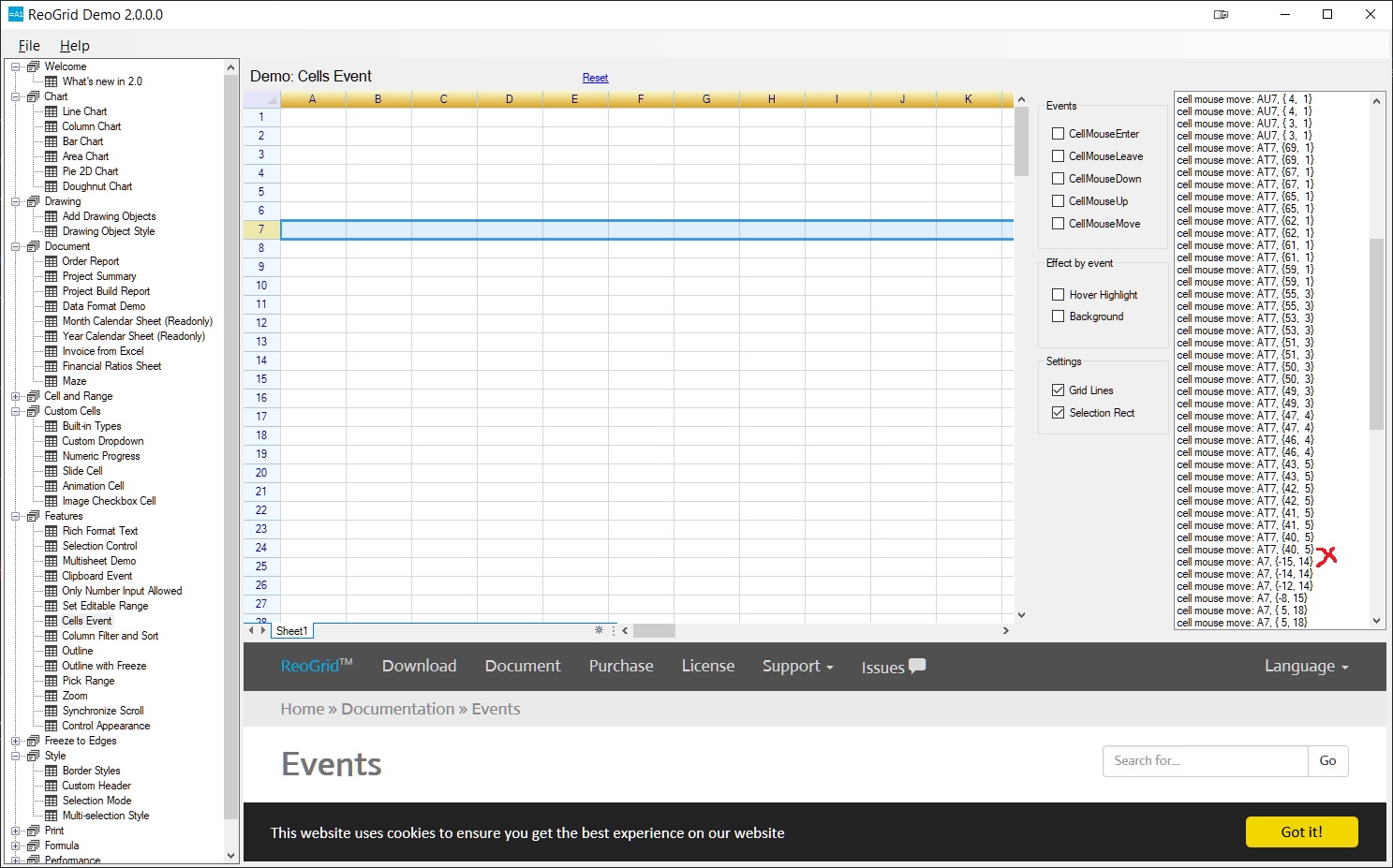

To clarify by dragging I am not talking about drag and drop when you select a cell, position the cursor at an edge, the cursor changes shape, and you drag. I am taking about when click on a cell and without releasing the click you drag the cell. You have not dragged and dropped the cell to another location, you have only expanded the cell to cover more cells. Dragging and dropping works fine. Dragging to expand does not for me.
I don't know how to reproduce the problem you mentioned. I have checked the demo project and I can't found the problems.
Do you use only the demo project? or some your own code?

Jingwood,
I originally sent this message on 4/14 as a reply to your message . I do not see it in the thread so I am posting it as a comment in case you did not receive my earlier reply.
Thanks for your reply. Yes, I did first notice it in my own code. It would be awkward to send you my code as I have a database, data layer, rules layer, and presentation layer. When I noticed the issue I tested to see if the same thing happened in your demo project. I have recorded a short (1 min) video and attached it to this message. I hope that it will show you how I get the same issue in your demo project. There is audio in the video file but just to put it in writing the issue happens when you are dragging the cursor to expanded the number of cells selected. When dragging the cursor to move a cell the scrolling works great. The problem is when you select a cell, click in the center of the cell and hold the left mouse button down, and then drag the cursor out of the viewing area. Once you leave the current viewing area the cursor jumps. In the case of moving the cursor to the left the cursor jumps to column A if you move past the left visible edge of the grid. In the video I first do a traditional drag/drop to move a cell. I select a cell, position the cursor at a cell edge and observe the change in the cursor shape, click and hold the left mouse button down, and then drag the cursor to the left out of the viewing area. You can see that when I move the cursor past the left visible grid edge the viewable area scrolls smoothly to the next group of cells. That is what I think should also happen if you move the cursor to expand a selected cell. However, as you will see in the video the screen jumps to Column A instead of smoothly scrolling like it did when I did a drag/drop to move the cell.
I hope this helps you reproduce the issue. If not please let me know and we will try something else.
Regards, Jeff
Jingwood,
Maybe an explanation of how I am using your grid will help. The grid is used for display/adjustment purpose inside of a To Do app. Dates/Times are column headers and personnel are the row headers. Various tasks are assigned by the supervisor in another app. My app reads the database, assigns a color to the task and then colors the appropriate cells on the grid. The purpose of the app I am developing is first to graphically display the task assignments and second to allow the personnel to adjust them as needed. Once any adjustment is made when the user clicks the Save button the changes will be written to the database.
Two types of adjustments are allowed. The first is to move the task from one date/time to another. To do this the user does a traditional drag/drop. The cursor is placed at the edge of a cell, the cursor changes to SizeAll, the left mouse button is clicked and not released, and the cell is dragged and dropped on the new date/time column. I have no problem with drag/drop moving as I illustrated in my video. Suppose a task is in column BW, the leftmost visible column is BV, and I want to drop the task on column BT. There is no problem with this, smooth as butter. When the cursor being dragged moves left past column BV the screen scrolls smoothly to the next set of columns and I can easily release the mouse button on column BT for the drop.
The other type of adjustment possible is to either extend or decrease the time the task takes. Suppose the columns are 15 minute intervals and a task takes 30 minutes or 2 columns. Further suppose because of some temporary circumstances the user sees the task will take an additional 60 minutes longer than planned. They can either start the task 4 columns earlier, end it 4 columns later, or split the difference and start a little earlier and end a little later. To start the task 60 minutes earlier the user clicks in the center of the task's first cell. The cursor is not SizeAll it remains the standard arrow pointer. Then with the mouse button still down they drag the cursor 4 columns to the left and release. My code will then color the 4 cells in the new columns with the task's color. So now the task covers 6 cells in 6 columns. This works fine as long as the target column is visible when the drag is started. However suppose the task starts in column BX and the leftmost visible column is BV. Since I want the task to start 60 minutes earlier that means it should start in column BT. But there is a problem. As soon as I drag the cursor to the left of BV the grid jumps to column A. It does not scroll gracefully to the next set of cells like it did for drag/drop move operation described in the previous paragraph. This is the issue I am raising. The scrolling behavior is not consistent.
I hope this helps, Jeff
Hi again. I have a much more concise way to explain my issue. Please try the 9 steps below and you will see my issue -
- Open your demo program and navigate to Features -> Cells Event
- Check CellMouseMove in the Events group
- Click and release on a cell in the middle of the visible grid to select it, say E10.
- Click mouse down and hold on the selected cell
- With the mouse button still down move the cursor downward (dragging without the Size All cursor) in the same column with the goal of trying to release the mouse button on row 145. Works great, screen scrolls smoothly making it easy to stop when you see row 145.
- Now try the other direction.
- Click and release on a cell in the middle of the visible grid to select it, say D173
- Click mouse down and hold on the selected cell
- With the mouse button still down move the cursor upward in the same column with the goal of trying to release the mouse button on row 75
When I do #9 above the screen jumps to row 1 when the cursor leaves the viewable cells. I have attached one screen shot showing what is reported by the CellMouseMove event. I selected cell D173 for the test. I then dragged it upwards towards row 75. For some reason the event log does not show the mouse moving up through D172, D171... on the way to the top of the visible cells. It does however show the mouse moved from D173 to D1 by teleportation. Please see the red arrow on the attached image.
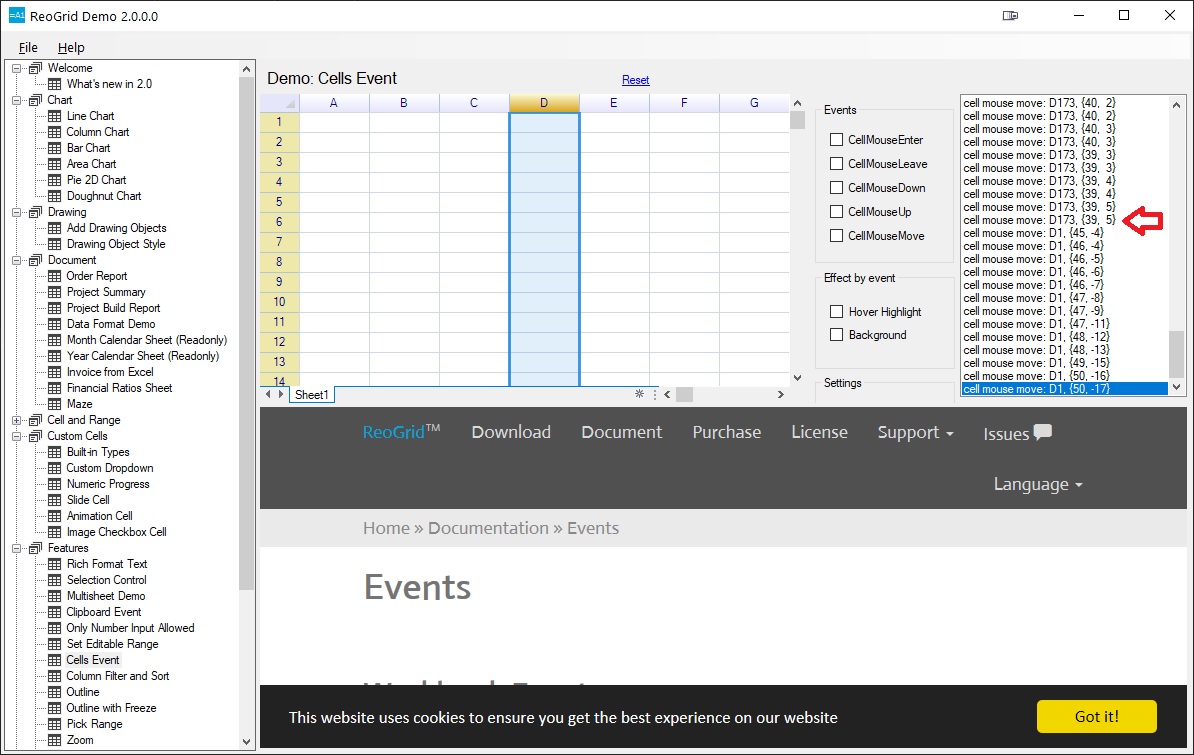
So the scrolling while dragging without the Size All cursor seems to work great when moving the mouse downward but has an issue when dragging upwards.
I found the same on the horizontal. If I am dragging right all is good. If I am dragging left then I see the same issue, the screen jumps.
- Scroll to column BW then click and release on a cell in the column to select it.
- Click mouse down and hold on the selected cell
- With the mouse button still down move the cursor leftward (dragging without the Size All cursor) in the same row with the goal of trying to release the mouse button on column AM
I hope this will allow you to confirm my issue.
Regards, Jeff
Jingwood,
I have been trying to think of another way to communicate my issue such that you see it as a bug that needs to be fixed. The issue I am having involves the screen scrolling to the first row or first column when crossing a screen boundary while selecting cells in the up or left directions respectively. Selecting cells down or to the right works fine. Suppose you have a monitor that shows 20 columns and 20 rows. If you are viewing rows 21 to 40 (the view after scrolling one screen down) you will not see the bug. That is because when you are only one screen away from showing the first row scrolling upwards to the next screen and scrolling to the first row are the same.
I have checked to see if always scrolling to the first row when crossing a screen boundary while selecting cells in the up direction is how Excel does it. Maybe it is some kind of labor saving device so you automatically scroll to the first row when selecting cells in the up direction. Excel does not automatically scroll to the top row when crossing a screen boundary while selecting cells in the up direction. Excel also does not automatically scroll to the first column when crossing a screen boundary while selecting cells in the left direction.
Suppose you have the same monitor as above and you can see 20 rows and 20 columns. You work for a company that has some number of salesman greater than 40. It could be any number 41 or greater. Just as long as the number of salesman requires more than 2 screens (40 rows) of data. You have a spreadsheet of each salesman's results sorted from low to high. Now your boss calls and asks you to send him the 30 lowest and 30 highest sales figures. For the lowest I scroll to the top column and select 30 cells starting from the top cell moving the mouse downwards. I can to that fine in both Reogrid and Excel. Now comes the problem. For the 30 highest I scroll to the bottom row and select from the bottom cell moving the mouse upwards. I can do that in Excel but not Reogrid. In the up direction Reogrid automatically scrolls to the first row when you cross a screen boundary while selecting multiple cells in the up direction.
I have attached 2 videos to this message. One is using Reogrid the other using Excel. In both I am trying to select the top and bottom 40 cells in a column. You can see it works in Excel but not Reogrid. I am only showing the problem with the up direction. There is also a problem with the left direction. In a row have some list of numbers greater than two screens. If you want to select the first 40 cells in the row that is easy in both Reogrid and Excel. But if you scroll to the last cell in the row and trying selecting 40 cells by moving the mouse to the left then there is an issue in Reogrid. When you cross a screen boundary the screen automatically scrolls to the first column.
I hope this explains the issue more clearly and shows that this issue is worth fixing.
Regards, Jeff Reogrid_Excel.zip
Hi @CmeFrog!
Thanks for your videos! Now I have understood the problem you describe. The selection always scrolls to the topmost cell or the leftmost cell is not good, I will try to fix it within some days.
Jingwood,
Wonderful. I am sorry that my language was not sufficient to explain this. As they say - a picture is worth a thousand words. Videos even more so. All my other previous issues I have found workarounds for so you can skip them as far as I am concerned.
I do have one other small(?) request. You allow the change of some of the mouse cursors. However to my mind it should either be all cursors, if that is possible, or none. Suppose I want to style the control including the mouse cursor. It works great for when the user is moving the mouse around the grid as I can set the pointer cursor. But if the user navigates over the row or column headers the cursor "look" gets broken with the change row height or change column width cursors because the cursor can only be the default. Same for when the Size All cursor is shown like when moving a cell. So I have not set any of the cursors so at least the cursors look consistent.
Thanks again for all your good work. You have a great control.
Regards, Jeff
Hello Jingwood,
I have noticed that this issue is still marked Confirming even though your reply of Aug. 17, 2021 you wrote that you would fix the issue. If you have then please change its status so I can rest easy knowing that whenever the next release comes out this issue will be no more.
Regards, Jeff