
unrust
 unrust copied to clipboard
 unrust
opengl 3.1 not supported by RenderDoc
Shall we upgrade the minimum version to 3.2, or maybe allow end user to override it?

Um.... I think it is kind of okay to me for upgrading to 3.2, but maybe we should decide these first:
- Do the glsl works in both webgl 1.0 and native GL ? If its not, how could we let the user do that? Right now we use some #define tricks to do that.
- We could use a higher level language and generate the corresponding glsl code to different platform which is how Unity works (A yaml / toml format of material would works too ).
- Or we could do nothing and let the user choose different shader for different platform.
For point 2, that's why i write a glsl parser to prepare this kind of usage.
(Updated : Fixed typo)

But in general case, you could just make a pull request to update it, and i would accept. ^^
mmh indeed, letting the user mess with the version would break a lot of things. let's just upgrade it to 3.2 then :) making a PR for that
Nice, we should keep this issue as open when we figure it out how to do this properly.
Im thinking about only support WebGL 2.0 ... would you break your things ??
On the contrary, it would allow me to use some blur shader that's not working on the web side right now
Right now you can enable the GLSL Shader Version 300 es by adding:
#define USE_GLSL_300ES
at the beginning of your .vs / .fs code. It will add the #define version 300 es in the pre-compiled shaders on web side.
Ok this was a bit more involved than I expected, but now all my shaders work on web side and no more need for #defines. I can use in /out everywhere. Awesome! You can check some blur shaders that weren't available before (once you pass the title screen) : http://roguecentral.org/~jice/viper2/?cart=celeste I also had to get rid of the uniform1fv function because it's not available on gl es 300. I had to use a mat4 instead of a float[11] in my shader. Pull request incoming to remove the uniform1fv function
Looks awesome as always :)
Im still working on the Sponza demo for performance tuning, and maybe added defered shading support on it. Right now it is only around 20fps on web in my 2014 macbook pro :(
Runs like a breeze of my oldish PC (latest firefox, Geforce GTX 670, Core i7 4790K) :)
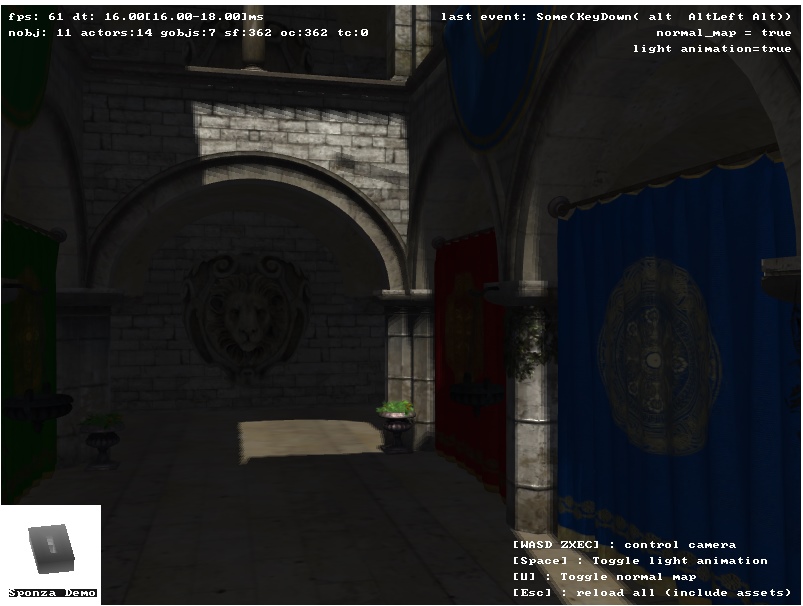
OMG... that's fast. That's why gaming in Mac is such as a bad experience :( So maybe i just added back some points light and fixed the shadow artifacts and call it good now. Do not want to waste too much time on it as i still have tons of features want to implement :)
On another hand, I've just checked all examples in native mode. They all run at 60fps except boxes and sponza that have abysmal perfs (< 10 fps). Not sure while they're so slow on native whereas they run fine on the web side... As far as I remember, the boxes example was running fine on native a few weeks ago.
Release mode or Debug mode ? I just tested the boxes example in native mode, it runs smooth 60 fps in release mode ...
ah indeed. It was debug mode. It runs 60fps on release mode. I wonder what makes debug mode so slow though.
@edwin0cheng @jice-nospam I would like to use uni-gl and uni-app but I don't want to require WebGL 2 support.
I could send a PR to add support for this, but I wanted to run it by you before I spend time on it.
Proposal: make App::new take in a configuration enum like enum WebGLSupport { RequireWebGL1, RequireWebGL2 }. If the user passes in RequireWebGL1, the app will work in all browsers that support WebGL 1. WebGL 2 features will be unavailable; they will throw an error when you try to use them. If the user supplies RequireWebGL2, all features will be available.
This appears simple, but it adds a maintenance burden to the project because each feature will need to consider support for WebGL 1 and WebGL 2.
Is this something you're open to? If so, I can take a stab at it and send you a PR.

How do we handle different version of glsl ? WebGL 1 is based on GLSL 1.20 and WebGL 2 is based on GLSL 3.30 ? And as i remember correctly, there are different handling of texture between WebGL 1 and 2, correct me if i am wrong. But in general, if you could take a stab at it and i am welcome to accept your PR :)
On the other hand, if you just want to use simple wasm+webgl stuff, you can use web-sys as the alternative. (unrust was created before wasm-bindgen was developed.)
How do we handle different version of glsl ? WebGL 1 is based on GLSL 1.20 and WebGL 2 is based on GLSL 3.30 ?
I'm picturing that if a user chooses RequireWebGL1, they have to pass their shaders as GLSL 1.2. And if they choose RequireWebGL2, they have to pass their shaders as GLSL 3.30. I believe this mimics how WebGL 1 and 2 work on the web. What do you think?
And as i remember correctly, there are different handling of texture between WebGL 1 and 2, correct me if i am wrong.
I'm actually not sure. I'm used to WebGL 1 but I don't know much about WebGL 2 so I'd have to try it and see how this shakes out...
@edwin0cheng oh interesting, thanks for the pointer! I want my app to run both on web (WebGL 1) and on desktop (OpenGL 2.1) though. Is that possible with web-sys? This seemed like the primary benefit of uni-gl.
I want the app to run on desktop because debugging with lldb on desktop is nice and debugging wasm is a pain.
The simple answer is no.
However, as i know, the main crate for basic desktop development in rust is winit, which handling all window management works. And about opengl part, gl-rs is the way to go, you could check if they support stdweb / wasm-binding or not.
PS: wasm-bindgen is current pseudo standard for wasm development in rust community which is a lower level crate to writing wasm related code.
And uni-gl and uni-app is just an wrapper crate for these 2 modules, and use stdweb to bridge the js-webgl call (at the time of development of unrust, gl-rs still do not support webgl)
Thank you! It looks like gl-rs added WebGL support so I'm going to try that.
I'm new to rust so I appreciate the pointers!