UnityLauncherPro

UnityLauncherPro copied to clipboard
 unitycoder
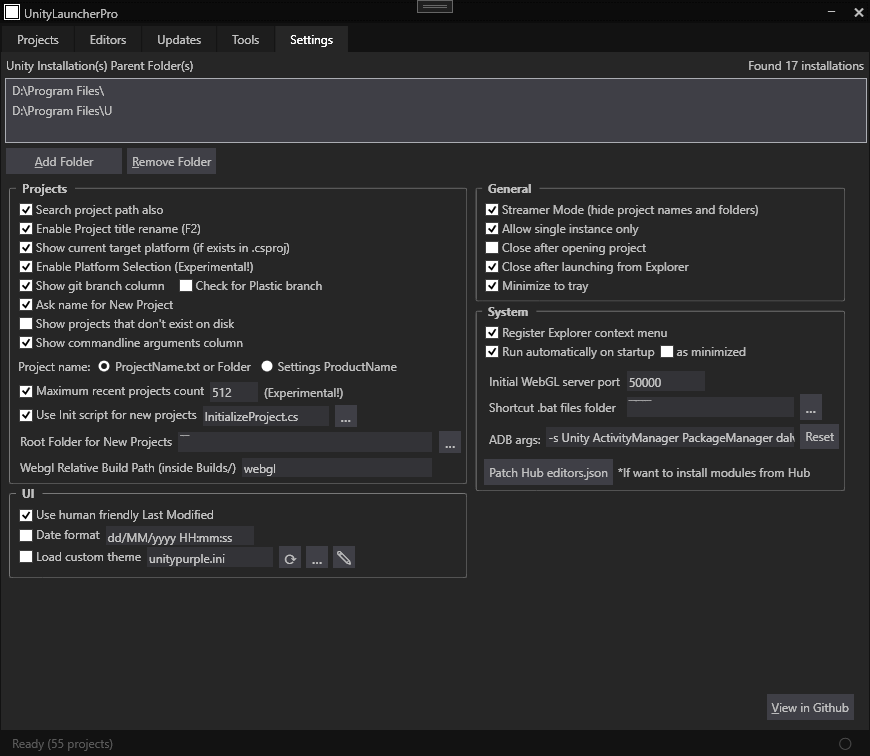
arrange settings into separate categories
todo
- [ ] arrange to groups
- [ ] how to fit more settings? (its already full..) *make root folders much smaller! usually only few lines max there
currently all settings are in one list:

could have separate categories:


testing how to split categories (not final..)
GENERAL
- Register Explorer context menu
- Run automatically on startup [ ] as minimized
- Close after opening project
- Close after launching from Explorer
- Allow Single Instance only
UI
- Minimize to tray
- Use human friendly last modifed
- Date format dd/MM/yyyy HHzmm
PROJECTS???
- Show commandline arguments column
- Search project path also
- Show git branch column & Check for Plastic branch
- Project name: ProjectName.txt or Folder / Settings Product Name
- Show projects that don't exist on disk
- Enable Project title rename (F2)
- Show current target platform
- Enable Platform Selection (Experimental!)
- Ask name for New Project
- Root Folder for New Projects
- Maximum recent projects count
MISC
- ADB args: ..
- Streamer Mode (hide project names and folders)
- Load custom theme
- Patch Hub editors.json
- Initial WebGL local server port
- Patch Hub editors.json
- Initial webggl local server port
FOLDERS
- Webgl Relative Build Path
- Shortcut .bat files folder