
yolov5
 yolov5 copied to clipboard
 ultralytics
Transfer Learning with Frozen Layers
📚 This guide explains how to freeze YOLOv5 🚀 layers when transfer learning. Transfer learning is a useful way to quickly retrain a model on new data without having to retrain the entire network. Instead, part of the initial weights are frozen in place, and the rest of the weights are used to compute loss and are updated by the optimizer. This requires less resources than normal training and allows for faster training times, though it may also results in reductions to final trained accuracy. UPDATED 28 March 2023.
Before You Start
Clone repo and install requirements.txt in a Python>=3.7.0 environment, including PyTorch>=1.7. Models and datasets download automatically from the latest YOLOv5 release.
git clone https://github.com/ultralytics/yolov5  # clone
cd yolov5
pip install -r requirements.txt  # install
Freeze Backbone
All layers that match the freeze list in train.py will be frozen by setting their gradients to zero before training starts.
https://github.com/ultralytics/yolov5/blob/771ac6c53ded79c408ed8bd99f7604b7077b7d77/train.py#L119-L126
To see a list of module names:
for k, v in model.named_parameters():
    print(k)

# Output
model.0.conv.conv.weight
model.0.conv.bn.weight
model.0.conv.bn.bias
model.1.conv.weight
model.1.bn.weight
model.1.bn.bias
model.2.cv1.conv.weight
model.2.cv1.bn.weight
...
model.23.m.0.cv2.bn.weight
model.23.m.0.cv2.bn.bias
model.24.m.0.weight
model.24.m.0.bias
model.24.m.1.weight
model.24.m.1.bias
model.24.m.2.weight
model.24.m.2.bias
Looking at the model architecture we can see that the model backbone is layers 0-9: https://github.com/ultralytics/yolov5/blob/58f8ba771e3712b525ca93a1ee66bc2b2df2092f/models/yolov5s.yaml#L12-L48
so we can define the freeze list to contain all modules with 'model.0.' - 'model.9.' in their names:
python train.py --freeze 10
Freeze All Layers
To freeze the full model except for the final output convolution layers in Detect(), we set freeze list to contain all modules with 'model.0.' - 'model.23.' in their names:
python train.py --freeze 24
Results
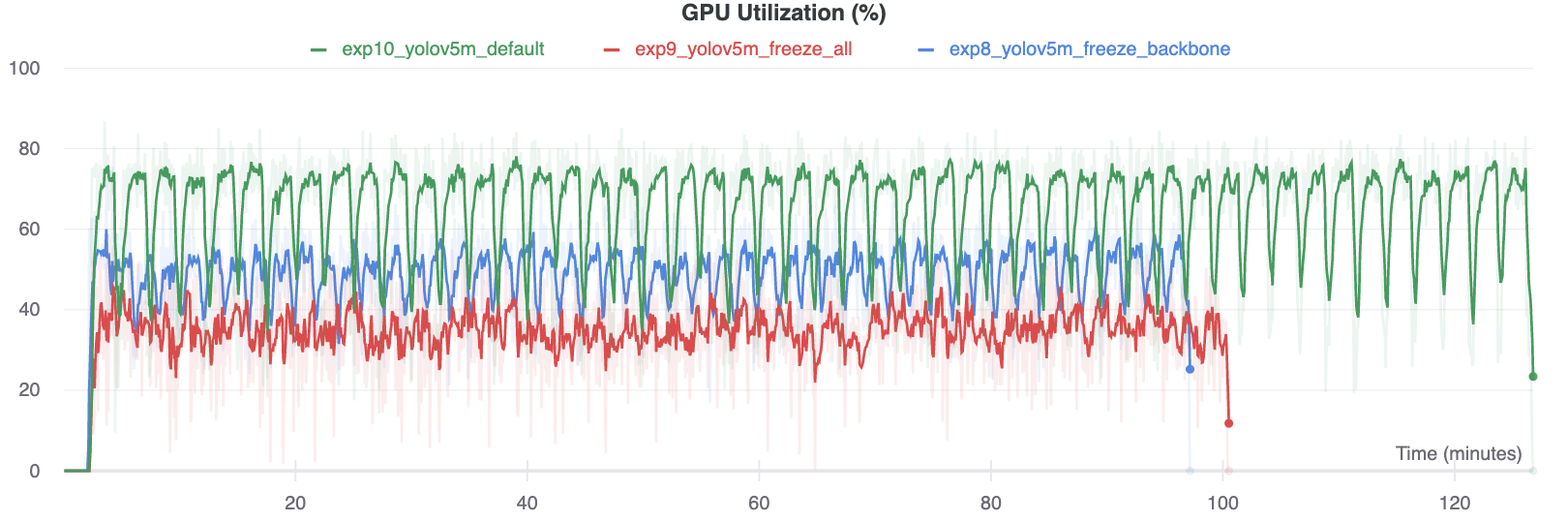
We train YOLOv5m on VOC on both of the above scenarios, along with a default model (no freezing), starting from the official COCO pretrained --weights yolov5m.pt:
$ train.py --batch 48 --weights yolov5m.pt --data voc.yaml --epochs 50 --cache --img 512 --hyp hyp.finetune.yaml
Accuracy Comparison
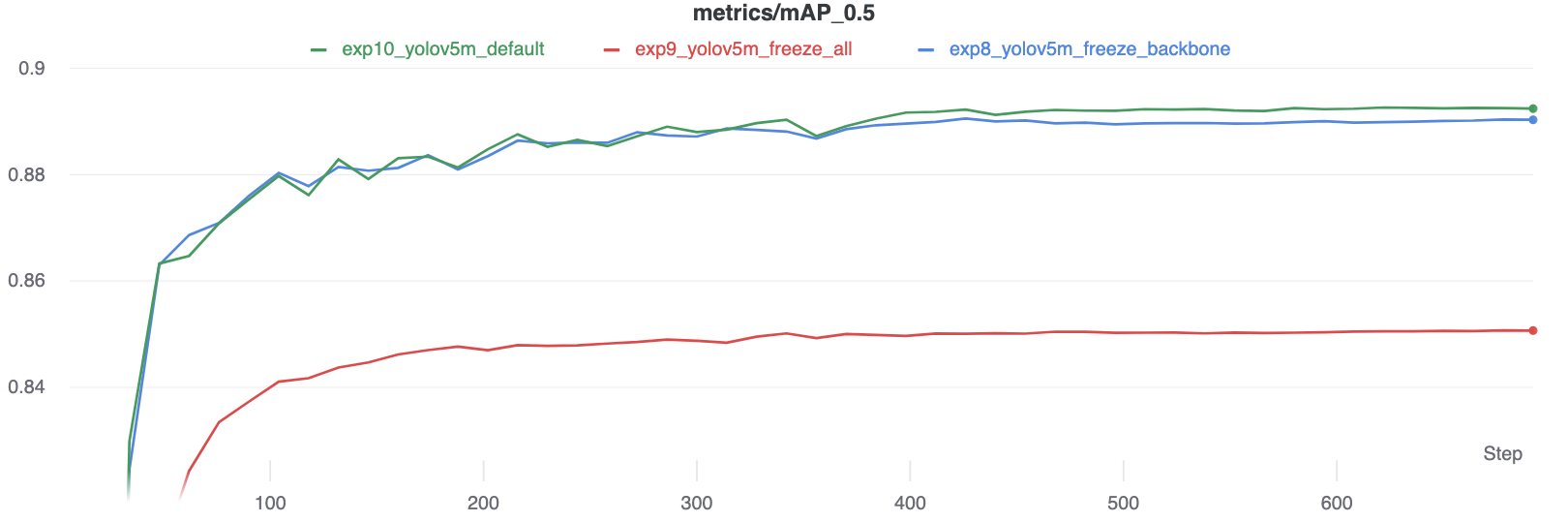
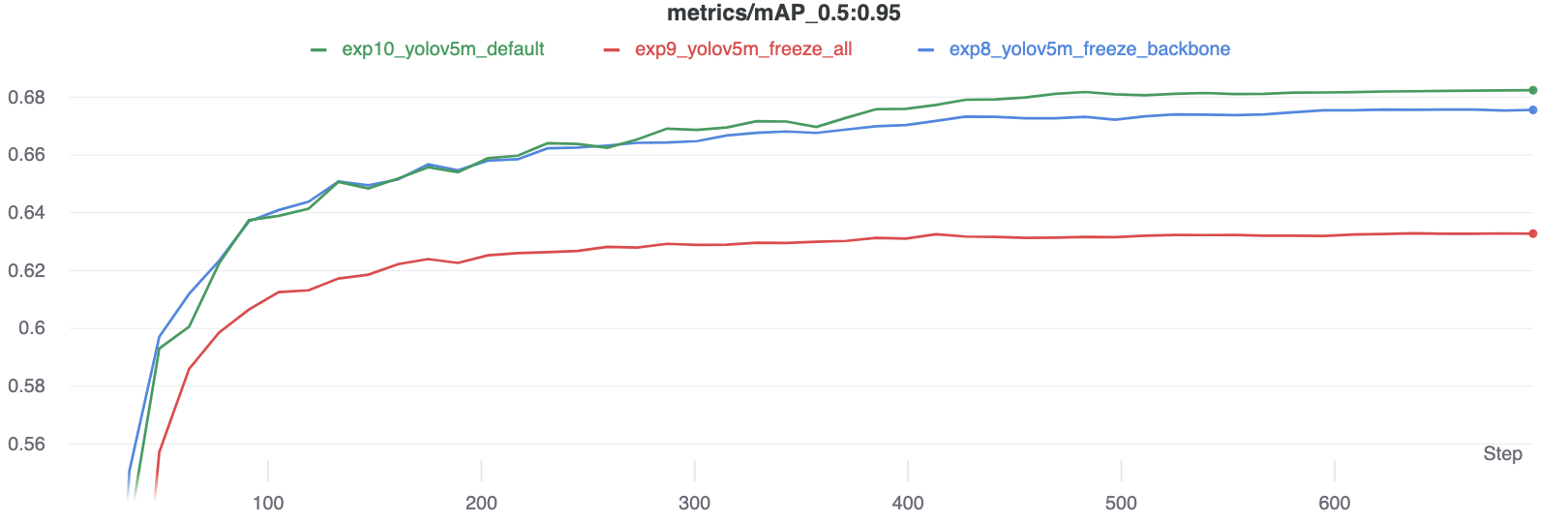
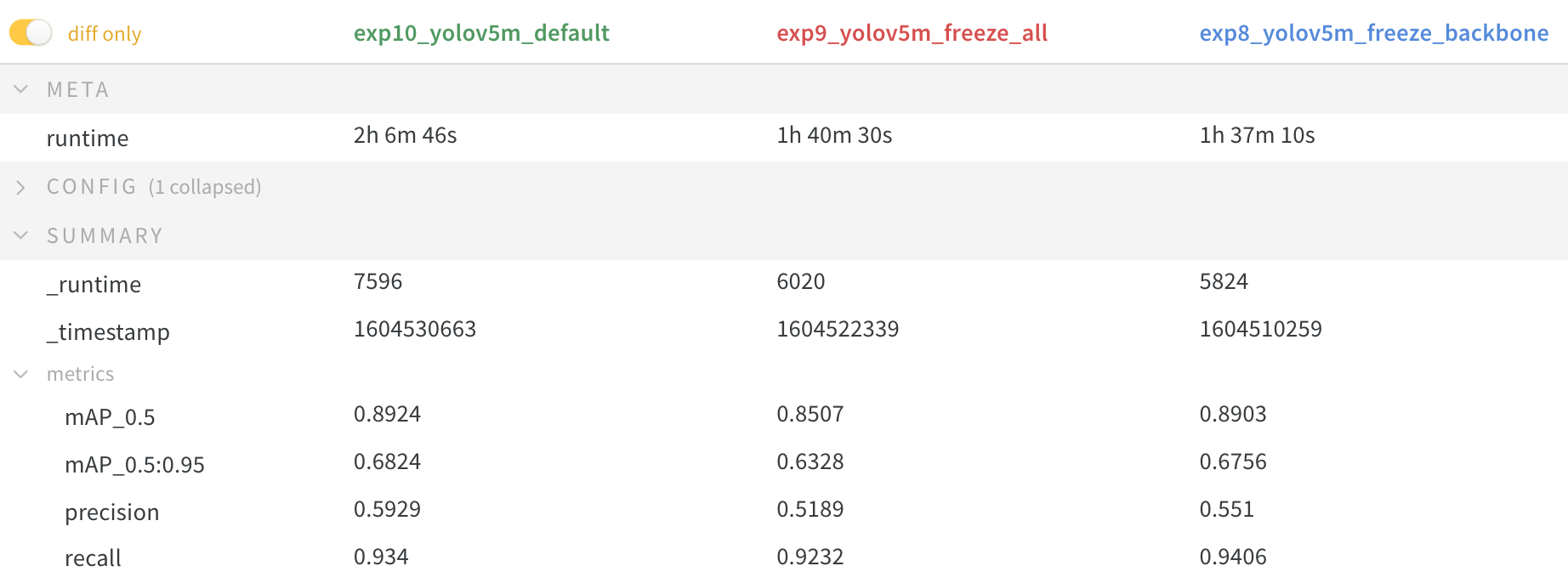
The results show that freezing speeds up training, but reduces final accuracy slightly.
GPU Utilization Comparison
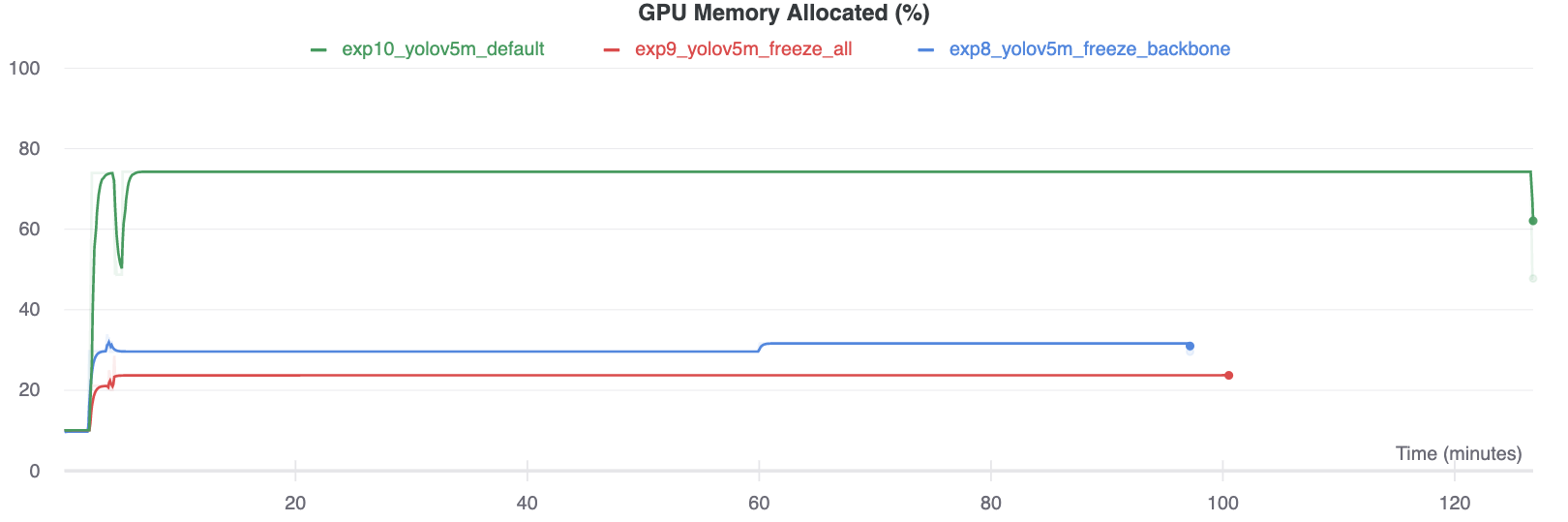
Interestingly, the more modules are frozen the less GPU memory is required to train, and the lower GPU utilization. This indicates that larger models, or models trained at larger --image-size may benefit from freezing in order to train faster.
Environments
YOLOv5 may be run in any of the following up-to-date verified environments (with all dependencies including CUDA/CUDNN, Python and PyTorch preinstalled):
- Notebooks with free GPU:



- Google Cloud Deep Learning VM. See GCP Quickstart Guide
- Amazon Deep Learning AMI. See AWS Quickstart Guide
- Docker Image. See Docker Quickstart Guide

Status

If this badge is green, all YOLOv5 GitHub Actions Continuous Integration (CI) tests are currently passing. CI tests verify correct operation of YOLOv5 training, validation, inference, export and benchmarks on MacOS, Windows, and Ubuntu every 24 hours and on every commit.

I noticed that there's an argument in yolov3 train.py code "--freeze-layer"?
Please, what does it do?
It states that it freezes all non-output layer?
Please can you provide more clarification about this?
Thank you.
Omobayode

@glenn-jocher Another dimension to this is generalization. I assume your results are shown for a test dataset. But for generalization to new datasets, freezing might also help prevent overfitting to ttraining data (and therefore improve robustness/generalization).

@mphillips-valleyit interesting point, though hard to quantify beyond existing val/test metrics.
It could be done with separate datasets--models pretrained on COCO, measure their generalization (freezing vs. non-freezing fine-tuning) to OpenImages for common categories. If I'm able to post results on this at some point, I will.
@mphillips-valleyit how is your custom data training result by transfer lerning ? could you attach you train log here?

@glenn-jocher Might be interesting to do a final step by unfreezing and training the complete netwerk again with differentiated learning rate. So complete training process would be (default method in fast.ai):
- Freeze the backbone
- (optional reset the head weights)
- Train the head for a while
- Unfreeze the complete network
- Train the complete network with lower learning rate for backbone

@ramonhollands that's an interesting idea, though I'm sure the devil is in the details, such as the epochs you take these actions at, the LRs used, dataset and model etc. I don't have time to investigate further, but you should be able to reproduce the above tutorial and apply the extra steps you propose to quantify differences. If you do please share your results with us.
One point to mention is that classification and detection may not share a common set of optimal training steps, so what works for fast.ai may not correlate perfectly to detection architectures like YOLO. Would be very interested to see experimental results.
Ill take that challenge the coming weeks. Trying to wrap your amazing work in the fast.ai framework to be able to use best of both worlds, including the fastai learning rate finder and discriminate learning rates etc. The method should work for detection architectures as well (https://www.youtube.com/watch?v=0frKXR-2PBY). Ill keep you updated.
I trained a model with an online dataset containing 5 categories, and now I'm trying to fine-tune it with my own images, which contain the same 5 categories plus an additional one. My images are similar to the ones from the online dataset, so I thought that transfer learning would work. However, this is what I obtain while fine-tuning:
Class = all, Images = 3, Targets = 0, P = 0, R = 0, [email protected] = 0, [email protected]:.95 = 0
When I visualize the labels everything looks correct, so I don't understand is why Targets is 0. I also modified the dataset configuration yaml file adding the new category.
The fine-tuning works when I remove my additional category and fine-tune with the same 5 categories.
Does anybody know what am I doing wrong here?
Thanks in advance!

@aritzLizoain I have done something similar. In my case, I created a dataset that borrows certain classes from COCO and OpenImages. Then I fine tuned a pretrained yolov5 (trained on COCO) model on my custom dataset. The performance of the fine-tuned model isn't good.

@ramonhollands LR finder sounds very cool, but be careful because sometimes LRs that work well for training can cause instabilities without a warmup to ramp the LR from 0 to it's initial value.
@aritzLizoain no targets found during testing means no labels are found for your images. Follow the Custom training tutorial to create a custom dataset: https://docs.ultralytics.com/yolov5/tutorials/train_custom_data
While using Transfer Learning (both with layers freeze and without), it happens that model "forgets" data it was trained on (metrics on original data are getting worse). So, I think problem might be in too large learning rate. Can you please give a little bit more details on what hyperparameters should be changed when finetuning the model? (maybe change lr0 to the last lr that was during original training and removing warmup epochs, or is it a wrong approach?)

@glenn-jocher Might be interesting to do a final step by unfreezing and training the complete netwerk again with differentiated learning rate. So complete training process would be (default method in fast.ai):
- Freeze the backbone
- (optional reset the head weights)
- Train the head for a while
- Unfreeze the complete network
- Train the complete network with lower learning rate for backbone
How do you set a different learning rate for the backbone?

You have to split the backbone and head parameters and add additional param groups for both with different 'lr' argument (https://pytorch.org/docs/stable/optim.html). I wrote some initial code which Ill post later today.
See https://github.com/ramonhollands/different_learning_rates/blob/master/train.py
I have added two parameters to experiment with:
- freeze-backone (which freezes backbone on start and unfreezes after 4 epoch
- diff-backbone (which lowers the learning rate for backbone, divided by 10)
I started some experiments which where encouraging but did not have enough time to finish up yet.
@glenn-jocher I am curious about result pics in "Accuracy Comparison", why can the mAP of exp9_freeze_all increase as training progresses? Now that all params are frozed, they won't be optimized and performance should be a flat line?

@laisimiao exp9_freeze_all freezes all layer except output layer, which has an active gradient.
Hey @glenn-jocher , How do I add replace the FC output layer and add a new one??

I don't understand why the time to get train on the model with all frozen layers, it's more than the backbone frozen layer. It would not be the inverse??

Hi @glenn-jocher . I trained the model with icevision(a wrapper around this repo). However, I could not find out a proper way to export the model with export.py to TorchScript model. https://github.com/ultralytics/yolov5/blob/master/models/export.py Saving the weights of yolo5 throws the following:
torch.save(model.state_dict(), "models/yolo.pth")
python export.py --weights ~/Documents/imageai/models/yolo.pt
Namespace(weights='/home/turgut/Documents/imageai/models/yolo.pt', img_size=[640, 640], batch_size=1, device='cpu', include=['torchscript', 'onnx', 'coreml'], half=False, inplace=False, train=False, optimize=False, dynamic=False, simplify=False, opset_version=12)
YOLOv5 🚀 v5.0-180-ge8c5237 torch 1.7.1+cu110 CPU

Traceback (most recent call last):
  File "/home/turgut/Documents/yolov5/models/export.py", line 165, in <module>
    export(**vars(opt))
  File "/home/turgut/Documents/yolov5/models/export.py", line 47, in export
    model = attempt_load(weights, map_location=device)  # load FP32 model
  File "/home/turgut/Documents/yolov5/models/experimental.py", line 120, in attempt_load
    model.append(ckpt['ema' if ckpt.get('ema') else 'model'].float().fuse().eval())  # FP32 model
KeyError: 'model'
If I save the model, then I get:
torch.save(model, "model.pth")
Namespace(weights='/home/turgut/Documents/imageai/model.pth', img_size=[640, 640], batch_size=1, device='cpu', include=['torchscript', 'onnx', 'coreml'], half=False, inplace=False, train=False, optimize=False, dynamic=False, simplify=False, opset_version=12)
YOLOv5 🚀 v5.0-180-ge8c5237 torch 1.7.1+cu110 CPU

Traceback (most recent call last):
  File "/home/turgut/Documents/yolov5/models/export.py", line 165, in <module>
    export(**vars(opt))
  File "/home/turgut/Documents/yolov5/models/export.py", line 47, in export
    model = attempt_load(weights, map_location=device)  # load FP32 model
  File "/home/turgut/Documents/yolov5/models/experimental.py", line 119, in attempt_load
    ckpt = torch.load(attempt_download(w), map_location=map_location)  # load
  File "/home/turgut/.local/share/r-miniconda/envs/r-reticulate/lib/python3.9/site-packages/torch/serialization.py", line 594, in load
    return _load(opened_zipfile, map_location, pickle_module, **pickle_load_args)
  File "/home/turgut/.local/share/r-miniconda/envs/r-reticulate/lib/python3.9/site-packages/torch/serialization.py", line 853, in _load
    result = unpickler.load()
  File "/home/turgut/.local/share/r-miniconda/envs/r-reticulate/lib/python3.9/site-packages/torch/nn/modules/module.py", line 778, in __getattr__
    raise ModuleAttributeError("'{}' object has no attribute '{}'".format(
torch.nn.modules.module.ModuleAttributeError: 'Model' object has no attribute 'param_groups_fn'
Is there a way to sort this out?

@turgut090 see TorchScript, ONNX, CoreML Export tutorial:
YOLOv5 Tutorials
- Train Custom Data 🚀 RECOMMENDED
- Tips for Best Training Results ☘️ RECOMMENDED
- Weights & Biases Logging 🌟 NEW
- Supervisely Ecosystem 🌟 NEW
- Multi-GPU Training
- PyTorch Hub ⭐ NEW
- TorchScript, ONNX, CoreML Export 🚀
- Test-Time Augmentation (TTA)
- Model Ensembling
- Model Pruning/Sparsity
- Hyperparameter Evolution
- Transfer Learning with Frozen Layers ⭐ NEW
- TensorRT Deployment
@glenn-jocher Thanks for your reply. Does this mean that I have to train a model only with this specific script? Here, I see: https://docs.ultralytics.com/yolov5/tutorials/model_export https://github.com/ultralytics/yolov5/blob/master/train.py in order to have checkpoints?
https://github.com/ultralytics/yolov5/blob/bb79e13d521c54b20b06555fe79cdff055f28721/train.py#L401-L408
Other options are yolov5m.pt, yolov5l.pt, and yolov5x.pt, or your own checkpoint from
training a custom dataset runs/exp0/weights/best.pt.
@turgut090 all tutorials in this repo operate correctly with models trained in this repo.
Naturally we can't speak to 3rd party implementations, nor do we provide support for them at this time.
@glenn-jocher
Hi, thank you for your awesome works!
I have a question about the freezing backbone layers in detail.
# Freeze
 freeze = [f'model.{x}.' for x in range(freeze)]  # layers to freeze
 for k, v in model.named_parameters():
     v.requires_grad = True  # train all layers
     if any(x in k for x in freeze):
         print(f'freezing {k}')
         v.requires_grad = False ](`url`)
If you freeze like above, as my best knowledge, the running vars and means of batch normalization layer will be trained cause the module is not changed to eval mode like module.eval().
How do you think about this issue? I wonder it was intended.
Best, Jihwan Eom

@JihwanEom the batchnorm learnable parameters gamma and beta are frozen by the above code, stats continue computing as normal while in train mode. See https://pytorch.org/docs/stable/generated/torch.nn.BatchNorm2d.html
@glenn-jocher
Thank you for kind explanation.
Then, the general freezing means only detaching gradients on parameters? Or include off tracking running means and vars?
@JihwanEom yes that's correct. The above freezing code only affects parameters and does not halt batchnorm stats updates (mean and var).
Hello! Thank you for your article. You can tell us in more detail how to add a new class to an already trained model.
That is, I trained the model to identify 5 objects, now I need the model to detect 6 classes, i.e. start finding another new one. How to do it correctly? I tried a frieze of 10 layers and 24, I tried to specify all 6 classes and only one new one in yaml for training, but the result was a model that finds the new class poorly and forgets the old ones.

@Partisanus you should train a model on all classes you want it to be able to detect on. See https://en.wikipedia.org/wiki/Catastrophic_interference
You can freeze or not freeze layers also, but this is a separate topic.
I am using pre-trained(on 80 coco classes) yolov5s.pt model and training it to detect 3 more classes. I used this data.yml file when i started training.
train: /content/yolov5/datasets/animal-dataset/train/images
val: /content/yolov5/datasets/animal-dataset/valid/images

nc: 83
names: ['person', 'bicycle', 'car', 'motorcycle', 'airplane', 'bus', 'train', 'truck', 'boat', 'traffic light',
        'fire hydrant', 'stop sign', 'parking meter', 'bench', 'bird', 'cat', 'dog', 'horse', 'sheep', 'cow',
        'elephant', 'bear', 'zebra', 'giraffe', 'backpack', 'umbrella', 'handbag', 'tie', 'suitcase', 'frisbee',
        'skis', 'snowboard', 'sports ball', 'kite', 'baseball bat', 'baseball glove', 'skateboard', 'surfboard',
        'tennis racket', 'bottle', 'wine glass', 'cup', 'fork', 'knife', 'spoon', 'bowl', 'banana', 'apple',
        'sandwich', 'orange', 'broccoli', 'carrot', 'hot dog', 'pizza', 'donut', 'cake', 'chair', 'couch',
        'potted plant', 'bed', 'dining table', 'toilet', 'tv', 'laptop', 'mouse', 'remote', 'keyboard', 'cell phone',
        'microwave', 'oven', 'toaster', 'sink', 'refrigerator', 'book', 'clock', 'vase', 'scissors', 'teddy bear',
        'hair drier', 'toothbrush', 'lion', 'frog', 'tiger']
according to above code i want to add lion, frog and tiger with index 80, 81 and 82 respectively.
and as described by @glenn-jocher, i added --freeze 10.
!python train.py --img 640 --batch 16 --epochs 5 --data data.yaml --weights yolov5s.pt --cache --freeze 10
but the problem i am facing is that now it only detects last 3 classes only not other 80 classes.
I tried this also in data.yaml: names: ['lion', 'frog', 'tiger'] with nc: 83 but nothings seems to work.
Please can someone help and provide more clarification about this?
Thanks, Dhruvil Dave
