

 ufrisk
Target PC spams PCILeech with weird TLPs and locks up
Hi Ulf, thanks for open-sourcing such a fantastic project. I've found a pretty weird behaviour on some systems that might need special handling in PCILeech for it to work with them.
On these systems, when I boot up with the PCILeech connected (and not doing anything), Windows will lock up at random (it's happened during boot-up, but also sometimes made it through to the desktop. I once had it lock up, blue screen and then lock up during the blue screen). This only seems to happen once the boot process gets to the OS stage. I could run a PCILeech probe with no issues while booted into the BIOS.
I was curious enough to try to figure out what was happening, so I modified PCILeech's TLP sending command so that sending a TLP was optional and it would still try to read a TLP (and loop doing so). I then ran this before booting the PC. This gave me a lot of output (mostly the same TLPs) and that let the machine successfully boot to the desktop and operate normally. Stopping the read/dump process caused the machine to lock up after 10-15 seconds.
I've been doing this on a AC701+FT601 configuration. I have two of these that have worked fine on more modern systems, so it shouldn't be a hardware issue. I am not sure which firmware version I was using (one of them is v3.0, the other I will need to check).
Systems where I've seen the issue: Dell Optiplex 960 and 760 (both Core 2 Duo-based, have not checked the chipset). Tried in Windows 7 (and BIOS). One of these has only one PCIe slot (for external GPU), so when I did the test there were only built-in PCIe devices. Both of these rebooted if I turned off PCILeech once they locked up. Beige-box PC with first-generation i7 and Intel X58 chipset and several PCIe devices. Tried in Windows 10 and using a Linux live USB (and BIOS). This remained locked up when the PCILeech got turned off. This is the only one where I've tested my TLP dumping idea, which I did in both Linux and Windows.
My theory is that something about how the chipsets (or drivers for them) work on these old systems results in TLPs getting sent to the PCILeech and since it does not try to receive them (or respond) while idle, the send buffers in the PCIe tree get filled up and eventually prevent all other messages being queued, meaning no other PCIe devices can work.
I have not yet tried to come up with a fix for this, although I have some ideas on how to do so (without having looked at enough of LeechCore or PCILeech-FPGA to know if they would be easy to implement). My employer has an approvals process for contributing code to FOSS projects if you would be happy accept the results of my attempts (and have a CLA that they are willing to contribute under). If you would prefer to implement a solution yourself, I would be happy to test it for you (and collect more complete TLP logs).
I hope you find this strange operation interesting. Some of the TLPs I've collected during my experimentation are below.
RX: TLP???: TypeFmt: 73 dwLen: 001 0000 73 00 00 01 00 00 00 7f 00 00 80 86 00 00 00 80 s...... ........ 0010 50 00 00 00 P...
RX: TLP???: TypeFmt: 73 dwLen: 001 0000 73 00 00 01 00 00 00 7f 00 00 80 86 00 00 00 80 s...... ........ 0010 61 00 00 00 a...
RX: TLP???: TypeFmt: 73 dwLen: 001 0000 73 00 00 01 00 00 00 7f 00 00 80 86 00 00 00 80 s...... ........ 0010 51 00 00 00 Q...
RX: TLP???: TypeFmt: 73 dwLen: 001 0000 73 00 00 01 00 00 00 7f 00 00 80 86 00 00 00 80 s...... ........ 0010 a1 00 00 00 ....
RX: TLP???: TypeFmt: 73 dwLen: 001 0000 73 00 00 01 00 00 00 7f 00 00 80 86 00 00 00 80 s...... ........ 0010 60 00 00 00 `...
RX: TLP???: TypeFmt: 73 dwLen: 001 0000 73 00 00 01 00 00 00 7f 00 00 80 86 00 00 00 80 s...... ........ 0010 b2 00 00 00 ....
RX: TLP???: TypeFmt: 73 dwLen: 001 0000 73 00 00 01 00 00 00 7f 00 00 80 86 00 00 00 80 s...... ........ 0010 b1 00 00 00 ....
RX: TLP???: TypeFmt: 73 dwLen: 001 0000 73 00 00 01 00 00 00 7f 00 00 80 86 00 00 00 80 s...... ........ 0010 91 00 00 00 ....
RX: TLP???: TypeFmt: 73 dwLen: 001 0000 73 00 00 01 00 00 00 7f 00 00 80 86 00 00 00 80 s...... ........ 0010 81 00 00 00 ....
RX: TLP???: TypeFmt: 73 dwLen: 001 0000 73 00 00 01 00 00 00 7f 00 00 80 86 00 00 00 80 s...... ........ 0010 71 00 00 00 q...
RX: TLP???: TypeFmt: 73 dwLen: 001 0000 73 00 00 01 00 00 00 7f 00 00 80 86 00 00 00 80 s...... ........ 0010 e1 00 00 00 ....
RX: TLP???: TypeFmt: 73 dwLen: 001 0000 73 00 00 01 00 00 00 7f 00 00 80 86 00 00 00 00 s...... ........ 0010 00 00 00 00 ....
My attempt to decode the messages, using https://www.programmersought.com/article/96938457349/: Format: Message request with data Type: Message Implicitly Broadcast from Root Complex Length: 1 Requester ID: 0 (root complex?) Tag: 0 Message code: 7F (vendor-defined message 1) Target BDF: 0 (not used?) Vendor ID: 8086 (seems pretty obvious it would be Intel)
I haven't looked into what the vendor-defined DWs would mean, or why there is 2 DW when there should only be 1.

Hi and many thanks for reporting this :)
I haven't had the chance to test on server systems and the bulk of the users are on consumer hardware so things like this are super interesting.
The issue is as you already figured out that these will clog up internal buffers completely up to the PCIe core and my code will stop processing TLPs incl. config space TLPs.
Also many thanks for looking into the contribution part before submitting a pull request. I'd be happy to accept contributions if it should come to that :)
Fixing this issue would unfortunately also lead to slightly lower performance (on the Screamers with less BRAM for buffers) or loss of custom config space in the default setup; but since it's been working well as-is I've kept things as they are.
-
Try the Version 4.9 bitstream (released recently). I increased buffering sizes on the AC701 amongst other things. It may delay the issue but not fix it.
-
You can try to disable custom config space in the PCIe core wizard. (as per image below)
-
Change this line to
.m_axis_rx_tready ( 1'b1 ),This would enable TLP processing to continue (incl. custom config space ones if (1) isn't changed). It may be that you would have to changereadsizeto a lower value for stable pcileech operation after this:-device fpga://readsize=0x14000as an example but you have to try your way around here. It may be that it works perfectly as well out of the box or with higher values. The AC701 has a lot of buffering space as compared to the Screamers. -
I could fix this more permanentely by default filtering out all packets but completions unless explicitly enabled. Or let people enable it
It would be interesting to see if (2) or (3) would resolve your issue.
I'll probably find the time to look into a fix next weekend. I know the issue; but I would need to think about the implications and make the proper tradeoffs before changing it. The AC701 isn't really affected but the smaller FPGAs that the bulk of the users are on is; and I try to keep everything as consistent as possible.
Anyway; I'm super much looking forward to know if anything above works. Please let me know and let's keep in touch about this. It's too bad I'm a bit busy to look into this until 1-2 weeks from now.
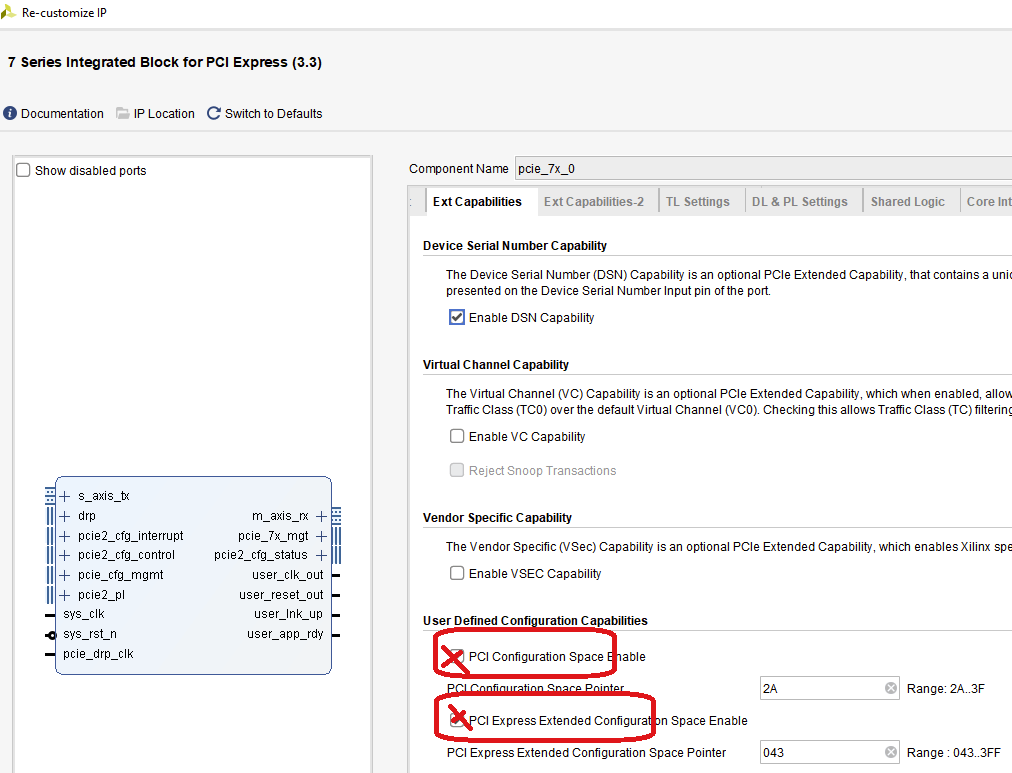

Happy to help, especially when you know your work far better than me :-)
These are all normal desktops (the Optiplexes are old business-oriented ones I have and the i7 is my old gaming PC). I do have an old server that I haven't tried yet, but it is harder to confirm things in the OS since it has ESXi on it.
I'm glad to hear that we have a similar understanding of the issue and ideas on how to fix it (I was thinking about option 4). It seems like a difficult trade-off to support targets that are more than 10 years old.
I will try options 1-3 and let you know what effects they have. If they can be used to resolve the issue, that may be good enough as those systems are not my usual targets (and probably are not very common for other users).
I only use these targets when working at home and have others I can use there, meaning I am not in a rush to have the permanent fix and can wait until you have time to look at it properly. It would probably still be faster than the process my employer will make me go through before I could develop and submit a pull request.
I'm excited to help you out with this in whatever way I can. I will keep in touch about my progress and results. Hopefully work will give me enough time to experiment with this.
Awesome and huge thanks for helping to look into this issue :) Please let me know when you've been able to look into this.
As I mentioned I'll try to add some kind of flag/setting to filter out packets like this; it should be easy enough. With a bit of luck I might have time to do it in the weekend; but I'm quite busy for the next 2 weeks; chances is that it will be after that.
I had a bit of time today to look at this (mostly taken up by compiling version 4.9 with all combinations of options 2 and 3), but I did get to try it on one of the systems (Optiplex 960). ~~Every variant I tried (unchanged, option 2, option 3, both options 2 and 3) seemed to work without getting any of the TLPs I'd been seeing (confirmed with my TLP checking command), so I managed to successfully run a probe. It's possible that I was using a different Optiplex 960 than last time, but that is still surprising.~~
~~I also checked what version of PCILeech was on the FPGA before updating it: 4.7. Is it possible something that has changed between these releases could have fixed it? Or maybe there was a change in the PCIe core you were using, since I compiled the 4.7 release with Vivado 2020.1 and the 4.9 release with 2021.?~~ It turns out I forgot to pass -vvv when doing this, so none of the TLPs were logged.
I probably will not get an opportunity to do more tests until next week, but I will do so with the older PCILeech version and the other systems I saw the issue on.
My apologies for the above mistake. I must have gotten over-excited by the test system not crashing when I tried the first modified version and forgotten the options I needed to get the full output. This was probably made harder to notice due to the larger buffers.
This time I used an Optiplex 760 (I know it probably does not matter, but it is probably good to note). Both v4.7 and unmodified v4.9 received the vendor-specific TLPs and locked up as expected. The versions of v4.9 I compiled with option 2, option 3, and both together all still got the TLPs, but did not appear to lock up. All versions of v4.9 were able to stay working long enough that I could run a probe, probably helped by me running my TLP dumping code during boot-up.
For my next series of testing I will start with timing how long it takes for the system to crash using plain v4.9 so I can be more sure that I have not accidentally missed a crash due to not waiting long enough. It seems surprising for both option 2 and option 3 to prevent crashes, but would be convenient if that is the case.
I'm sorry for taking so long to do my follow-up tests, but I now have explanations for some of my previous results.
I've tested this on the Optiplex 760 and Optiplex 960, but not yet the other PC. The main results being similar is promising. I built the firmware again from the latest version on GitHub.
With both unmodified 4.9 and with the extended and option 2 (customised PCIe configuration space disabled): the systems would still lock up within 30 seconds of powering on, which would cause them to lock up before they had completed logging in. One of them stull blue-screened when I turned off the FPGA while it was locked up, the other rebooted if I turned off the FPGA while it was locked up. With option 3 (forcing TLP processing) on its own and both option 2 and 3: the systems booted and worked fine for at least 90 seconds before shutting down. Turning off the FPGA while the system was up didn't affect either system, but I possibly did not wait long enough to see any effect (this will make more sense later).
To explain why I did not notice any lock-ups last time I performed these tests, I also tried booting the systems with my TLP dumping variant of PCILeech running, then stopping the dumping code once the system had finished starting up Windows and all other applications. Both target systems took at least 60 seconds to lock up under this process. I noticed that while booting up, there was a higher frequency of the unknown TLPs than when the system was idle at the desktop, meaning that the buffers must have filled up too slowly for me to notice during the last experiment.
Using the option 3 build, I was able to confirm that PCILeech probe and MemProcFS were not affected by the changes and larger amount of incoming TLPs. This included waiting 90 seconds for the buffers to fill up before running the commands. I did not do anything particularly complex or time-sensitive using MemProcFS while confirming this. I also noticed that the frequency of the unknown TLPs increase while the system was shutting down.
This implies that for the near future, the changes in option 3 seem to be sufficient to resolve the issue I was having (I will try to confirm this on my other PC soon). Whatever the cause of these TLPs is, option 2 does not affect it, and extra buffering memory in PCILeech-FPGA will not be a convenient solution for many users (unless they can start it as soon as the PC is sufficiently booted to connect to it).
I'm closing this issue since it was resolved in the v4.11 bitstream. PCILeech should no longer lock up when the host spam it with packets.