
aad-auth

aad-auth copied to clipboard
 ubuntu
Unable to login on Ubuntu server using AAD-auth "The request body must contain the following parameter: 'client_assertion' or 'client_secret'."
Config
- Ubuntu 23.04 LTS server
- aad-cli == 0.4
- libpam-aad == 0.4
- libnss-aad == 0.4
Error msg summary
App Sign-in logs "Failure reason The request body must contain the following parameter: 'client_assertion' or 'client_secret'."
Improvement ability
- Add instructions how to point aad.conf to 'client_assertion' or 'client_secret'.
- If needed, ensure encoded step in a configuration script and/or
aad-clito be able to place 'client_secret' on the target machine (where AAD login is required).
Details: Azure > Subscription > Ent. App. > Activity Details: Sign-ins
  Failure reason
  The request body must contain the following parameter: 'client_assertion' or 'client_secret'.
  Additional Details
  Developer error - the app is attempting to sign in without the necessary or correct authentication parameters.
  User
  **------------------------------------------**

  Username
  **------------------------------------------**
  User ID
  **------------------------------------------**
  Sign-in identifier
  **------------------------------------------**
  User type
  Member
  Cross tenant access type
  None
  Application
  ubuntu_aad
  Application ID
  **------------------------------------------**
  Resource
  Microsoft Graph
  Resource ID
  **------------------------------------------**
  Resource tenant ID
  **------------------------------------------**
  Home tenant ID
  **------------------------------------------**
  Home tenant name
  Client app
  Browser
  Client credential type
  None
  Service principal ID
  Service principal name
  Resource service principal ID
  **------------------------------------------**
  Unique token identifier
  **------------------------------------------**
  Token issuer type
  Azure AD
  Token issuer name
  Incoming token type
  None
  Authentication Protocol
  ROPC
  Latency
  91ms
  Flagged for review
  No
  User agent
  Go-http-client/1.1
Thanks in advanced !

I've had the same problem, here is how I've solved it.
1.) Your app registration in AAD, under "Authentication -> Advanced Settings" you need to enable the following settings to support IWA (Integrated Windows Authentication).
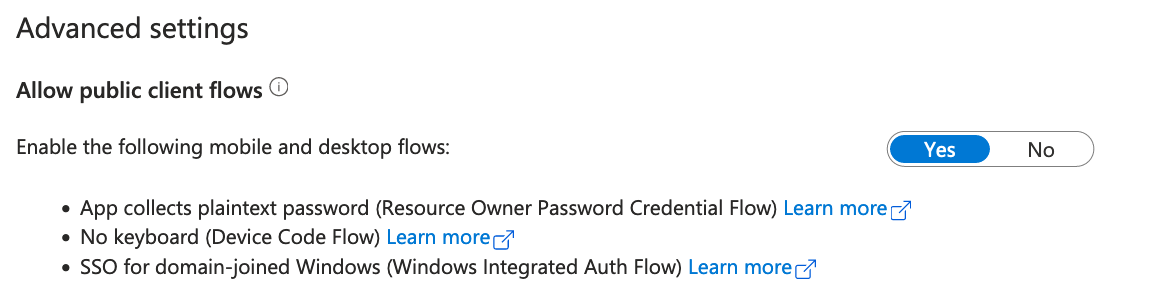 2.) Also, you need to add delegated API permission 'User.Read' for MS Graph and grant admin consent.
That should fix it.

