

 uberhalit
Causes Stuttering With Game Version 1.02.2
I updated to 1.02.2 and stuttering seems to be fixed for me. However, if I try to unlock fps I get stutters again.
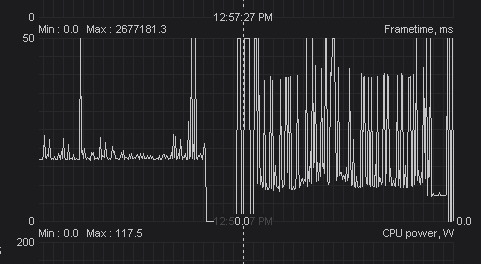
That picture is over roughly 3 minutes. The drop to 0 in the middle of that picture is from alt-tabbing. The left side of the image is without the fps unlocker and the spikes on the left only occur when opening menus. During gameplay frametimes remain "smooth" between say 15-40 ms. On the right is immediately after enabling the unlocker. I can reproduce this every single time. While the right side of the graph may look dramatic, I'm not playing a slideshow. I can achieve 100-130 fps and it feels perfectly fine except for the stutters. Some of those spikes I don't feel, sometimes I only feel 1 or 2 every couple seconds, sometimes a couple will occur in quick succession with less than 1 second in between that I will feel and sometimes I won't notice the stutters for up to 10 seconds. But it is noticeably worse than without the unlocker, where I don't feel them whatsoever despite getting only 60 fps.
I've tried loading the game without the fps unlocker and playing normally for a few minutes with no stutters whatsoever. I've tried launching with the unlocker and patching immediately without alt-tabbing rather than playing without it, alt-tabbing to patch and tabbing back in. I've tried playing in borderless and also tried with MSI afterburner closed & not running in the background as well as other programs that may cause issues with overlays such as discord and anything else I may have had open running in the background. I also tried with and without gsync enabled.
Even after restarting the game and trying again the stutters are still there, and gone without it. They occur immediately after patching the game with the unlocker.
I had the unlocker set to:
Frame rate lock: 144 Change FOV: 35 (Stuttered even without this option)
Specs: Win 10 64 bit 16 GB RAM GTX 1080 ti i5 10600k Game installed on secondary NVMe SSD, C drive is a SATA SSD

Got the same problem.
Here is the PC spec if it can somehow helps;
Frame rate locked to 240
RTX 3080 Ryzen 5 5600 Win 10 Pro 16GB Ram Installed on NVME

Hi, can you try setting the fps limit in the unlocker to your monitor refresh rate and then using a 3rd part limiter like RTSS to reduce maximum frames a few fps below your Hz rate?

Hello there,
I just tried, locked to 240 and limited to 236 with RTSS. It did not fixed the problem unfortunatly. Tried with Gsync on and off. Tried windowed and full screen.
For information, I got a 2nd 144hz monitor.
Hmm it doesn't stutter for me on a 3080 and 240Hz. Does this happen everywhere or primarily in the open world?
I've done some more test, actually it seems way better. It doesnt stutter in caves and in the starting zone open world. (It was unplayable before) There is still a little stutter in the first Castle, but it gotta be trash optimisation related. (game itself) Anyway my fps didnt exceed 120 fps, so I'm not sure how the RTSS lock did something.
Maybe @JamesYZFR1 have other results.
Ok so I tried what you ask, I set the unlocker to my monitor's refresh rate (240) and used RTSS to limit my fps to 235 but unfortunately I got the same results. I tried changing the FPS limit to say 45, 59, 60, 90, 100, same problem. I tried changing a couple RTSS settings one at a time just in case such as detection level, show OSD, stealth mode, custom Direct3D support but again there was no difference.
I left the unlocker at those settings (fps set to 240, RTSS capped at 90) and tried to get more data for you.
Btw I think I almost entirely tested this out in the open world or at POIs that were outside such as Leyndell, Redmane, etc. For the tests in the last two images I remembered your comment about if it was primarily in the open world so I tested it in a cave and got different results.
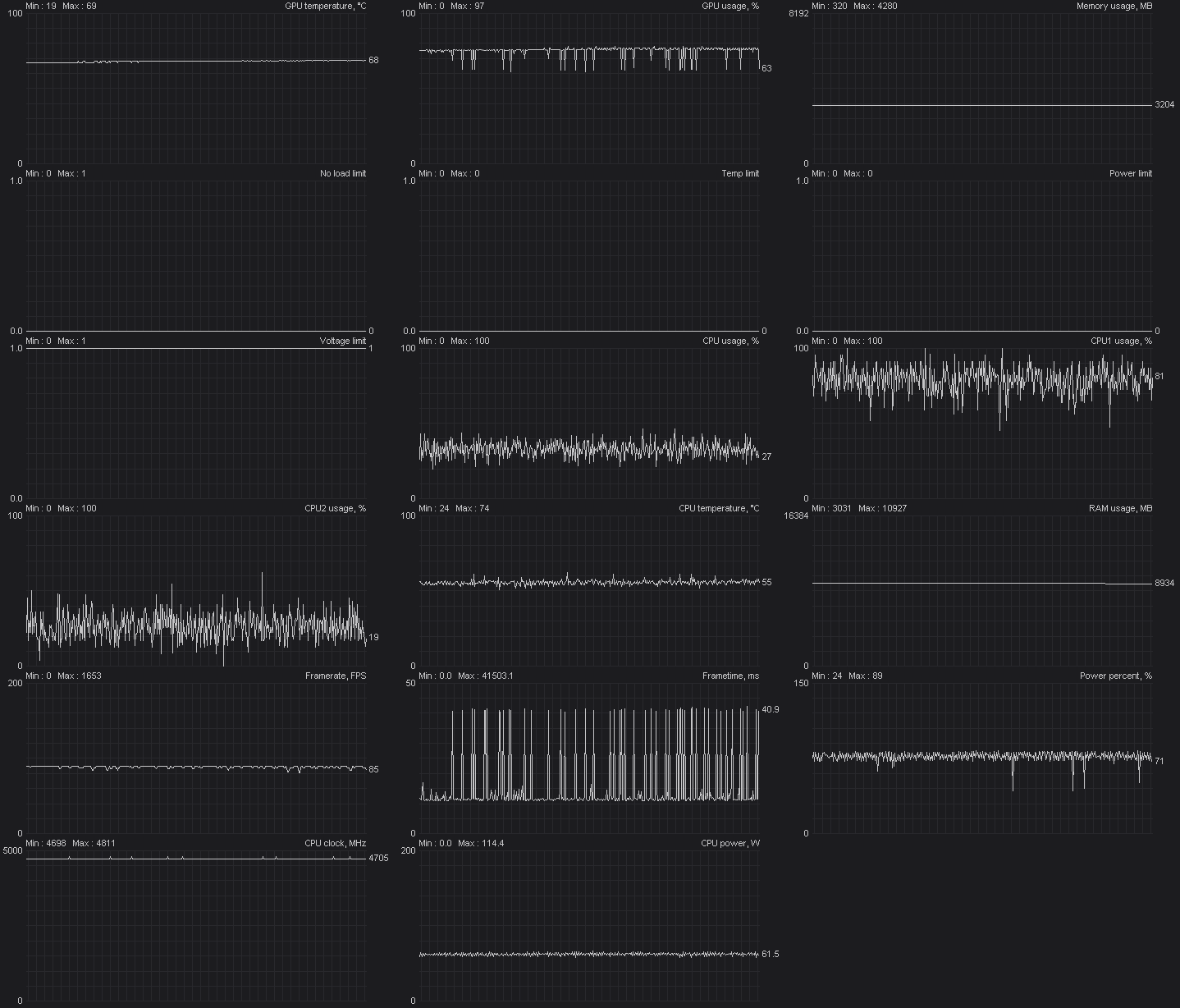
The image above is with G-Sync enabled, in fullscreen. Borderless had essentially the same results.

This is with G-Sync off and VSync off in my elden ring profile in Nvidia control panel with the game in borderless.
Halfway through you can see a significant decrease in stuttering. This is when I decided to enter the Groveside cave near the starting area. I went through it fighting the wolves with a sorcerer and it was noticeably smoother. So it does seem to be a primarily open world issue. I'm intrigued now so I think I'll try to get a couple more results in caves for you.
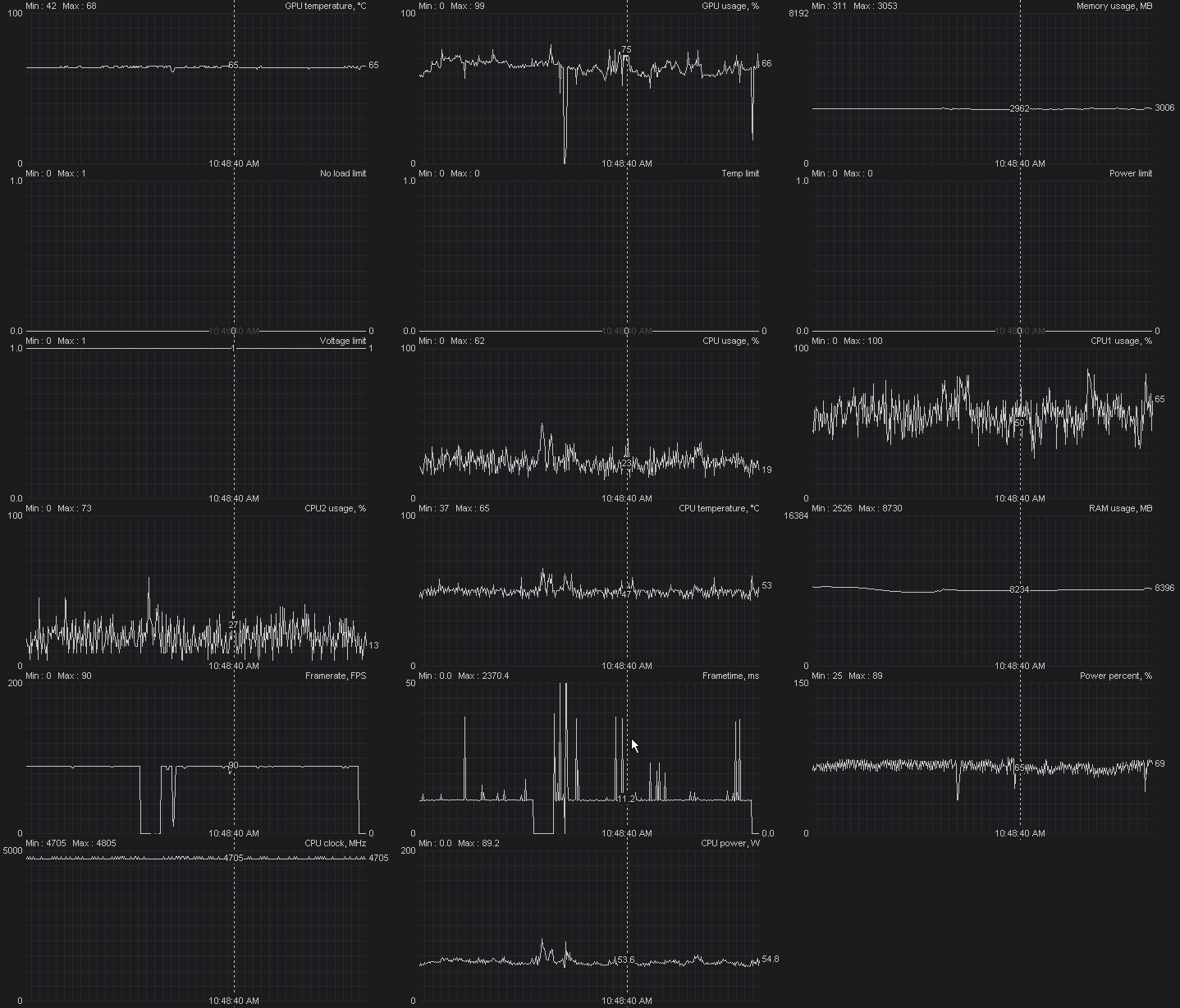
This is with G-Sync off and VSync off in my elden ring profile in Nvidia control panel with the game in fullscreen. This is in the same cave from the previous test but everything was already dead so I walked around a bit. The initial drop to 0 is me switching to fullscreen and to the left of the drop you can see the results from the last test. As you can see, significantly less stuttering
Update:
Tried with latest update Problem still occur with RTSS.
Active patch, full stuttering in first castle Disabling patch, crappy 60fps, no stutter whatsoever in first castle Activating the patch again, full stutter.
I've discovered that the stutter occur way way more often (like every 1.5, 2sec) when using mouse and keyboard than when using controller.
