

 typora
may i read-only the markdown article?
when i read some article that is myself or everybody. i don't want to change anything i don't want to change. read-only state just like static web page. it don't changed.

Can't you just read it without doing any changes? I mean, you don't have to edit the file, do you?

to do so target is To prevent unintentional modifications for example, i read Typora Quick Start. this kind of article don't need to be changed and shouldn't be changed. some other soft, for example, pdf reader. just read not write. pdf pro can write. it's target is protect document don't be changed. excel has lock function to protect worksheet. and so on.
I found this program searching for a solution for just viewing/reading markdown files. I have a lot of markdown files for class and I just want to read them and reference them, not make any changes unintentionally. So I'd love it if that was a feature to allowed us to turn read-only on/off.

On macOS you could just "lock" the file. For Window/Linux, just click 'Do not save' when you close the window.
So this is a low priority task in my own opinion, since there are some "alternative" solution. We will consider this, but no plans for near future

@abnerlee Maybe just add a shortcut key to toggle the "lock" of file on macOS. That could be more convenient.

This is really a duplicate of #89. If you are in favor of this one, I recommend you go vote for #89.

@abnerlee
On macOS you could just "lock" the file.
Read-only mode should do more than prevent editing. One should be able to click on links without having to hold down the command key to navigate them.
Maybe mark this as a duplicate of #89?
I think is issue is about for reading/previewing purpose
#89 is for presentation/demo purpose
Ok, then I'll move my viewer mode comment from #89 to here:
A read-only mode would be very useful. It allows Typora to be both a Markdown editor and a Markdown viewer.
In viewer mode:
- Clicking links navigate to the target rather then rather then exposes the link markup for editing.
- Optimized for reading. Markups is not exposed.
- You can't accidentally modify the content, which is a big deal since on OSes like macOS changes are automatically saved.
- Optionally, a different theme/CSS would be used.
@abnerlee Maybe change the title of this Issue to either "Read-only Mode", "Viewer Mode" or "Reader Mode"?
viewer mode is really useful and a nice feature of the soft. I don't have to export to html or pdf format for getting good experience of reading.

I too would appreciate this feature.
I distribute the documentation of my projects in their respective repos, I use a lot of hyperlinks between documents to tie it together.
A reading mode that allows people to follow hyperlinks without holding cnt/cmd.
I would also require clicked hyperlinks to open in the same window.
These two things are holding me back from being able to recommend Typora to my team as the default documentation reading tool

Ok, then I'll move my viewer mode comment from #89 to here:
A read-only mode would be very useful. It allows Typora to be both a Markdown editor and a Markdown viewer.
In viewer mode:
* **Clicking links** navigate to the target rather then rather then exposes the link markup for editing.

* **Optimized for reading**. Markups is not exposed.

* You can't accidentally modify the content, which is a big deal since on OSes like macOS changes are automatically saved.

* Optionally, a different theme/CSS would be used.
@abnerlee Maybe change the title of this Issue to either "Read-only Mode", "Viewer Mode" or "Reader Mode"?
For me, as a programmer I write a lot of code in md files, when I want to copy code from codeblocks it is annoying because spaces before and after the codeblock would always be selected. If View mode is on, then the issue is gone.

On Linux, you can chmod -w yourFile.md and then when you open the file in typora you cannot modify it. I do this, I hope it helps.

I use typora for reading large set of files. Occasionally I also edit them. Most of the time I would like to be sure that I will not change anything unintentionally. chmod on selected files or group of files is too far from a handful solution in my case.

I have a similar use-case for typora as @alshdavid and would also greatly appreciate this feature.

I see there is already a checkbox option "Locked" to lock/unlock file on top of the application frame. I find it enough.

@guesswh0 can't seem to find this option. Could you provide a screendump or such? On linux here btw.

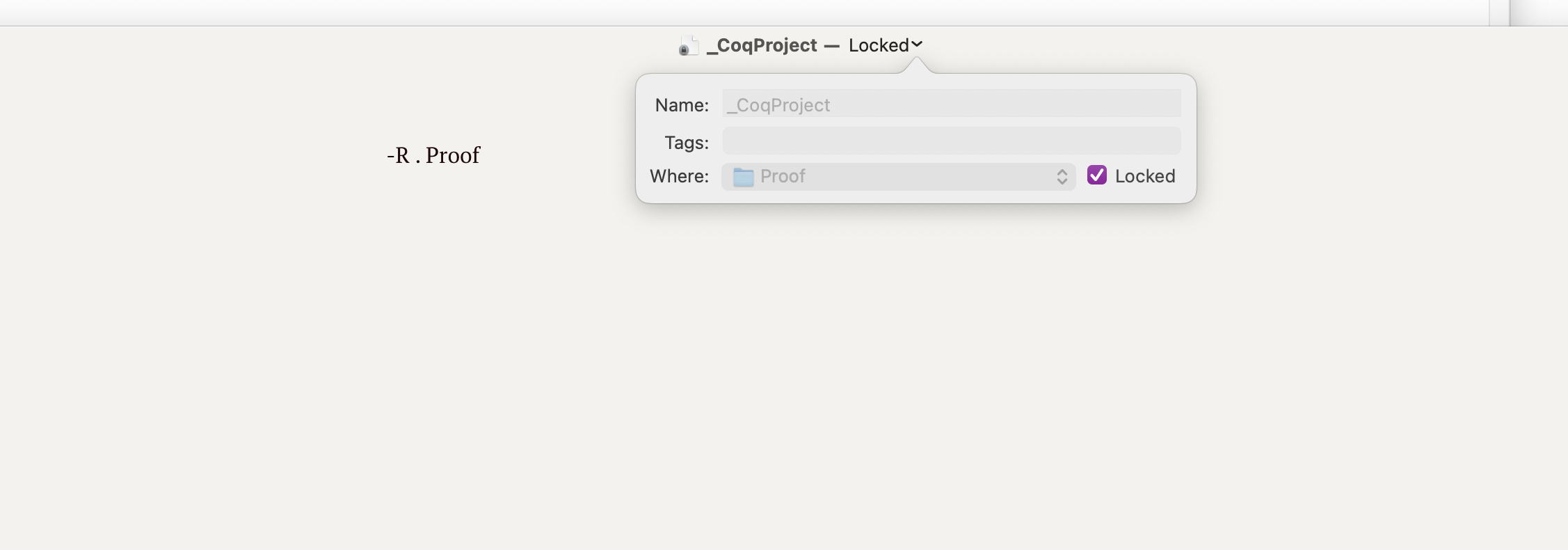 @undersound click the title and then there's a lock option appearing in drop-down menu (mac-version)

@juniorxxue you mean the title of the file that is displayed in the GUI window? Not seeing that option unfortuanetely. Perhaps this is a mac only option?
I vote for this one too.
I didn't saw this feature request, but I mentioned about it in other issue https://github.com/typora/typora-issues/issues/4645#issue-988375178


A read-only mode would be very useful. It allows Typora to be both a Markdown editor and a Markdown viewer.
In viewer mode:
* **Clicking links** navigate to the target rather then rather then exposes the link markup for editing.

* **Optimized for reading**. Markups is not exposed.

* You can't accidentally modify the content, which is a big deal since on OSes like macOS changes are automatically saved.

* Optionally, a different theme/CSS would be used.
YES, please.. This suggestion is a MUST. An only viewer mode is necessary

In our organziation we use Typora a lot to read documentation which is written in .md. A read-only mode would reduce risk of accidental modifications and improve the usability.

That's exactly why I never bought typora, and just abandoned evernote. I want my notes to be WIKI style. And almost nobody supports that simple feature. At least Obsidian does.

I also vote for the feature "Viewer mode". There should be an option to activate it with a command line parameter.

-1
Typora is a markdown editor, at least that's how I see it. I would really rather not have modes in Typora, like an editor mode or viewer mode. That will start to make Typora feel more like Vim, which I would rather avoid.
If you want a markdown viewer, I suggest using Marked 2. That's all that app does. Then you can use Marked 2 for viewing and Typora for editing.

+1 I'd also like to be able to toggle a viewer mode, where I can edit the markdown elsewhere and have typora render and display. Paid user on linux mint, fwiw.

+1 Sometimes I have completed my editing work, but I can't close it because I need to read it. In this case, I don't want my operations which out of my attention mess up my file, so the viewer mode is useful, it is like reader mode in Jetbrains.

Team typora, Any updates on this issue? Can you please include this feature in the latest release this has been pending for some time now and lots of other folks have already raised this above?
Even writing this comment has a Preview tab where I am actually verifying this formatting and you can understand the importance of this feature and why we have paid for this software to have better response from the team
Please look into this 🙏🏽
