
typora-issues

typora-issues copied to clipboard
 typora
Flowchart display not 100% correct.
OS: Windows 10 Typora version 1.1.3 as well as 1.1.2
When I try to draw the flowchart with the basic example, the flowchart display does not 100% correct.
st=>start: Start
op=>operation: Your Operation
cond=>condition: Yes or No?
e=>end

st->op->cond
cond(yes)->e
cond(no)->op
The output result is:

But another example code works fine.
st=>start: Start:>http://www.google.com[blank]
e=>end:>http://www.google.com
op1=>operation: My Operation
sub1=>subroutine: My Subroutine
cond=>condition: Yes
or No?:>http://www.google.com
io=>inputoutput: catch something...
para=>parallel: parallel tasks

st->op1->cond
cond(yes)->io->e
cond(no)->para
para(path1, bottom)->sub1(right)->op1
para(path2, top)->op1
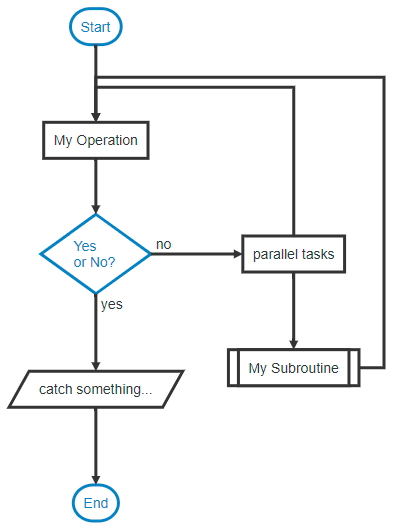
Thank you Typora, it's really fantastic.

It is same with https://flowchart.js.org/ so it should be a upstream issue.
