
hass-aarlo
 hass-aarlo copied to clipboard
 twrecked
Arlo HA Credentials
Hello
I copied the aarlo folder to my "custom_components" and I'm now able to add the arlo integration in HA.
Now I have to enter the username and TFA username etc. This is not working for me. I get everytime the message "Error occured". Is TFA 2 two factor authentification for the mail account and the "normal" username and password the login for arlo? Is it possible to setup the Arlo Login without TFA?
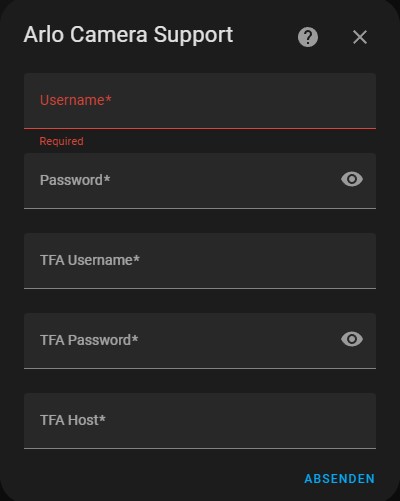
Whats the name of the configuration file, I can fill in with this informations (without TFA Informations)? aarlo: username: !secret arlo_username password: !secret arlo_password
best

I recommend installing from HACS at the moment, the trunk code isn't quite ready for prime time, with the HACS install configure it with the file.
Having said that, if you don't have two factor authentication set up on you Home Assistant Arlo account you can safely enter anything into those fields and they will be ignored. (I don't know if you can leave them blank, I always have to fill them in.)
But if you do have TFA enabled you will need to enter the username/password/host of the IMAP account you get the code sent to.

Hi twrecked
Thank you very much for your answer. My problem is, I use Home Assistant on Synology Docker. Here I'm not able to install HACS. Is it not possible to configure it with the file without HACS? I have so many things running on my Home Assistant Docker without problems.
I tried now everything without TFA settings etc. I'm not able to connect.
Best feron
If you clone the repository you can check out the version-0.7.x branch, this is the same version that HACS will install. This version uses the configuration.yaml file.
Once you have that configured turn on logging so I can see what is going wrong. You can look at the logs and it might tell you what is wrong. If you can't see anything obvious feel free to attach the logs to this bug report. But, tose logs contain some sensitive information so you should encrypt it with this site so only I can read it.
That would be great, when the version use the configuration.yaml and I can use the same HACS Version on docker. But I don't understand what I have to send you? How can I clone the repository and check the version?
Update: I made the steps from this link and downloaded the Git-Bash. Now I have the folder on my local C. An info.md file shows me a version 0.8. Is it the right version? Where can I see the version? I updated my files on my synology but I still have the same problem. https://docs.github.com/en/repositories/creating-and-managing-repositories/cloning-a-repository?tool=webui#about-cloning-a-repository
Update: If you mean the original code for my Home Assistant installation. This is the originally Synology Docker package of Home Assistant, which I have installed and the aarlo folder for custom_components is from your github page.
Please let me know, where I can see know if I have the right HACS aarlo version?
Hi Steve
I opened «Code» than copied the HTTPS URL and copied it go Git-Bash and started the Git-Bash. After that I uploaded the files to my synology docker custom_components folder:
Best
feron
Von: Steve Herrell @.> Gesendet: Donnerstag, 20. Oktober 2022 18:11 An: twrecked/hass-aarlo @.> Cc: feron81 @.>; Author @.> Betreff: Re: [twrecked/hass-aarlo] Arlo HA Credentials (Issue #641)
How did you get the original code?
— Reply to this email directly, view it on GitHub https://github.com/twrecked/hass-aarlo/issues/641#issuecomment-1285816724 , or unsubscribe https://github.com/notifications/unsubscribe-auth/AUHHC2JQATJK6EJH7626ORDWEFVHTANCNFSM6AAAAAARJ4OM24 . You are receiving this because you authored the thread. https://github.com/notifications/beacon/AUHHC2IZJDEDRDAI5FT6RODWEFVHTA5CNFSM6AAAAAARJ4OM26WGG33NNVSW45C7OR4XAZNMJFZXG5LFINXW23LFNZ2KUY3PNVWWK3TUL5UWJTSMUQAZI.gif Message ID: @.*** @.***> >
I've never used Git Bash but I think think will checkout the correct version for you.
git checkout version-0.7.x
Or see if you can see that branch in you download. You need to install that version.
For me its also the first time I use Git Bash. You wrote about clone directoy. That was the reason, why I downloaded Git-Bash.
I have a changelog file there: aarlo = 0.8.0a9 last entry aarlo/pyaarlo = 0.7.1 last entry
Maybe do you mean aarlo/pyaarlo 0.7.1, than I have the same version than HACS will provide?
You need to checkout the version-0.7.x, did you try the git checkout command in the previous comment?
I opened Git CMD and went to the right path and pasted your command and get following message: Switched to a new branch 'version-0.7.x' branch 'version-0.7.x' set up to track 'origin/version-0.7.x'.
I think it could be the right version now. I uploaded the files to my Synology Docker. Then I added my username and passwort on the configuration.yaml and started the Home Assistant new. It tooks a long time to connect "waiting on arlo". But when I open "Camera" I can't see a view. Where can I check now the Arlo settings on Home Assistant?
I can see different errors in Home Assistant like: -> aarlo Component setup: Error: 2fa startup failed
Unable to prepare setup for platform aarlo.camera: Unable to set up component. 20:27:48 – (FEHLER) setup.py Setup of aarlo is taking longer than 300 seconds. Startup will proceed without waiting any longer 20:27:48 – (FEHLER) setup.py Waiting on integrations to complete setup: aarlo 20:27:47 – (WARNUNG) bootstrap.py - Die Nachricht ist zum ersten Mal um 20:23:47 aufgetreten und erscheint 5 mal Setup of aarlo is taking over 10 seconds. 20:22:58 – (WARNUNG) runner.py unable to connect to Arlo: attempt=2,sleep=30,error=2fa startup failed
I tried so many times. I'm not able to connect. The problem is the TFA. Do you have an idea, what's the problem? I used following code with my credentials in the configuration.yaml:
aarlo: username: !secret arlo_username password: !secret arlo_password tfa_source: imap tfa_type: email tfa_host: imap.host.com:1234 tfa_username: your-user-name tfa_password: your-imap-password
It's getting there!
One thing to try now would be to logon to the Arlo camera website with your Home Assistant login and see what is happening. For the Home Assistant integration to work you need to either login straight in or to get sent an email with a code in it. Does one of those two things happen?
If that doesn't help we can turn on some extra debug. Read this section for turning on extra debug. This debug will contain some sensitive data - camera serial numbers and the like - so you can use this page to encrypt it so only I can see it.
But by reading the debug, look for lines with pyaarlo in them it might be pretty obvious what is going wrong.
Now I could connect my camera with the Home Assistant account. Is it possible to see the live view of the cam directly on the home assistant web page? And I would like to make a flow that the stream of my arlo cam will show on my google nest hub. It shows me no live picture on the nest hub (only a camera icon). Do I need a configuration on the configuration.yaml to show the live view?
I don't know how to stream a live view to a nest hub, I just show everything on a lovelace glance card on the standard GUI. You might have more luck with that one on the Home Assistant community website.
Thank you very much for your help. Stream on a lovelance glance would be good for me. Nest hub is secondary. Here I have the same problem that I don‘t have the HACS Store while running on Docker. How can I install the lovelance glance manually? Do I need to copy the code to my configuration.yaml?
I'm not understanding why you can't install HACS on your device, I run a docker image and I've done it, it really would make things easier. If you can install my pieces you can install HACS - see here.
This is the location of the lovelace card, the installation is slightly different, see the README for details.
I rode on several blocks that its not possible to install HACS on docker, that it needs a OS version. How did you install HACS on docker? That would really be much better for me. Do I need the Container/Container version? Where I have to open a terminal (Home Assistant, Client, Synology)? And where I have to run the HACS download script?
I opened my Synology File station and copied the files from my local C to my Synology custom_components folder.
You can do the same with HACS - the source is here, and the exact piece you need is here.
But if you ssh onto your Home Assistance install then you can run the instruction on here
You mean I have to copy the exact piece "hacs" to the same folder than aarlo (custom_components\hacs)? Thats all what I have to do? Then I don't need ssh?
I uploaded the hacs folder now to my synology and restartet my home assistant insallation. I still can't see the HACS Store. Maybe it needs something more?
Under integration I can't see HACS and when I want to add the HACS integration I get an error: The configuration flow could not be loaded: {"message":"Invalid handler specified"}
No idea, it's not my integration. Did you check out the HACS install instructions?
Thank you for your help. I will have a look at the install instructions. I hope I can install HACS on docker and then I will download arlo lovelance. Maybe I have then question about lovelance.
Good luck. And once HACS is on there is a load more stuff you can install with a single click, it really makes things easier.
Hi twrecked, I have HACS now running on my Docker installation. I downloaded an older version. With this one it works. Now I installed the lovelace files from HACS. No the files are installed.
Now I tried the following readme. I don't understand point 9. Where can I find the lovelace Dashboard? https://github.com/twrecked/lovelace-hass-aarlo/blob/master/hacsinstall.md
I feel like is very out of date, sorry, and it's safe to ignore that config on there as well.
The card is probably already installed. it will be under www/community on your docker device. www is at the same level as custom_components.
And this is a good example configuration to start with.