

 twibiral
Edit this block
I do not show the button to edit this block
and tell me please how to implement the function so that when you click in any area of code, it switches to editing code
It seems that I had it in the previous version Obsidian

Hi! Are you using the Live Preview mode? On the bottom ribbon of Obsidian, you should see your current mode in an icon:
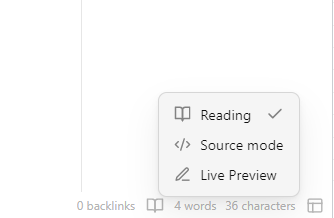

yes Live Preview
i added edit buttom by css snippet
but i still need the function so that when you click in any area of code, it switches to editing code
when in live preview, i am able to click on the code to edit. does your behaviour change when you disable the plugin xbillion?

Hi @xbillion, you are probably using code blocks with the run- prefix (like run-python)?
Do you mind sharing the code for your edit button to help us implement the functionality?

Hi @xbillion, you are probably using code blocks with the
run-prefix (likerun-python)?Do you mind sharing the code for your edit button to help us implement the functionality?
I have the same problem. When using run-python in a block, I cannot edit the code by cimply clicking on the block. Edit button would be helpful.
Currently I am just selecting text by selecting a couple of lines within the codeblock which changes the view to edit mode.
PS: @twibiral From what I see I am not able to run the code when I state simple python within the block. It must always be run-python right?

python is for editing in live preview and running in reading mode. run-python is for running in live preview mode.
As far as I'm aware the expected behaviour is to navigate into the codeblocks with the caret (as you are doing). However, having an edit button like other codeblocks rendered in live preview do would definitely be more intuitive and easier.

+1 for being able to click on the code block while in Live Preview. (That's how it works as usual in vanilla Obsidian Live Preview)
It's counterintuitive to have to click above/below a code block and then use the keyboard to move the cursor into the code block.


This happens because the plugin uses registerMarkdownCodeBlockProcessor() from https://docs.obsidian.md/Plugins/Editor/Markdown+post+processing#Post-process+Markdown+code+blocks which automatically removes the code block.
If the plugin instead appended things to code blocks, this could be implemented; however, I'm not sure how feasible that is. Looking into it Seems it would be kind of difficult. Darn.
I think that it might be possible to more easily make it so clicking the code switches it to editing mode though - so you could double click on the code?
It looks like we don't actually need to use registerMarkdownCodeBlockProcessor(), as we are already parsing the DOM to add the controls to the code block. This is in function addToCodeBlock() in function addToAllCodeBlocks(). However, it is harder to parse the DOM obsidian itself creates, because it creates one div for each line of the code block rather than what we get by using registerMarkdownCodeBlockProcessor() which puts the entire code block inside a single element. However, I will keep investigating.
@magnus-ISU Thanks for your help! Yes, this feature would need some annoying changes. The biggest advantage of the current implementation is that the "run-" blocks do not need a separate implementation.
I understand that its annoying, but one could also use spit view and open the code with the normal edit mode on the one side and the reading mode on the other side. Then you can run and edit side-by-side.
My two cents (also related to #63): Now that we can store output as Markdown in notes (https://github.com/twibiral/obsidian-execute-code/pull/384), I believe we don't necessarily need a dedicated interface. This would eliminate the need to register a new code block language called run-, allowing users to take advantage of Obsidian's live preview features and edit their code seamlessly. I think it would be nice to maintain the plugin-specific run- language, but also enable users to execute code, e.g., through a command, in standard code blocks without requiring a registered interface.
