
unity_browser

unity_browser copied to clipboard
 tunerok
mouse buttons not working on windows build
hi again! the mouse are completely functionally on editor (no problem at all) but on windows build mouse pointer are there and move around but all three buttons not working i'm using unity 2019.4.17.

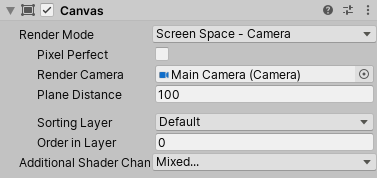

Hi, it's me again. The solution above is not bad but in my project, I couldn't use this rendering mode so I had to rewrite this method to getting mouse position. I know, it is one big 'XD' but that was enough for my prototype. It is from WebBrowser2D.
` private Vector2 GetScreenCoords(GraphicRaycaster ray, StandaloneInputModule input) {
        RectTransform window = GetComponent<RectTransform>();

        Vector2 mouseOffset = new Vector2(Input.mousePosition.x - window.position.x, Input.mousePosition.y - window.position.y);
        mouseOffset.x /= window.lossyScale.x;
        mouseOffset.y /= window.lossyScale.y;
        mouseOffset.y = window.rect.height - mouseOffset.y;

        if (mouseOffset.x < 0 || mouseOffset.y < 0 || mouseOffset.x > window.rect.width || mouseOffset.y > window.rect.height)
            mouseOffset = new Vector2(-1, -1);

        return mouseOffset;
} `