

 trzy
trzy
Faster quad rendering
See commit message. Otherwise quad rendering is completely unusable on all lower end GPUs, e.g. Intel.

The quad patch sounds good. The sky in Harley has massive polys which were running out of precision with the original quad code, hence the double math. It took me a long time to actually find that was the issue. It doesn't surprise me the double precision kills the frame rate on older or crappy h/w as they probably lack hardware support entirely for double precision math. The quad code always ran faster than the triangle version even with the added overhead of the geometry shader on my nvidia card.

Nice! On my laptop it was a bit slower before, so win-win. ;) btw: With all variants (the old fp32, the current fp64, and my PR) there are still artifacts in the harley/first person sky on my Intel. But as there is literally no change in the amount of artifacts no matter which version i test, i think this is a separate issue still and/or the driver optimizing too aggressively (or compiler bug even).
Can you make a screenshot of the artefacts? Be interesting to see if it's the same I had before. I've never even tried supermodel on an Intel gpu. Do you get artefacts on say an nvidia or amd gpu with your code?
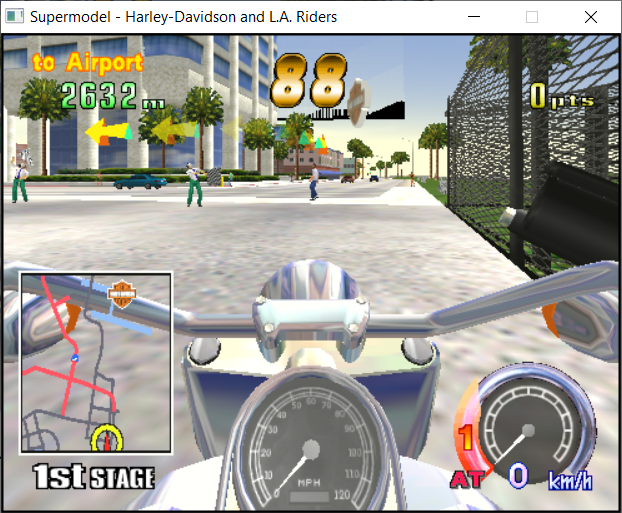
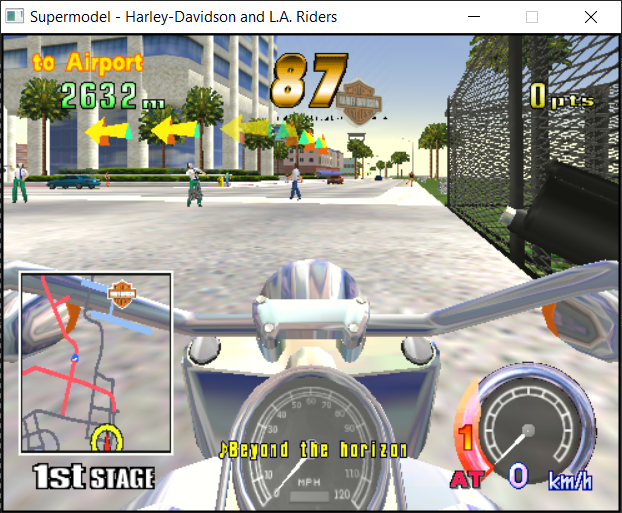
And these are heavily flickering, also no matter if i try the old fp32 path, the current fp64, or my PR, it always roughly looks the same.
Nothing of that on NVIDIA, also not with my PR. My PR basically always seems to match the fp64/double code so far.
On my nvidia card it was only happening at very specific points in the sky. It wasn't happening there, but the bug looks similar. You can tell the attribute interpolation is bad in the first pic. Not just the artefacts around the edge. It's still clearly running out of precision somewhere. Maybe the Intel cards are using a different floating point round mode or something.
Yeah, the joy of shader programming. All spec'ed out and still every vendor having its own quirks. :/ When i use the old fp32 path on my NVIDIA, i see kinda like very thin triangle-like artifacts. With fp64 and my PR, these are gone there.
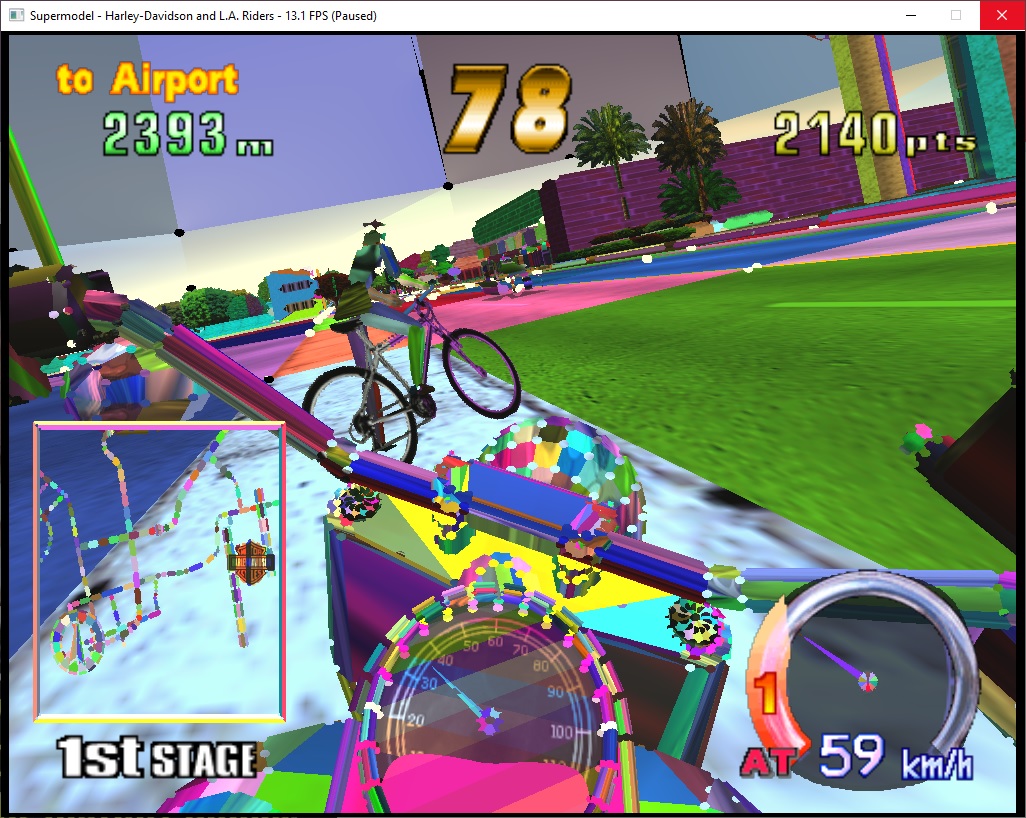 This is one of the few debug images I found of the problem. Basically I just modified the shader to look for out of range values. The vertical gaps in the sky are the actual bug on my nvidia h/w. That was one of the very few places the bug showed up.
Yes, this is also what i'm seeing if i use the old fp32 code. Would need to do something similar to test the Intel issue. But then again, don't know if its worth the trouble, i think they should rather fix this on their side. ;)
You could try something like #define GL_ARB_shader_precision 1
https://registry.khronos.org/OpenGL/extensions/ARB/ARB_shader_precision.txt
So could this be merged now? The remaining Intel issues are not worse than before, but at least it renders much much much faster there now (and i guess on all other boards that do not feature HW fp64s, too).
Going to wait for Ian to have the final word on this one. He might be busy now but if he doesn't follow up in a week's time I can ping him privately by email.

I'd like to actually tested on intel h/w. Unfortunately I don't have access to any intel gpus.
Then you'd have to trust me. :) It's basically visually equivalent to the fp64 version (i.e. same artifacts in Harley in 1st person, all other tested games look fine), but at least much much faster on Intel (on all games obviously).
And on NV GPUs its also visually equivalent to the fp64 version (i.e. NO artifacts on Harley, also all other tested games look fine).
I have a couple of machines with Intel GPUs. Anything specific to test? Specific scenes, etc.?
Sent from my iPhone
On Aug 12, 2022, at 6:42 AM, dukeeeey @.***> wrote:
I'd like to actually tested on intel h/w. Unfortunately I don't have access to any intel gpus.
— Reply to this email directly, view it on GitHub, or unsubscribe. You are receiving this because you commented.
I also just tried #extension GL_ARB_shader_precision : enable on Intel, unfortunately no visible change :/
I (for now) give up on the Intel Harley artifacts. It is somehow 'constant', so even if i just output directly fs_in.color in fragmentShaderR3DQuads, then i still get this
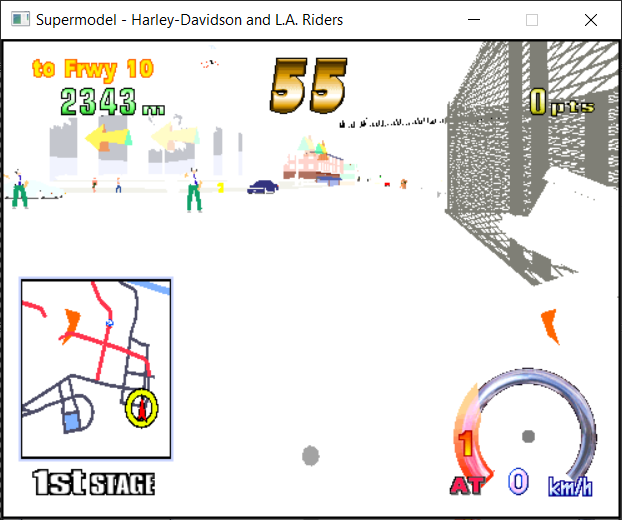 I also tried fooling around with all kinds of depth buffer settings, but still the same. :/
I finally got around to testing the quad code. Seems fine. I haven't noticed any rendering artifacts. Runs the same speed on my nvidia card. But nice to not need double precision math. It would be good to figure out why it fails on intel cards.
So do you have a hint for me what i could still test/experiment on Intel? (and as mentioned before, the artifacts seen are independent of my fp32 vs fp64 change; as you can also see in the image above, which doesn't use any of the touched code anymore, at least from my understanding).
The black around the edges is where the discard statement is being triggered. This is related to the area calculations, either in the fragment shader or possibly the geometry shader. What I did before was look for any abnormal values coming out of the calculations. Either very large numbers or Nan values. When you find one just get the fragment shader to write a colour eg red then end the shader. It's very crude but you can debug this way.
Yes, indeed, if (lambdaSignCount != 4) is causing this. But no infinite or nan values. :/
So simply the signs being off due to numerical precision. :/
I'll see if can find some way to improve that.
Nevertheless, could we get this PR here through? I think we could still work on the Intel issue separately, as it only happens in all of my testing in this first person Harley view, whereas the double precision harms all quad rendering on Intel.
I'm happy for the patch to be pushed. It seemed to work well when I tested here. With regards to intel, it might not be NaN or Inf values. it could be just very large numbers as a result of losing precision somewhere. Maybe intel just sucks lol.