
trezor-suite
 trezor-suite copied to clipboard
Published
20 hours ago •
 trezor
trezor
Old device: degraded user experience
Ok, I was helping one of my releatives with trezor and user experience was not very good.
Info:
- Suite Version: web, 22.7.3 8eddb2accd31c78577f276df2e9ecf773d2c3c17
- Browser: chrome 95.0.4638.54
- OS: Ubuntu 20.04.4 LTS
- Bridge: 2.0.27
- Firmware Version: 1.6.1
Features (30 bytes) {
    bootloader_mode: True,
    firmware_present: True,
    major_version: 1,
    minor_version: 5,
    patch_version: 1,
    vendor: 'bitcointrezor.com',
}
normal mode
Features (134 bytes) {
    bootloader_hash: 32 bytes 0x511290a8723fafe73415259d2596765406325ce24b4b80032c0b70b05d9846e9,
    device_id: '...',
    flags: 0,
    imported: False,
    initialized: True,
    label: '...',
    major_version: 1,
    minor_version: 6,
    model: '1',
    needs_backup: False,
    passphrase_protection: False,
    patch_version: 3,
    pin_cached: False,
    pin_protection: True,
    revision: 20 bytes 0xef86786ff750351ec454c7bae33b4966cfa862d7,
    vendor: 'bitcointrezor.com',
}
How to reproduce Steps to reproduce the behavior:
Connect device
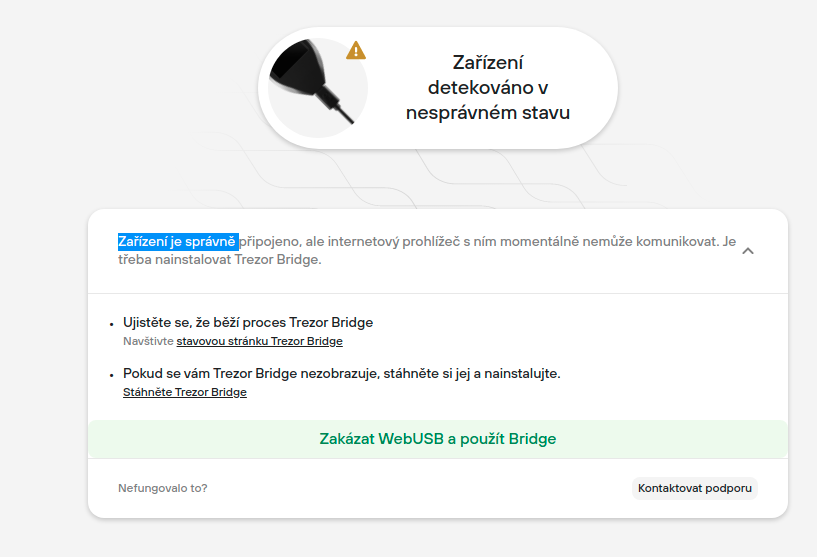
turn on bridge version: 2.0.27 and click "disable webusb and use bridge"
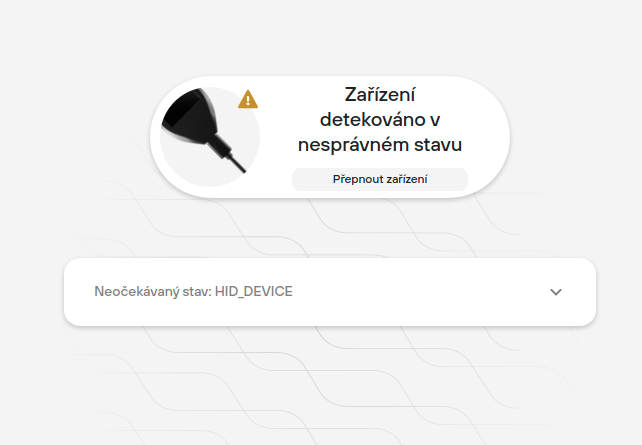
Now I am stuck. Suite tells me "Unexpected state: HID DEVICE". Refreshing suite helps and I can proceed normally
Expected behavior Should not see "Unexpected state: HID DEVICE" screen
Additional context Sorry for czech language in screenshots. Will do better next time
