

 transmission
Diferent Color for Seeding and Finished Torrents
I try to search if it’s possible to change basic color parameters to Transmission, but no information found. When I download a torrent the color of "progress" shows me a green bar. Is the same color for completed and seeding torrents, only if you stop the torrent the item becomes gray. If you have more than 10 torrents (sometimes I have more than 50) with this color characteristic is difficult to check if a torrent is finished(seeding) or still active (downloading). Is there a way to change the color for SEEDING/COMPLETED to blue for example?

Would you please state the version and flavor (Qt, GTK+, Mac, web) of Transmission you're using and the operating system you're using it on?

Sorry, totaly forgot mention my Transmission client: Client Transmission for Windows v2.92 (14714), runing on Windows 10 x64 Creator Update. I run transmission in remote configuration, under web gui the color of the finished and downloading files are different, but in windows client as I sayd is the same. Remote Server Transmission 2.84 (14307) runing under Debian Jessie x64.
+1 same here on Ubuntu 16.04 - Version 2.84 (GTK) It's impossible to quickly determine if a download is finished (it then goes back to 0% and shows how much is seeded) or still downloading, because the percentages are used for seeding and downloading.
It would be great if the name of the torrent would be displayed in green or something the like...
I don't know if I coded this correctly (when is a download finished? when status is SEED?):
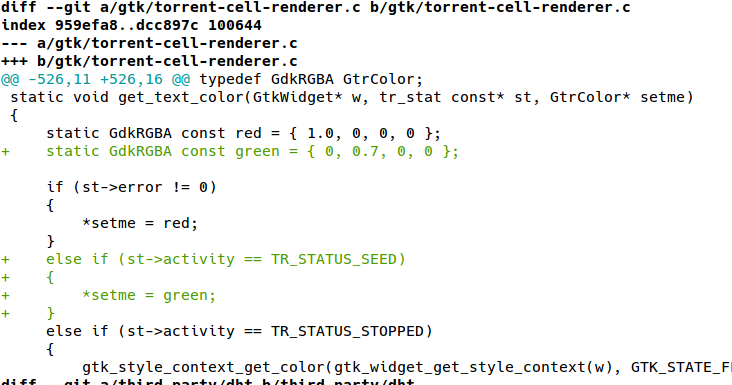

+1, Transmission 2.92 on Ubuntu.
It's impossible to see torrent's status in compact view, as torrents being downloaded and seeded look exactly the same in compact view. And they only differ by small text field in normal view. This is quite user-unfriendly

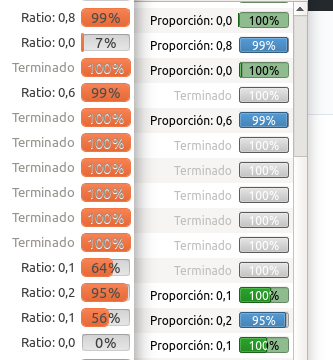
With Transmission 2.92 under Ubuntu Desktop Artful, it happens with the GTK front-end (transmission-gtk). In QT (transmission-qt), progress bars are distinguished by colour: downloading files are blue, downloaded but sharing are green, everything else is pale gray.
A forum thread from 2012 says this is because GTK restricts the colours of the progress bar (to match the current theme, I suppose). Can anybody confirm?
If bringing the colour system to GTK is not possible, could you add some other distinguishing sign? Either adding a coloured icon (like in BitTorrent) or replacing “100%” with a useful legend (like “↑ [ratio]”, would be very helpful.
(Edited to upload a screen capture. There's another difference between GTK and QT: for completed files, GTK shows as a percentage the quotient between the current and the desired U/D ratio, while QT shows this in colours but always reads “100%“)

@mikedld @ckerr I never saw this issue until Mike mentioned it in the piecebar issue before but Gary has been making some progress on having a unified progressbar color scheme across all clients in https://github.com/transmission/transmission/issues/5648 so when that is complete it will also satisfy this issue.
