
transgui
 transgui copied to clipboard
 transmission-remote-gui
Error: Duplicate object member: "status"
For bug report, please provide version info of:
- Operating system: 5.8.11-1-MANJARO
- Transmission Daemon: transmission-daemon 3.00 (bb6b5a062e)
- Transmission Remote GUI: 5.18.0 Build 17f71e6 FPC 3.2.0 Lazarus 2.0.10.0
When trying to connect to the daemon I get the following error:
Error: Duplicate object member: "status"
I have no issues connecting to the daemon through the web browser.

under
petrov@petrov:~ % uname -a
FreeBSD petrov 12.2-RELEASE FreeBSD 12.2-RELEASE r366954 GENERIC  amd64
same here after upgrade fpc & Lazarus ports
Screens with versions of an applications
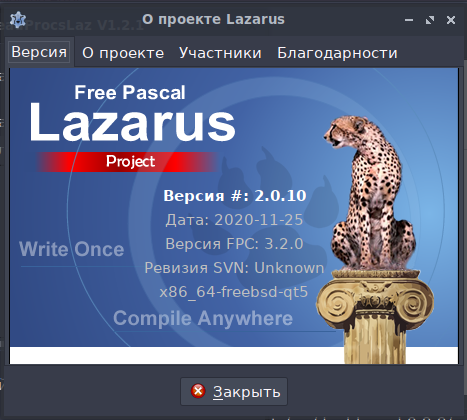
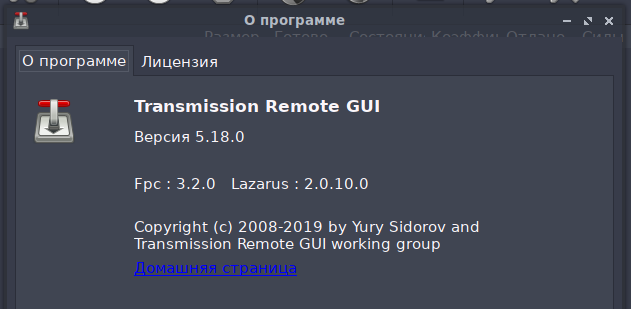

Seems issue needs to be merged with #1325 as duplicate due to sloooow motion development
I've caught the same error on
- Debian GNU/Linux 11 (bullseye)
- Transmission daemon 3.00
- Transgui 5.18.0


Same error here. transgui 5.18.0, Fpc 3.2.2, Lazarus 2.0.12.0, on Ubuntu 22.04. Connecting to a Transmission 3.00 daemon.When I connect to the same Transmission 3.00 daemon on an Arch system with transgui 5.18.0, Fpc 3.2.2 and Lazarus 2.0.12.0, everything works. transgui from AUR.


same with upgrading my desktop to 22.04, server has been on transmission 3.xx from the transmissionbt launchpad repo.
The package transgui-test provided in the snap store works.

same with upgrading my desktop to 22.04, server has been on transmission 3.xx from the transmissionbt launchpad repo.
The package transgui-test provided in the snap store works.
Does this mean that transgui will likely not work anymore after Linux Mint 21 comes out (which is based on 22.04)? Thanks for the snap store lead.


I left a comment in the launchpad bug tracker.
The bug is fixed in the upcoming Kinetic (22.10) release with version 5.18.0+dfsg-3.
Download it manually and install in Jammy (22.04) with dpkg if needed.
Even with version 5.18.0+dfsg-3 on Linux Mint 21/Ubuntu 22.04 I still got Duplicate object member: "status" error.

This did work for me on jammy (Mint 21). Not sure how, since it still says 5.18.0, but I'm grateful. Thanks!


I can confirm v5.18 fixes this error. Tested on Ubuntu 22.04
Download it with the link provided by emk2203 and install it using:
sudo dpkg -i transgui_5.18.0+dfsg-3_amd64.deb
Same issue on ubuntu 22.04 desktop with apt installed transgui. Snap installed trangui-test gives those ssl issues.
Download it manually and install in Jammy (22.04) with dpkg if needed.
Works fine on Ubuntu 22.04.
not for me. Still the same error.

@TrueOsiris I had the same problem. Solution above from @mikabytes helped me.


Just a confirmation that as of April 2023, the Linux Mint repo version still has the problematic version, although manually installing the latest deb fixes the problem.

i just had this problem with the apt version but installing the dpkg fixed it

