

 transistorsoft
[Bug] java.lang.NoSuchMethodException: com.transistorsoft.locationmanager.adapter.TSConfig$Builder.setİsMoving
Your Environment
- Plugin version: 4.9.0
- Platform: iOS or Android ANDROID
- OS version: 13
- Device manufacturer / model: SAMSUNG - NOTE20 ULTRA
- Flutter info (
flutter doctor): - Plugin config:
PASTE_YOUR_CODE_HERE
Expected Behavior
Actual Behavior
Steps to Reproduce
Context
Debug logs
Logs
‼️  com.transistorsoft.locationmanager.adapter.TSConfig$Builder.setİsMoving [class java.lang.Boolean]
03-02 14:52:22.059  3537  3537 E TSLocationManager: java.lang.NoSuchMethodException: com.transistorsoft.locationmanager.adapter.TSConfig$Builder.setİsMoving [class java.lang.Boolean]
03-02 14:52:22.059  3537  3537 E TSLocationManager:     at java.lang.Class.getMethod(Class.java:2103)
03-02 14:52:22.059  3537  3537 E TSLocationManager:     at java.lang.Class.getMethod(Class.java:1724)
03-02 14:52:22.059  3537  3537 E TSLocationManager:     at com.transistorsoft.locationmanager.adapter.TSConfig$Builder.a(Unknown Source:78)
03-02 14:52:22.059  3537  3537 E TSLocationManager:     at com.transistorsoft.locationmanager.adapter.TSConfig$Builder.b(Unknown Source:0)
03-02 14:52:22.059  3537  3537 E TSLocationManager:     at com.transistorsoft.locationmanager.adapter.TSConfig.reset(Unknown Source:2)
03-02 14:52:22.059  3537  3537 E TSLocationManager:     at com.transistorsoft.locationmanager.adapter.TSConfig.reset(Unknown Source:1)
03-02 14:52:22.059  3537  3537 E TSLocationManager:     at com.transistorsoft.flutter.backgroundgeolocation.BackgroundGeolocationModule.ready(BackgroundGeolocationModule.java:365)
03-02 14:52:22.059  3537  3537 E TSLocationManager:     at com.transistorsoft.flutter.backgroundgeolocation.BackgroundGeolocationModule.onMethodCall(BackgroundGeolocationModule.java:222)
03-02 14:52:22.059  3537  3537 E TSLocationManager:     at io.flutter.plugin.common.MethodChannel$IncomingMethodCallHandler.onMessage(MethodChannel.java:262)
03-02 14:52:22.059  3537  3537 E TSLocationManager:     at io.flutter.embedding.engine.dart.DartMessenger.invokeHandler(DartMessenger.java:295)
03-02 14:52:22.059  3537  3537 E TSLocationManager:     at io.flutter.embedding.engine.dart.DartMessenger.lambda$dispatchMessageToQueue$0$io-flutter-embedding-engine-dart-DartMessenger(DartMessenger.java:319)
03-02 14:52:22.059  3537  3537 E TSLocationManager:     at io.flutter.embedding.engine.dart.DartMessenger$$ExternalSyntheticLambda0.run(Unknown Source:12)
03-02 14:52:22.059  3537  3537 E TSLocationManager:     at android.os.Handler.handleCallback(Handler.java:942)
03-02 14:52:22.059  3537  3537 E TSLocationManager:     at android.os.Handler.dispatchMessage(Handler.java:99)
03-02 14:52:22.059  3537  3537 E TSLocationManager:     at android.os.Looper.loopOnce(Looper.java:226)
03-02 14:52:22.059  3537  3537 E TSLocationManager:     at android.os.Looper.loop(Looper.java:313)
03-02 14:52:22.059  3537  3537 E TSLocationManager:     at android.app.ActivityThread.main(ActivityThread.java:8741)
03-02 14:52:22.059  3537  3537 E TSLocationManager:     at java.lang.reflect.Method.invoke(Native Method)
03-02 14:52:22.059  3537  3537 E TSLocationManager:     at com.android.internal.os.RuntimeInit$MethodAndArgsCaller.run(RuntimeInit.java:571)
03-02 14:52:22.059  3537  3537 E TSLocationManager:     at com.android.internal.os.ZygoteInit.main(ZygoteInit.java:1067)


basic headless setup.
it works btw. but i can see that error in debug logs.
BackgroundGeolocation.registerHeadlessTask(headlessTask);
@pragma('vm:entry-point')
void headlessTask(bg.HeadlessEvent headlessEvent) async {
  await Firebase.initializeApp(
    options: DefaultFirebaseOptions.currentPlatform,
  ).then((value) => print('Firebase initialized'));
  String uid = FirebaseAuth.instance.currentUser!.uid;
  print('[BackgroundGeolocation HeadlessTask]: $headlessEvent');
  // Implement a 'case' for only those events you're interested in.
  switch (headlessEvent.name) {
    case bg.Event.TERMINATE:
      bg.State state = headlessEvent.event;
      print('- State: $state');
      break;
    case bg.Event.HEARTBEAT:
      bg.HeartbeatEvent event = headlessEvent.event;
      print('- HeartbeatEvent: $event');
      break;
    case bg.Event.LOCATION:
      bg.Location location = headlessEvent.event;
      print('- Location: $location');
      LocationData locationData = Utils.bgLocationToLocationData(location);
      FirebaseService.addLocationData(locationData, uid);
      print("Firebase data added");
      break;
    case bg.Event.MOTIONCHANGE:
      bg.Location location = headlessEvent.event;
      print('- Location: $location');
      break;
    case bg.Event.GEOFENCE:
      bg.GeofenceEvent geofenceEvent = headlessEvent.event;
      print('- GeofenceEvent: $geofenceEvent');
      break;
    case bg.Event.GEOFENCESCHANGE:
      bg.GeofencesChangeEvent event = headlessEvent.event;
      print('- GeofencesChangeEvent: $event');
      break;
    case bg.Event.SCHEDULE:
      bg.State state = headlessEvent.event;
      print('- State: $state');
      break;
    case bg.Event.ACTIVITYCHANGE:
      bg.ActivityChangeEvent event = headlessEvent.event;
      print('ActivityChangeEvent: $event');
      FirebaseService.addActivityData(event, uid);
      break;
    case bg.Event.HTTP:
      bg.HttpEvent response = headlessEvent.event;
      print('HttpEvent: $response');
      break;
    case bg.Event.POWERSAVECHANGE:
      bool enabled = headlessEvent.event;

      print('ProviderChangeEvent: $enabled');
      break;
    case bg.Event.CONNECTIVITYCHANGE:
      bg.ConnectivityChangeEvent event = headlessEvent.event;
      print('ConnectivityChangeEvent: $event');
      break;
    case bg.Event.ENABLEDCHANGE:
      bool enabled = headlessEvent.event;
      print('EnabledChangeEvent: $enabled');
      break;
  }
}
   bg.BackgroundGeolocation.onLocation((bg.Location location) {
      print('[location]  - $location');
      FirebaseService.addLocationData(Utils.bgLocationToLocationData(location),
          FirebaseAuth.instance.currentUser!.uid);
    });

    // Configure BackgroundGeolocation.
    bg.BackgroundGeolocation.ready(bg.Config(
            debug: true,
            reset: true,
            desiredAccuracy: bg.Config.DESIRED_ACCURACY_HIGH,
            distanceFilter: 10.0,
            enableHeadless: true,
            stopOnTerminate: false,
            startOnBoot: true))
I suggest you review the Android Setup docs and ensure you've completed every item in the doc.
Same problem, I'm pretty sure I followed all the steps in the Android setup.
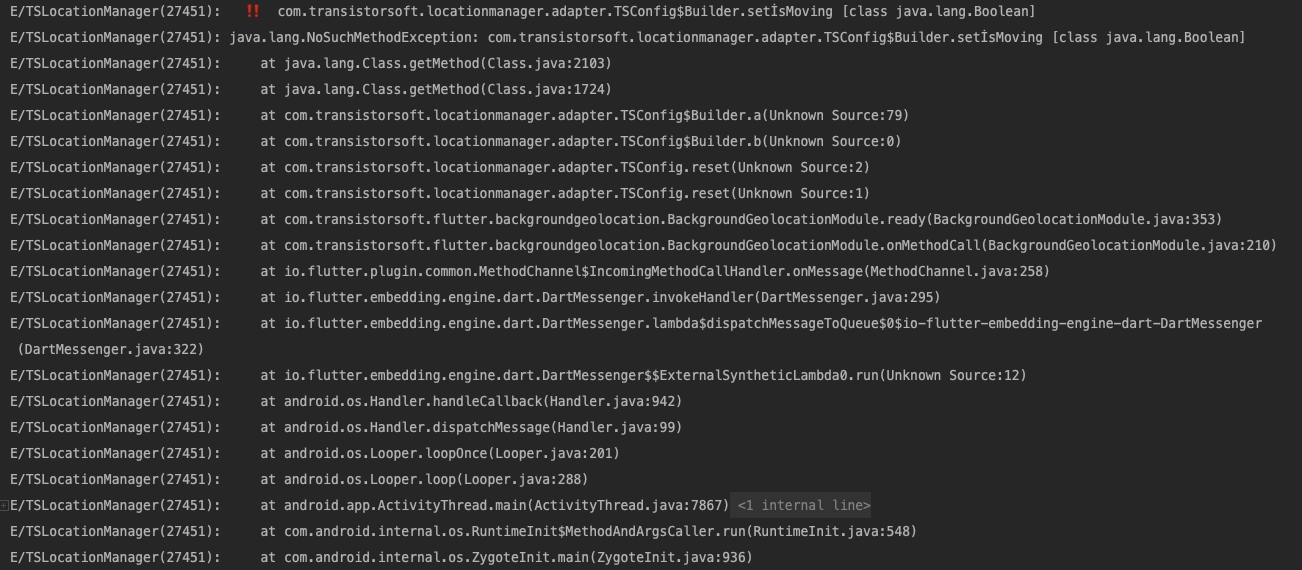

I think I see the problem. The plugin is using reflection and composing method-names via String concatenation.
While capitalizing the property name isMoving to method-name setIsMoving, the capitalization on the I in isMoving looks to generate an unexpected character where the capital I has a dot above it. It must be related to the Locale on the device.
setİsMoving
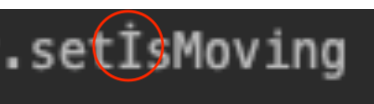
This is supposed to be:
setIsMoving
These exceptions are caught and should not cause a crash. I will look into enforcing en-US when performing String.toUppercase on the letter i.
This issue is stale because it has been open for 30 days with no activity.
![github-actions[bot] avatar](https://avatars.githubusercontent.com/in/15368?v=4 "Published by a pub.dev verified publisher")
This issue was closed because it has been inactive for 14 days since being marked as stale.