

 tramhao
termusic failing to fill Library/Database
I checked for a debug mode to try to check in logs what could happen. I installed termusic on a second laptop with a different Music directory, and noticed that besides the mp3 directory listed (the one created by termusic itself, see https://github.com/tramhao/termusic/issues/109), it doesn't list any of the content of ~/Music.
The origin of the install is the same (ArchLinux's AUR), though I could notice slight differences in configs. The one working correctly was installed with 0.7.7 and contains ["~/Music"] for music_dir, while the laptop with the issue was installed with the 0.7.8 and contains ["/home/clement/Music/mp3", "/home/clement/Music"] as music_dir (note that one of them expanded ~ while the other didn't, I don't know why).
It could also be that some files in ~/Music are giving termusic a hard time but I don't know why and a debug mode would be kind of helpful here I think.

Yes, you're rignt. in v0.7.8 I expand the ~ when initialize the program, because win related problem reported for ~. Debug mode is a great idea. I think I need to implement it. But as it's related to many aspect of the app, the implementation could be one module after another.

The database is only updated for files below current root. If it's outside, you need to set it as root. However, the database will keep growing when you switch roots. It's quite confusing here. Probably some other implementation is better.
Well, I didn't used much the mode database on the laptop with no issue, I mostly used the library mode; on the laptop with the issue even in library mode there's nothing else than the mp3 dir listed while ~/Music contains many directories with Music, and I'm trying to figure out why but I guess something have termusic fails to populate files/directories. Could some files (archives etc.) result in a fail for termusic and have it interrupt the listing process?
It's possible. I'm not so confident with the scan of database. Perhaps I add debug mode to this module first and see what's happening when sync database.
It's possible. I'm not so confident with the scan of database. Perhaps I add debug mode to this module first and see what's happening when sync database.
Just to be clear, the issue I think arise even before populating the database: I guess the directories are first read and listed in the Library tab (<1>), and it's then used to populate the database. Here, even the library is shown as empty while it really isn't empty at all:
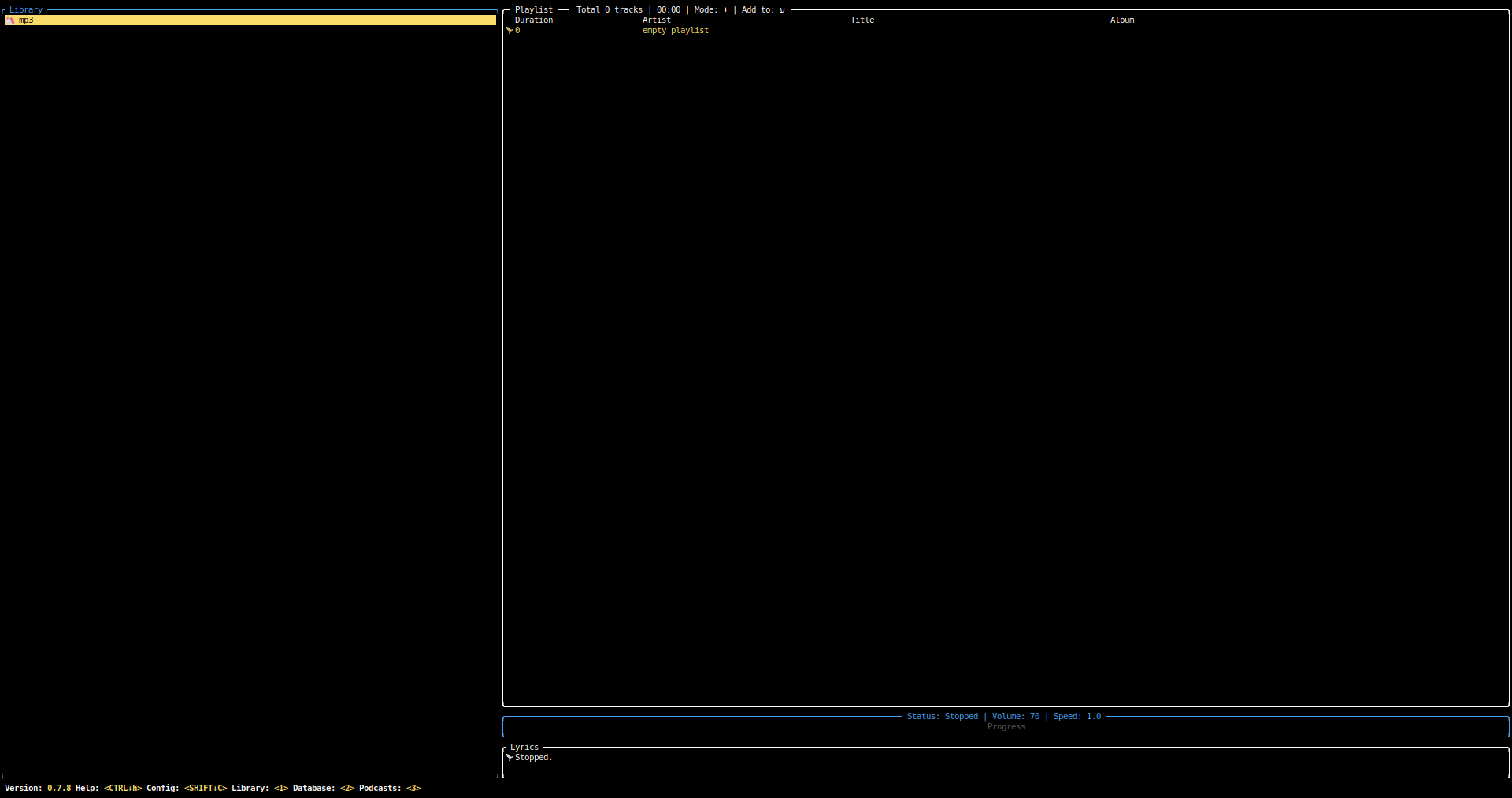
I can't tell why, but only the created mp3 directory is listed: every other directory is missing from here.
Please use o key to switch root when you're focusing library. Currently the root is set as ~/Music/mp3, and that's why it's empty(because it's newly created)
Mmmh, okay, my bad there I didn't get that it worked that way (and it's a little bit confused to be honest).
I was tricked by the fact the other computer only had ["~/Music"] in music_dir by default while the one I was reporting the issue for had ["/home/clement/Music/mp3", "/home/clement/Music"] by default.
EDIT: This switch with 'o' might benefit from a visual list in case of many dirs listed in this variable , I think. Also, what was the reason behind adding this mp3 dir by default, which is created?
That's another issue. From certain version, I use a configuration management tool, to merge old config and don't restore to default. Thus recently I change ~/Music to $XDG_AUDIO_DIR, but if you're running from an old config, the root value will not be changed.
could this issue be re-confirmed with latest master (currently at 3560924113989c6a17616ea2143c7f3d79fb87c9)?
since 0.7.11 the logger has been upgraded, many refactors have been done and some errors have improved.
the logger can now be enabled via --log-to-file which will output /tmp/termusic-{server,tui}.log files, or use environment variable TM_LOGFILE=/path/to/tui.log and TMS_LOGFILE=/path/to/server.log.
also to clarify the issue: this issue is about no files showing up in the Music library tree view, right?
to verify, what files are in the listed directory if you do ls -al?

could this issue be re-confirmed with latest master (currently at 3560924)?
since 0.7.11 the logger has been upgraded, many refactors have been done and some errors have improved. the logger can now be enabled via
--log-to-filewhich will output/tmp/termusic-{server,tui}.logfiles, or use environment variableTM_LOGFILE=/path/to/tui.logandTMS_LOGFILE=/path/to/server.log.also to clarify the issue: this issue is about no files showing up in the
Music librarytree view, right? to verify, what files are in the listed directory if you dols -al?
So, I reread everything to remind me of this. To sum up, the "issues", might be different ones, depending on what you consider.
First, the default generated config populate music_dir with ["/home/$USER/Music/mp3", "/home/$USER/Music"]. termusic used to create that mp3 directory. It doesn't anymore, but still populate it in that variable.
Second, when this variable contains more than one value, there's nothing hinting the user as to this "root" selection and how to switch between them, making that really not intuitive. Note that termusic doesn't feels like it's problematic to have in here a directory that doesn't exist (the mp3 directory doesn't exist).
Finally, for a user with a basic organisation such as me (musics, in my ~/Music), "/home/$USER/Music/mp3" comes first from the generated config and therefore is that first root, leading to an empty library, because that place doesn't exist and is therefore empty.
In the end, I think this mp3 directory have no reason to be placed in that config file, and that this "root" feature needs some UX improvement as that's not something people commonly see elsewhere and basically knows.
so, if i understand correctly the issues here are:
- termusic's initial config (or default value if not present) defaults to a music directory with
mp3attached at the end - termusic is not handling non-existent directories well (both in config and TUI); non-existent directories should be skipped
- termusic's UI does not properly handle going back up from a non-existent directory
also to clarify the issue: this issue is about no files showing up in the Music library tree view, right?
that quote was my interpretation because of comments like https://github.com/tramhao/termusic/issues/110#issuecomment-1410733290, but now re-reading it again it is likely a misunderstanding, because the first entry in the tree list is the root and there is only one root (meaning in that screenshot you are in directory mp3 and so only get shown the entries in that directory)
PS: i just checked, and the TUI has shortcuts to change between roots: o to switch between root folders, a to add a new root folder and SHIFT+A to remove the current folder as a root
so, if i understand correctly the issues here are:
* termusic's initial config (or default value if not present) defaults to a music directory with `mp3` attached at the end
No, it defaults to ["/home/$USER/Music/mp3", "/home/$USER/Music"]
* termusic is not handling non-existent directories well (both in config and TUI); non-existent directories should be skipped
Well I don't know if you can sum it up this way: it doesn't crash or anything for the fact it doesn't exist. But it should probably ignore it. What your summary also lacks is that even if the directory exists (like when termusic was creating it), it is an empty directory, and therefore shows en empty list. with no hint to the user as to why and how to manage this (this root thing isn't something people are used to).
* termusic's UI does not properly handle going back up from a non-existent directory
No, it actually switch roots with o very well back from and to it even if it doesn't exist. It's just counter-intuitive and have poor discoverability.
also to clarify the issue: this issue is about no files showing up in the Music library tree view, right?
that quote was my interpretation because of comments like #110 (comment), but now re-reading it again it is likely a misunderstanding, because the first entry in the tree list is the root and there is only one root (meaning in that screenshot you are in directory
mp3and so only get shown the entries in that directory)PS: i just checked, and the TUI has shortcuts to change between roots:
oto switch between root folders,ato add a new root folder andSHIFT+Ato remove the current folder as a root
Yes, as explained above, I thought the issue was that it did not show up anything before I was explained this "root" things and the o shortcut, which really deserves better discoverability.
Didn't know about a and SHIFT + a (does it edit the config file, or is it just for the current session?), but I think it'd deserve some explicit explanation on UX/help.
No, it actually switch roots with o very well back from and to it even if it doesn't exist. It's just counter-intuitive and have poor discoverability.
i think you misunderstood what i meant, i mean via Backspace going up a directory, not switching roots. (though in a sense switching roots of the tree, but not actually switching roots of music being played / what is listed in the config)
though i dont know if this is a actual issues, as i have not tried it yet, only my guess from reading previous comments.
(does it edit the config file, or is it just for the current session?)
i dont know, as long as it modifies the Settings struct and the app exits gracefully (no crash or panic), then the config should get saved (the same as volume and things get saved)
for reference, the following is where it gets set:
https://github.com/tramhao/termusic/blob/3560924113989c6a17616ea2143c7f3d79fb87c9/lib/src/config/mod.rs#L41-L54
Let me explain the history of this function. In the beginning, there is only 1 root supported, thus it's always ~/Music. Then there is a feature request for multiple roots. I added the function(not very nicely but works). In order to show how to configure it, by default it'll be 2 roots. And with this bug report, I decided not to create the folders, so there will be non-existing root folder. However, you can still move around with backspace, and set new root with enter. I'm also a little confused about how to set a more reasonable config especially for new users. For old users, it'll be fine because as long as it's set once, it'll be saved to configuration.
slight update, e97fae72029182e8e311b12b98d468f8275cc98d has changed the order to have the /mp3 directory after the normal music directory
slight update, e97fae7 has changed the order to have the
/mp3directory after the normal music directory
But does it even makes sense to keep a non-existant directory there? Also, it makes me think, does it handle well localized directories? (I can't tell, even though English isn't my native language, I set my OS to use English now).
Also, it makes me think, does it handle well localized directories? (I can't tell, even though English isn't my native language, I set my OS to use English now).
no it does not, it uses a static ~/Music, no XDG or similar used yet. (from what i can tell)