
algo
 algo copied to clipboard
 trailofbits
Websites offline
As recommended here, seeking assistance for this issue of certain websites not loading. I've connected to my algo server (on DigitalOcean) and run the MTU test, and it returns 'mtu: 1500.' Two of the webs I can't connect to are duckduckgo.com and microsoft.com - when I do an mtr to these two sites from the algo server I get:
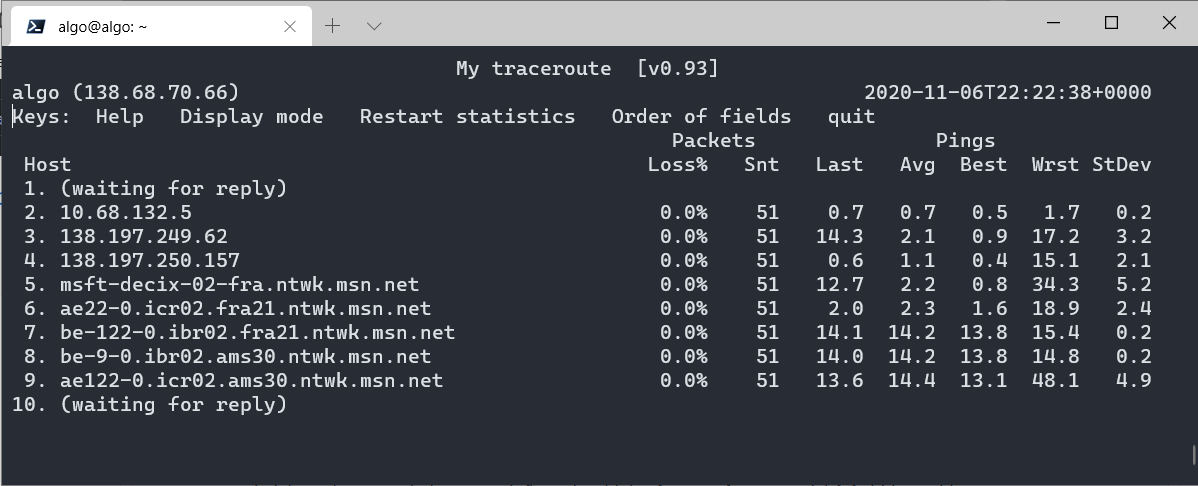

Any pointers on how to get these to work, or any tests that I can run?

I don't think mtr will be useful in figuring this out.
If you're using WireGuard on your client you can eliminate MTU as the issue by setting the MTU to 1280 in the WireGuard client. If your WireGuard client is iOS the MTU is already 1280 and the problem lies elsewhere.
Some web sites block connections from some cloud providers, but I've never heard of DuckDuckGo blocking connections from anywhere.

I think the issue is that I have my WireGuard client running on a mini-PC (running Ubuntu server) which is acting as a router (daisy-chained behind my ISP gateway). There is something I must be missing in my iptables configuration, I suspect. If I unplug my desktop from my router, plug it directly into my ISP's gateway and start up the WireGuard client on it I can access DuckDuckGo without a problem. I thought it might be an ipv6 issue, as I don't have my mini-PC/router configured to assign ipv6 addresses, but even when I disable ipv6 on my desktop client (via /etc/sysctl.conf) I can still access DuckDuckGo when connecting directly through my ISP's gateway.
I can't think what the missing configuration is in my router - as I say, as it is presently configured I can plug in my desktop to it and I will get access to just about everywhere, minus duckduckgo.com and microsoft.com (I think there may be other sites). Does anybody have any ideas for things I can be looking into?
An observation which may or may not be related to this: a number of sites, including duckduckgo.com and microsoft.com, have deliberately blocked responses to ping, and it seems to be these sites to which I don't have access when connecting to my DigitalOcean algo server via my router. Could this relationship be of any significance when trying to determine what information my router is not passing from the WireGuard client's wg0 interface to my LAN interface?
I still haven't been able to resolve this. With respect to MTU, I notice that when I create an algo server with
reduce_mtu: 0
in my config.cfg file, the MTU reported by the running client wg0 using ifconfig is 1420:

If I then create another algo server with:
reduce_mtu: 80
the MTU reported by the running client wg0 is 1340 (1500 - (80 * 2)). I don't know if this is expected behavior (in these tests I have made no change to the wg0.conf the WireGuard client is running).
If you're using WireGuard on your client you can eliminate MTU as the issue by setting the MTU to 1280 in the WireGuard client.
Did you you try this?
Did you you try this?
Thank you for the suggestion - I had tried it, and I've just tried it again now. Unfortunately I still can't connect to duckduckgo.com. It's a strange one, I'm all out of ideas as to what (or where) the problem might be.
Just for the record - from a client connected directly to my algo server there's no problem. But when I route traffic from my algo server to my LAN, then I can't access sites (duckduckgo.com etc.). This occurs even when both my iptables and ip6tables let everything through, i.e.
*filter

# Base policy
:INPUT ACCEPT [0:0]
:FORWARD ACCEPT [0:0]
:OUTPUT ACCEPT [0:0]

COMMIT

*nat

# Base policy
:PREROUTING ACCEPT [0:0]
:POSTROUTING ACCEPT [0:0]
:OUTPUT ACCEPT [0:0]
:INPUT ACCEPT [0:0]

-A POSTROUTING -o wg0 -j MASQUERADE

COMMIT
If it's not an MTU issue, and it's not a firewall/netfilter issue, then I'm at a loss to know what it is.