

 traccar
App stops updating location
Sometimes the client stops sending its location data to the server for some reason. So I have updates every 60s but looking at the log for today it got up to 12:38 then nothing till 12:55. I have enabled power optimise on the app to try and stop it sleeping but still not working. I think it may be something to do when I change between 4G and WiFi, not sure.

I'm not sure either. You would have to get system logs to find out what is happening.

Which logs would need to be pulled.
As of now if I stop/start the service (using slider within the app window) all that shows up is the following.
4:32 pm - Service stopped 4:32 pm - Service started 4:32 pm - Connectivity change
Nothing appears after, the location flag appears on the titlebar but does not go any further.
SOS shortcut does work and pushes latest location.
If you don't see location update message there, then your device doesn't have a GPS fix.
It defiantly is odd as sos sent the correct location and it was like that even when I went down the road and Google maps works fine. When it happens again ile use 'GPS Status' app to confirm that GPS is working.
SOS uses last known location, so it won't affect it. Google Maps use network provider if GPS is not available, so it works even if no GPS signal.
Hi,
I am trying to investigate a similar issue on my phone (Nexus 5 running Lineage OS with microg and then network provider as well).
I set the "interval" to be "60" (one minute) and both "distance" and "angle" to 0. Location provider mode is "hybrid" and my location preferences in Android are "energy saving" for the moment.
As far as I can see from the code, I should expect to have a "Location updated" status message every minute. I left the app open for a few minutes and indeed it works:

Then, I opened another app (Traccar then goes to background, still running) and it no longer works. Battery optimization is disabled for Traccar in settings. I used my phone for a couple of minutes and let it idle, at the same position for 10 minutes or so, and it did not log much during this period:

I think the point at 11:41 corresponds to me bringing back Traccar to foreground to check that it was running, but I am not 100% sure. The point at 11:50 was correctly logged in background. Then, Traccar in background with my setups logs a point every 10 minutes or so, instead of every minute.
If I let it run in background for longer times, eventually it ends up logging some points, but the interval has nothing to do with the expected logging interval.
Do you have any idea why this is happening? I can provide adb logs or such if it might help.
Note that I chose a small interval for easily reproducing it, but I spent whole yesterday with a 5 minutes interval and got points every hour or so. :/
Thanks!

I was using latest version available from F-Droid, but I have just realized it is version 5.5 and quite out of date. I'll try with the regular apk from Github and let you know.
Thanks!
It seems to get really similar results with the same config and latest regular version from github. I used "medium" accuracy (network only in Android settings) and disabled battery optimization.
Running in foreground, it more or less respects the 1 min interval

Running in background, that's rather 4 minutes:
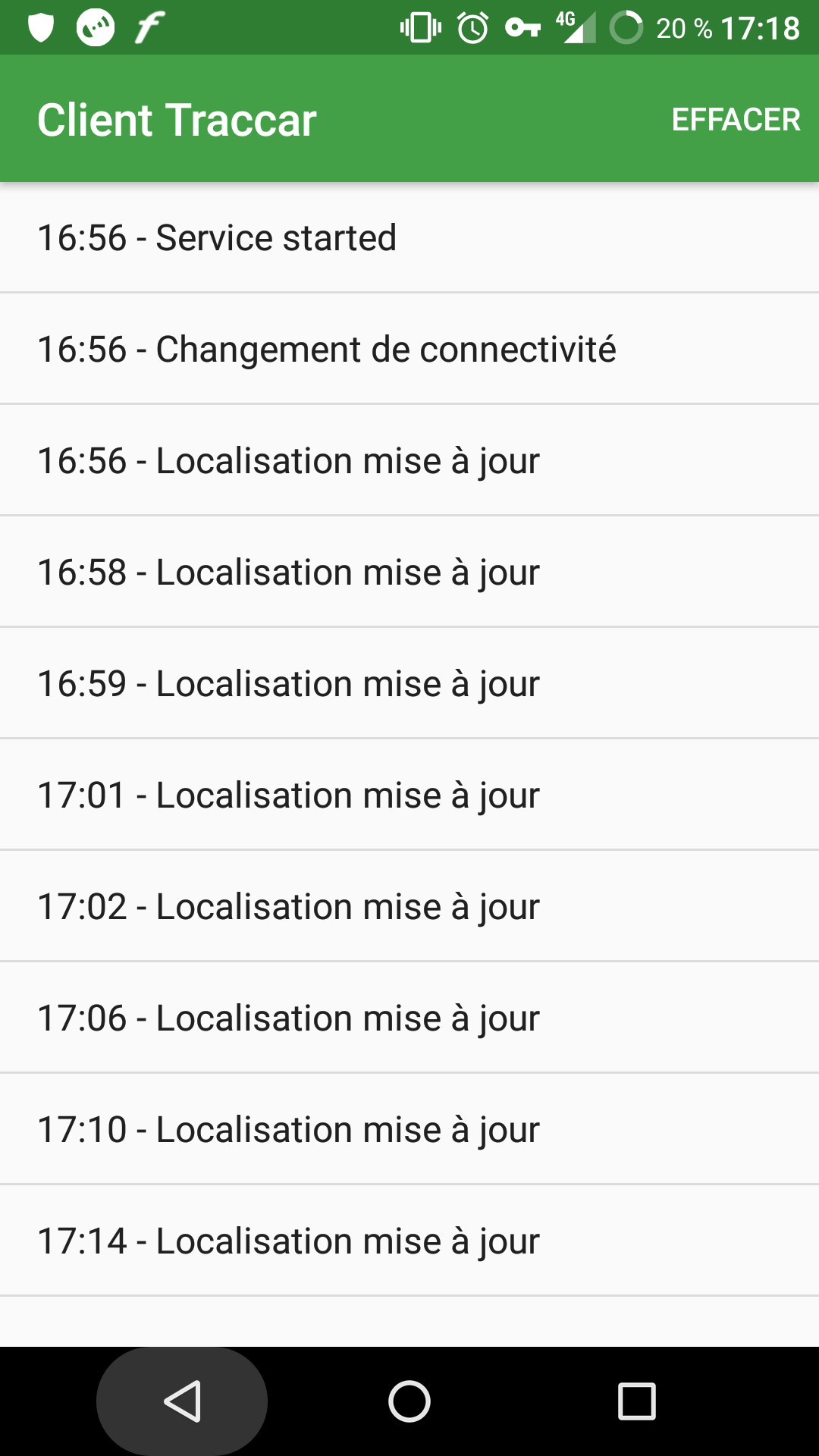
It probably means that Android system itself is throttling location updates.
Maybe, it's weird that the interval seems to be throttled by a proportional factor, no matter the expected interval.
I am back to 10 mins interval now and got an update at 6:56 and another one one hour later at 7:35.
Network updates seems to be working fine though as I have a couple of them between 6:56 and 7:35.
As a workaround for now, I guess I can just lower the interval, until I have an effective interval that matches the expected one.
Is it something worth reporting back to Mapzen LOST?
Thanks!
Phyks
Android might be throttling by a factor. I don't think it's LOST issue; it's just how Android works.
Android might be throttling by a factor.
Sure, but I can't find any reference to it in the docs so far :/
I don't think it's LOST issue; it's just how Android works.
But I guess there could be a way to overcome it. When linking your Android device with your Google account (on a Google Android build, with Play Services), you can have access to your device location at any time.
EDIT: Might be related to https://github.com/lostzen/lost/issues/238.
This might be relevant:
https://developer.android.com/about/versions/oreo/background-location-limits.html
Indeed, I'll have a look at this. I was wondering (might be naive, I don't know much about Android dev, just trying to debug this :/) whether the lack of PendingIntent could have an effect or not.
It seems you don't use any PendingIntent for location update in background, contrary to the small examples in their doc: https://github.com/lostzen/lost/blob/master/docs/location-updates.md#requesting-location-updates.
(Additionnally, you handle the minimal distance by setting interval to minimal interval value and manually checking for distance, instead of keeping the default interval and using their minimal distance setting. But this is another issue, and I guess there is a good reason to do it this way :)
Thanks!
We use foreground service, so the app technically shouldn't actually be affected, but who knows what other optimisations Android system has to reduce battery consumption.
Ok, so from the doc linked before (https://developer.android.com/about/versions/oreo/background-location-limits.html),
It has a foreground service.
then traccar should be considered as foreground app.
And
If an app is in the foreground on a device running Android 8.0 (API level 26), the location update behavior is the same as on Android 7.1.1 (API level 25) and lower.
Then, the behavior I observe is very weird :/ Have you already observed similar behaviors on your devices or with other users?
No, but I don't really run Traccar Client on my phone for long periods of time. Also my Android phone has died recently, so I can't really test on it at the moment.
Ok. Here are some logs found with adb (5 minutes frequency):
01-12 12:24:58.895 2523-2523/org.traccar.client D/TrackingController: read
01-12 12:24:58.940 2523-2523/org.traccar.client I/NetworkManager: network on
01-12 12:24:59.875 2523-2523/org.traccar.client I/NetworkManager: network on
01-12 12:28:32.985 2523-2523/org.traccar.client I/NetworkManager: network off
01-12 12:28:33.176 2523-2523/org.traccar.client I/NetworkManager: network off
01-12 12:28:33.598 2523-2523/org.traccar.client I/NetworkManager: network on
01-12 12:28:33.599 2523-2523/org.traccar.client D/TrackingController: read
01-12 12:28:34.061 2523-2523/org.traccar.client I/NetworkManager: network on
01-12 12:36:59.722 2523-2523/org.traccar.client I/PositionProvider: location new
01-12 12:36:59.724 2523-2523/org.traccar.client D/TrackingController: write (id:0 time:1515757019 lat:48.842601 lon:2.3844594)
01-12 12:36:59.743 2523-2523/org.traccar.client D/TrackingController: read
01-12 12:36:59.746 2523-2523/org.traccar.client D/TrackingController: send (id:105 time:1515757019 lat:48.842601 lon:2.3844594)
01-12 12:36:59.747 2523-5827/org.traccar.client W/System: ClassLoader referenced unknown path: /system/framework/tcmclient.jar
01-12 12:37:00.176 2523-2523/org.traccar.client D/TrackingController: delete (id:105 time:1515757019 lat:48.842601 lon:2.3844594)
01-12 12:37:00.196 2523-2523/org.traccar.client D/TrackingController: read
01-12 13:04:32.046 2523-2523/org.traccar.client I/PositionProvider: location new
01-12 13:04:32.049 2523-2523/org.traccar.client D/TrackingController: write (id:0 time:1515758672 lat:48.8426798 lon:2.3750183)
Basically, it seems that indeed Android is not sending any new position for a lot of time. I get network changes notifications but no location update. Looking at logs from Android itself, it seems this is the case. I am trying to get more logs to find eventually what is going on :/
First, sorry for the double post. I found better Android logs available, which seems to indicate there is actually a bug in Traccar.
Here are the logs from my network location provider:
01-12 14:11:40.768 9296-9296/org.microg.nlp.backend.apple D/AppleNlpBackendService: Found 28 wifis, of whom 13 with location and 0 unknown.
01-12 14:12:40.731 9296-9296/org.microg.nlp.backend.apple D/AppleNlpBackendService: Found 27 wifis, of whom 11 with location and 0 unknown.
01-12 14:13:40.704 9296-9296/org.microg.nlp.backend.apple D/AppleNlpBackendService: Found 23 wifis, of whom 9 with location and 0 unknown.
01-12 14:14:40.589 9296-9296/org.microg.nlp.backend.apple D/AppleNlpBackendService: Found 20 wifis, of whom 5 with location and 0 unknown.
01-12 14:15:40.730 9296-9296/org.microg.nlp.backend.apple D/AppleNlpBackendService: Found 24 wifis, of whom 9 with location and 0 unknown.
01-12 14:16:40.738 9296-9296/org.microg.nlp.backend.apple D/AppleNlpBackendService: Found 22 wifis, of whom 9 with location and 0 unknown.
01-12 14:17:40.724 9296-9296/org.microg.nlp.backend.apple D/AppleNlpBackendService: Found 23 wifis, of whom 9 with location and 0 unknown.
01-12 14:18:40.756 9296-9296/org.microg.nlp.backend.apple D/AppleNlpBackendService: Found 23 wifis, of whom 9 with location and 0 unknown.
01-12 14:19:40.741 9296-9296/org.microg.nlp.backend.apple D/AppleNlpBackendService: Found 25 wifis, of whom 9 with location and 0 unknown.
01-12 14:20:40.677 9296-9296/org.microg.nlp.backend.apple D/AppleNlpBackendService: Found 23 wifis, of whom 8 with location and 0 unknown.
01-12 14:21:40.716 9296-9296/org.microg.nlp.backend.apple D/AppleNlpBackendService: Found 23 wifis, of whom 9 with location and 0 unknown.
01-12 14:22:40.749 9296-9296/org.microg.nlp.backend.apple D/AppleNlpBackendService: Found 23 wifis, of whom 9 with location and 0 unknown.
01-12 14:23:40.748 9296-9296/org.microg.nlp.backend.apple D/AppleNlpBackendService: Found 22 wifis, of whom 9 with location and 0 unknown.
01-12 14:24:40.729 9296-9296/org.microg.nlp.backend.apple D/AppleNlpBackendService: Found 23 wifis, of whom 9 with location and 0 unknown.
It is regularly fetching position every minute, as expected by the Traccar config.
On the contrary, here is Traccar log:
01-12 14:11:40.858 2523-2523/org.traccar.client I/PositionProvider: location new
01-12 14:11:40.859 2523-2523/org.traccar.client D/TrackingController: write (id:0 time:1515762700 lat:48.84193626702746 lon:2.384278231732605)
01-12 14:11:40.873 2523-2523/org.traccar.client D/TrackingController: read
01-12 14:11:40.877 2523-2523/org.traccar.client D/TrackingController: send (id:124 time:1515762700 lat:48.84193626702746 lon:2.384278231732605)
01-12 14:11:40.880 2523-11809/org.traccar.client W/System: ClassLoader referenced unknown path: /system/framework/tcmclient.jar
01-12 14:11:41.465 2523-2523/org.traccar.client D/TrackingController: delete (id:124 time:1515762700 lat:48.84193626702746 lon:2.384278231732605)
01-12 14:11:41.506 2523-2523/org.traccar.client D/TrackingController: read
01-12 14:11:56.544 2523-2523/org.traccar.client I/NetworkManager: network off
01-12 14:11:56.831 2523-2523/org.traccar.client I/NetworkManager: network off
01-12 14:11:58.192 2523-2523/org.traccar.client I/NetworkManager: network on
01-12 14:11:58.193 2523-2523/org.traccar.client D/TrackingController: read
01-12 14:11:58.996 2523-2523/org.traccar.client I/NetworkManager: network on
01-12 14:11:59.558 2523-2523/org.traccar.client I/NetworkManager: network off
01-12 14:11:59.662 2523-2523/org.traccar.client I/NetworkManager: network off
01-12 14:12:02.054 2523-2523/org.traccar.client I/NetworkManager: network on
01-12 14:12:02.056 2523-2523/org.traccar.client D/TrackingController: read
01-12 14:12:02.753 2523-2523/org.traccar.client I/NetworkManager: network on
01-12 14:12:03.447 2523-2523/org.traccar.client I/NetworkManager: network off
01-12 14:12:03.714 2523-2523/org.traccar.client I/NetworkManager: network off
01-12 14:12:05.331 2523-2523/org.traccar.client I/NetworkManager: network on
01-12 14:12:05.332 2523-2523/org.traccar.client D/TrackingController: read
01-12 14:12:06.106 2523-2523/org.traccar.client I/NetworkManager: network on
01-12 14:12:13.656 2523-2523/org.traccar.client I/NetworkManager: network off
01-12 14:12:13.988 2523-2523/org.traccar.client I/NetworkManager: network off
01-12 14:12:15.146 2523-2523/org.traccar.client I/NetworkManager: network on
01-12 14:12:15.147 2523-2523/org.traccar.client D/TrackingController: read
01-12 14:12:15.927 2523-2523/org.traccar.client I/NetworkManager: network on
01-12 14:13:40.738 2523-2523/org.traccar.client I/PositionProvider: location new
01-12 14:13:40.744 2523-2523/org.traccar.client D/TrackingController: write (id:0 time:1515762820 lat:48.84193213471433 lon:2.384286577123298)
01-12 14:13:40.763 2523-2523/org.traccar.client D/TrackingController: read
01-12 14:13:40.765 2523-2523/org.traccar.client D/TrackingController: send (id:125 time:1515762820 lat:48.84193213471433 lon:2.384286577123298)
01-12 14:13:40.767 2523-12629/org.traccar.client W/System: ClassLoader referenced unknown path: /system/framework/tcmclient.jar
01-12 14:13:57.439 2523-2523/org.traccar.client D/TrackingController: delete (id:125 time:1515762820 lat:48.84193213471433 lon:2.384286577123298)
01-12 14:13:57.468 2523-2523/org.traccar.client D/TrackingController: read
01-12 14:15:40.757 2523-2523/org.traccar.client I/PositionProvider: location new
01-12 14:15:40.759 2523-2523/org.traccar.client D/TrackingController: write (id:0 time:1515762940 lat:48.84192927150561 lon:2.384288126674471)
01-12 14:15:40.771 2523-2523/org.traccar.client D/TrackingController: read
01-12 14:15:40.774 2523-2523/org.traccar.client D/TrackingController: send (id:126 time:1515762940 lat:48.84192927150561 lon:2.384288126674471)
01-12 14:15:41.565 2523-2523/org.traccar.client D/TrackingController: delete (id:126 time:1515762940 lat:48.84192927150561 lon:2.384288126674471)
01-12 14:15:41.590 2523-2523/org.traccar.client D/TrackingController: read
01-12 14:16:40.771 2523-2523/org.traccar.client I/PositionProvider: location new
01-12 14:16:40.773 2523-2523/org.traccar.client D/TrackingController: write (id:0 time:1515763000 lat:48.84192994413335 lon:2.3842878641112355)
01-12 14:16:40.786 2523-2523/org.traccar.client D/TrackingController: read
01-12 14:16:40.788 2523-2523/org.traccar.client D/TrackingController: send (id:127 time:1515763000 lat:48.84192994413335 lon:2.3842878641112355)
01-12 14:16:41.265 2523-2523/org.traccar.client D/TrackingController: delete (id:127 time:1515763000 lat:48.84192994413335 lon:2.3842878641112355)
01-12 14:16:41.280 2523-2523/org.traccar.client D/TrackingController: read
01-12 14:18:40.786 2523-2523/org.traccar.client I/PositionProvider: location new
01-12 14:18:40.787 2523-2523/org.traccar.client D/TrackingController: write (id:0 time:1515763120 lat:48.84192834858423 lon:2.38428838988805)
01-12 14:18:40.802 2523-2523/org.traccar.client D/TrackingController: read
01-12 14:18:40.804 2523-2523/org.traccar.client D/TrackingController: send (id:128 time:1515763120 lat:48.84192834858423 lon:2.38428838988805)
01-12 14:18:41.418 2523-2523/org.traccar.client D/TrackingController: delete (id:128 time:1515763120 lat:48.84192834858423 lon:2.38428838988805)
01-12 14:18:41.444 2523-2523/org.traccar.client D/TrackingController: read
01-12 14:20:40.706 2523-2523/org.traccar.client I/PositionProvider: location new
01-12 14:20:40.707 2523-2523/org.traccar.client D/TrackingController: write (id:0 time:1515763240 lat:48.84192997942095 lon:2.3842884853885287)
01-12 14:20:40.718 2523-2523/org.traccar.client D/TrackingController: read
01-12 14:20:40.721 2523-2523/org.traccar.client D/TrackingController: send (id:129 time:1515763240 lat:48.84192997942095 lon:2.3842884853885287)
01-12 14:20:41.431 2523-2523/org.traccar.client D/TrackingController: delete (id:129 time:1515763240 lat:48.84192997942095 lon:2.3842884853885287)
01-12 14:20:41.444 2523-2523/org.traccar.client D/TrackingController: read
01-12 14:21:02.254 2523-2523/org.traccar.client I/NetworkManager: network off
01-12 14:21:02.463 2523-2523/org.traccar.client I/NetworkManager: network off
01-12 14:21:10.251 2523-2523/org.traccar.client I/NetworkManager: network on
01-12 14:21:10.253 2523-2523/org.traccar.client D/TrackingController: read
01-12 14:21:10.996 2523-2523/org.traccar.client I/NetworkManager: network on
01-12 14:21:34.744 2523-2523/org.traccar.client I/NetworkManager: network off
01-12 14:21:34.866 2523-2523/org.traccar.client I/NetworkManager: network off
01-12 14:21:40.747 2523-2523/org.traccar.client I/PositionProvider: location new
01-12 14:21:40.748 2523-2523/org.traccar.client D/TrackingController: write (id:0 time:1515763300 lat:48.84192995719731 lon:2.3842880441376)
01-12 14:21:44.737 2523-2523/org.traccar.client I/NetworkManager: network on
01-12 14:21:44.738 2523-2523/org.traccar.client D/TrackingController: read
01-12 14:21:44.746 2523-2523/org.traccar.client D/TrackingController: send (id:130 time:1515763300 lat:48.84192995719731 lon:2.3842880441376)
01-12 14:21:44.747 2523-13720/org.traccar.client W/System: ClassLoader referenced unknown path: /system/framework/tcmclient.jar
01-12 14:21:45.547 2523-2523/org.traccar.client I/NetworkManager: network on
01-12 14:21:45.548 2523-2523/org.traccar.client D/TrackingController: delete (id:130 time:1515763300 lat:48.84192995719731 lon:2.3842880441376)
01-12 14:21:45.564 2523-2523/org.traccar.client D/TrackingController: read
01-12 14:21:51.415 2523-2523/org.traccar.client I/NetworkManager: network off
01-12 14:21:51.688 2523-2523/org.traccar.client I/NetworkManager: network off
01-12 14:21:52.483 2523-2523/org.traccar.client I/NetworkManager: network on
01-12 14:21:52.484 2523-2523/org.traccar.client D/TrackingController: read
01-12 14:21:53.209 2523-2523/org.traccar.client I/NetworkManager: network on
01-12 14:22:40.781 2523-2523/org.traccar.client I/PositionProvider: location new
01-12 14:22:40.783 2523-2523/org.traccar.client D/TrackingController: write (id:0 time:1515763360 lat:48.84193095753289 lon:2.3842878064577087)
01-12 14:22:40.794 2523-2523/org.traccar.client D/TrackingController: read
01-12 14:22:40.796 2523-2523/org.traccar.client D/TrackingController: send (id:131 time:1515763360 lat:48.84193095753289 lon:2.3842878064577087)
01-12 14:22:40.797 2523-13995/org.traccar.client W/System: ClassLoader referenced unknown path: /system/framework/tcmclient.jar
01-12 14:22:41.652 2523-2523/org.traccar.client D/TrackingController: delete (id:131 time:1515763360 lat:48.84193095753289 lon:2.3842878064577087)
01-12 14:22:41.679 2523-2523/org.traccar.client D/TrackingController: read
01-12 14:24:40.818 2523-2523/org.traccar.client I/PositionProvider: location new
01-12 14:24:40.820 2523-2523/org.traccar.client D/TrackingController: write (id:0 time:1515763480 lat:48.84192923053812 lon:2.384288076219363)
01-12 14:24:40.834 2523-2523/org.traccar.client D/TrackingController: read
01-12 14:24:40.838 2523-2523/org.traccar.client D/TrackingController: send (id:132 time:1515763480 lat:48.84192923053812 lon:2.384288076219363)
01-12 14:24:41.461 2523-2523/org.traccar.client D/TrackingController: delete (id:132 time:1515763480 lat:48.84192923053812 lon:2.384288076219363)
01-12 14:24:41.488 2523-2523/org.traccar.client D/TrackingController: read
It lacks about one point out of two, not sure exactly why. My best bet is some deadlock with the online status, but I am not really sure. This does not explain the huge discrepancies between expected frequency and real one, but that may be a beginning of explanations.
I'm not sure how you determined there is a bug, but I need some read evidence.
I have been using Owntracks for about two days now, and did not get any point loss besides the obvious ones (no position could be acquired + no network when in airplane mode or in the subway). For the rest of the time, I have a point every 5-8 minutes for a time interval set to 5 minutes.
I have the same issue using Nexus 5 and stock ROM 6.0.1. I request updates every 10 minutes and I got only few updates per day when phone is not used for anything else. Battery optimizations are disabled, not sure what is going on... Maybe problem of LOST?

If it works the same on older version of the app, then it's just how Android works and not an issue in LOST.
Which version should I try? Android (and other apps) works fine. This issues is only with Traccar.
I installed version 5.5 with same settings (GPS only) and I have better results. Sometimes is missing one update, but there is no "few hours without update". Do not consider this as final result of testing, I'll test other phone settings, intervals and app versions.