
pythonocc-core
 pythonocc-core copied to clipboard
 tpaviot
How to display point cloud as a set of spheres?
Point cloud is sometime usefull, but is there any chance that Pythonocc can handle a set of little spheres , like the point-gaussian display mode in ParaView as the picture-1 below, because when the point is few, the point is hard to see as the points themselves are sizeless, as the picture-2 below.
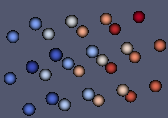
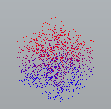

@tpaviot is there any direct or indirect method that can solve this problem? Thank You.
@DaYongUpUp AFAIK there's no possibility to use the AIS_Point cloud as you would like to. If you have up to 100 points, then you can use BRep spheres centered at each point, but it's not an elegant solution. What you need is similar to particle systems or vortices, I suggest you have a look at GLSL shaders applied to the AIS_Cloud, if ever it can be done. Never tried, please report any related feedback.

@DaYongUpUp AFAIK there's no possibility to use the AIS_Point cloud as you would like to. If you have up to 100 points, then you can use BRep spheres centered at each point, but it's not an elegant solution. What you need is similar to particle systems or vortices, I suggest you have a look at GLSL shaders applied to the AIS_Cloud, if ever it can be done. Never tried, please report any related feedback.
And another problem: When I set the point aspect of the point cloud in C++, the marker and the scale can be changed, but when I set the aspect property in pythonocc project, it did not work. The feature is not introduced or is a bug?
Can you please provide an example in python so that I can test
Le mer. 15 janv. 2020 à 16:13, DaYongUpUp [email protected] a écrit :
@DaYongUpUp https://github.com/DaYongUpUp AFAIK there's no possibility to use the AIS_Point cloud as you would like to. If you have up to 100 points, then you can use BRep spheres centered at each point, but it's not an elegant solution. What you need is similar to particle systems or vortices, I suggest you have a look at GLSL shaders applied to the AIS_Cloud, if ever it can be done. Never tried, please report any related feedback.
And another problem: When I set the point aspect of the point cloud in C++, the marker and the scale can be changed, but when I set the aspect property in pythonocc project, it did not work. The feature is not introduced or is a bug?
— You are receiving this because you were mentioned. Reply to this email directly, view it on GitHub https://github.com/tpaviot/pythonocc-core/issues/744?email_source=notifications&email_token=AAFBFIWOQRDPJ6262P4QC63Q54RZNA5CNFSM4KA6RNR2YY3PNVWWK3TUL52HS4DFVREXG43VMVBW63LNMVXHJKTDN5WW2ZLOORPWSZGOEJAUWMA#issuecomment-574704432, or unsubscribe https://github.com/notifications/unsubscribe-auth/AAFBFIRMJ55UGY7TEO57EO3Q54RZNANCNFSM4KA6RNRQ .
Can you please provide an example in python so that I can test Le mer. 15 janv. 2020 à 16:13, DaYongUpUp [email protected] a écrit : … @DaYongUpUp https://github.com/DaYongUpUp AFAIK there's no possibility to use the AIS_Point cloud as you would like to. If you have up to 100 points, then you can use BRep spheres centered at each point, but it's not an elegant solution. What you need is similar to particle systems or vortices, I suggest you have a look at GLSL shaders applied to the AIS_Cloud, if ever it can be done. Never tried, please report any related feedback. And another problem: When I set the point aspect of the point cloud in C++, the marker and the scale can be changed, but when I set the aspect property in pythonocc project, it did not work. The feature is not introduced or is a bug? — You are receiving this because you were mentioned. Reply to this email directly, view it on GitHub <#744?email_source=notifications&email_token=AAFBFIWOQRDPJ6262P4QC63Q54RZNA5CNFSM4KA6RNR2YY3PNVWWK3TUL52HS4DFVREXG43VMVBW63LNMVXHJKTDN5WW2ZLOORPWSZGOEJAUWMA#issuecomment-574704432>, or unsubscribe https://github.com/notifications/unsubscribe-auth/AAFBFIRMJ55UGY7TEO57EO3Q54RZNANCNFSM4KA6RNRQ .
Thank You for your imediate reply, here is the code:
- C++ Code:
Handle(Graphic3d_ArrayOfPoints) points = new Graphic3d_ArrayOfPoints(1000, Standard_True);
for(int i=0; i<10; ++i)
for(int j=0; j<10; ++j)
for(int k=0; k<10; ++k)
{
	points->AddVertex(gp_Pnt(0.1*i, 0.1*j, 0.1*k), Quantity_Color(0.1*i, 0, 0, Quantity_TOC_RGB));
}
Handle(AIS_PointCloud) pntCloud = new AIS_PointCloud();
pntCloud->SetPoints(points);
Handle(Prs3d_PointAspect) pntaspect = pntCloud->Attributes()->PointAspect();
pntaspect->SetScale(3);
pntaspect->SetTypeOfMarker(Aspect_TOM_POINT);
pntCloud->Attributes()->SetPointAspect(pntaspect);
myOccView->getContext()->Display(pntCloud, Standard_False);
myOccView->fitAll();
myOccView->getContext()->UpdateCurrentViewer();
- Python code is:
points_3d = Graphic3d_ArrayOfPoints(100000, True)
for idx in range(100):
    for idy in range(100):
        for idz in range(10):
            x = -5 + idx * 0.1
            y = -5 + idy * 0.1
            z = 0 + idz * 0.1
            color = Quantity_Color((x+5)/10.0, 0, z, Quantity_TOC_RGB)
            points_3d.AddVertex(gp_Pnt(x, y, z), color)
point_cloud = AIS_PointCloud()
point_cloud.SetPoints(points_3d)
pntaspect = point_cloud.Attributes().PointAspect()
pntaspect.SetTypeOfMarker(Aspect_TOM_POINT)
pntaspect.SetScale(10)
point_cloud.Attributes().SetPointAspect(pntaspect)
ais_context = display.GetContext()
ais_context.Display(point_cloud, True)
display.FitAll()
display.View_Iso()
Have a look at the example https://github.com/tpaviot/pythonocc-demos/blob/master/examples/core_display_line_properties.py to see how to correctly set new presentation attributes
Have a look at the example https://github.com/tpaviot/pythonocc-demos/blob/master/examples/core_display_line_properties.py to see how to correctly set new presentation attributes
Sorry to bother again, but the problem is still there. I tried some ways as below: 0. get the PointAspect of the point cloud and set new scale and marker, and then set it back. It did not work;
- get the Attributes and the PointAspect, change the scale and the marker of the PointAspect, and set it to the Attributes and then set the Attributes back to the point cloud. as described in the examples you gave.
- construct a new attributes and pointaspect and set them to the point cloud but the marker and size still the same as default. In fact I need to keep the color, so this way is not quite the solution.
Here is the file Thank you for your time.
I'm a bit confused. Indeed when trying your code, aspect of each point of the point cloud is not changed. However, I uploaded an example to pythonocc-demos where I can change the aspect for a set f points, invidually (see https://github.com/tpaviot/pythonocc-demos/blob/master/examples/core_display_point_properties.py), here is the result:
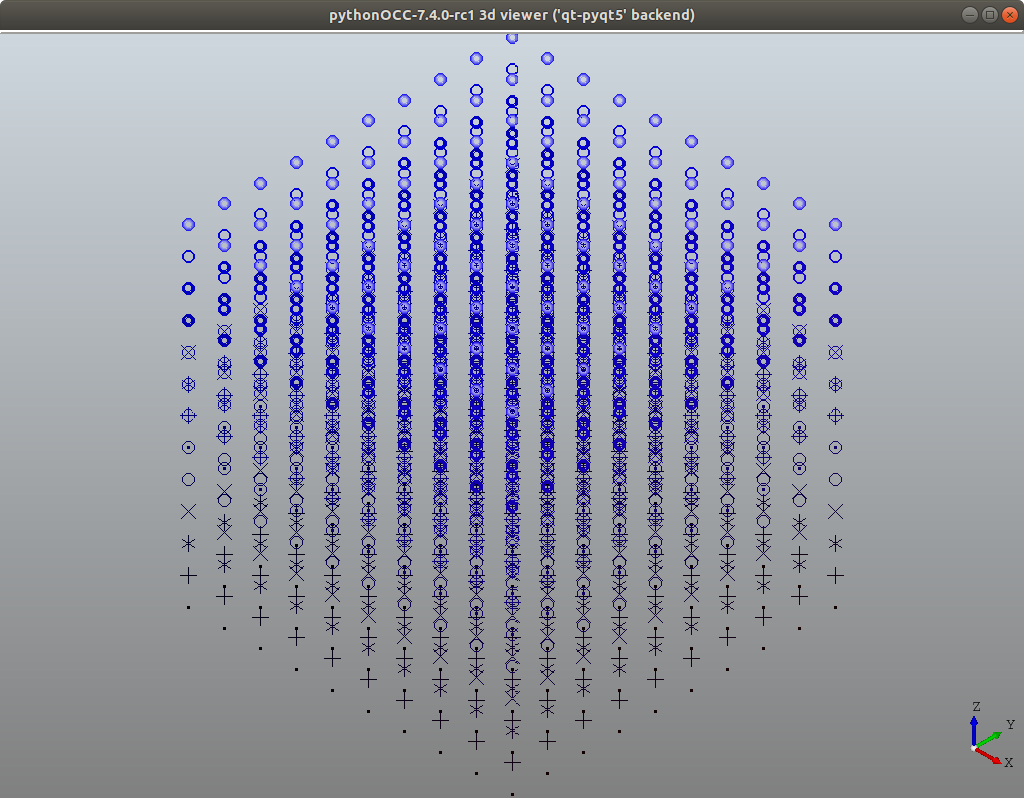
The Prs3d_PointAspect can be applied for each point, but the same does'nt work for AIS_PointCloud.
I'm a bit confused. Indeed when trying your code, aspect of each point of the point cloud is not changed. However, I uploaded an example to pythonocc-demos where I can change the aspect for a set f points, invidually (see https://github.com/tpaviot/pythonocc-demos/blob/master/examples/core_display_point_properties.py), here is the result:
The
Prs3d_PointAspectcan be applied for each point, but the same does'nt work for AIS_PointCloud.
Yes, the problem is realy confusing. Aspect of AIS_Point can be changed, but it is very slow to view large number of point. However, point cloud can be adopted to view large number of points, but the aspect can not be changed. Is there any chance the bug can be fixed? Or I have to use OpenCasCade as aspect of point cloud can be changed in C++?
I'm a bit confused. Indeed when trying your code, aspect of each point of the point cloud is not changed. However, I uploaded an example to pythonocc-demos where I can change the aspect for a set f points, invidually (see https://github.com/tpaviot/pythonocc-demos/blob/master/examples/core_display_point_properties.py), here is the result:
The
Prs3d_PointAspectcan be applied for each point, but the same does'nt work for AIS_PointCloud.
Hi, Sry to bother, Is there any chance that the problem can be solved? Or any plan to solve it? Thank You. Li
Hello, I have been running into the same and similar issues, where functions that should work didn't do anything. I've played around with the versions of OCC and could bring the example from above to work. The version this was possible was OCC 0.18.1.
The code (copyed from DaYongUpUp and modified) is the following:
from OCC.gp import gp_Pnt
from OCC.Graphic3d import Graphic3d_ArrayOfPoints
from OCC.AIS import AIS_PointCloud
from OCC.Quantity import Quantity_Color, Quantity_TOC_RGB
from OCC.Prs3d import Prs3d_PointAspect
from OCC.Display.SimpleGui import init_display
from OCC.Aspect import *

display, start_display, add_menu, add_function_to_menu  = init_display()

def pointcloud():

    points_3d = Graphic3d_ArrayOfPoints(100000, True)
    print(type(points_3d))
    for idx in range(100):
        for idy in range(100):
            for idz in range(10):
                x = 0 + idx * 0.1
                y = 0 + idy * 0.1
                z = 0 + idz * 0.1
                color = Quantity_Color(x/10.0, 0, z, Quantity_TOC_RGB)
                points_3d.AddVertex(gp_Pnt(x, y, z), color)

    #create the point_cloud and set the points
    point_cloud = AIS_PointCloud()
    point_handle = points_3d.GetHandle()
    point_cloud.SetPoints(point_handle)
    point_cloud_handle = point_cloud.GetHandle()

    # test0, get PointAspect changed it and set it back

    pntaspect = point_cloud.Attributes().GetObject().PointAspect().GetObject()
    pntaspect.SetScale(2.0)
    pntaspect.SetTypeOfMarker(Aspect_TOM_BALL)
    point_cloud.Attributes().GetObject().SetPointAspect(pntaspect.GetHandle())

    # test 1, get attributes, change it and set it back
    '''
    drawer = point_cloud.Attributes().GetObject()
    #pntcolor = Quantity_Color(0.0, 0.0, 1.0, Quantity_TOC_RGB)
    pntaspect = Prs3d_PointAspect(Aspect_TOM_BALL, 5)
    drawer.SetPointAspect(pntaspect.GetHandle())
    point_cloud.SetAttributes(drawer.GetHandle())
    '''

    # test 2, construct new attributes and point aspect and set it as property
    '''
    drawer = Prs3d_Drawer()
    pntcolor = Quantity_Color(0.0, 0.0, 1.0, Quantity_TOC_RGB)
    pntaspect = Prs3d_PointAspect(Aspect_TOM_BALL, pntcolor, 10.0)
    drawer.SetPointAspect(pntaspect)
    point_cloud.SetAttributes(drawer)
    '''

    display.Context.Display(point_cloud_handle)
    display.FitAll()
    start_display()

if __name__ == "__main__":
    pointcloud()
However, same as @DaYongUpUp, I want to keep the color, which seems to be overwritten by the new Point_Attribute even though I didn't specify a new color.. Has anyone an Idea on how to accomplish this?
Thanks in advance
Till

@Pinija I do not understand your question or you issue. Can you please be more precise about what you want to perform.
@Pinija I do not understand your question or you issue. Can you please be more precise about what you want to perform.
@tpaviot I want to achieve the same thing as everyone else in this issue: Display a set of points as a set of spheres (widely described in the comments above). There is a bug, that the aspect of points in an AIS_PointCloud can't be changed even though this should theoretically work.
I have given You the code above to support my theory: Changing the aspect of points in a Pointcloud WAS possible (until pythonocc-core 0.18.1), after that the methods in my code above (test0 modified to work for 7.4) lost their functionality.
I suppose this is related to the absence of the methods "GetHandle() and GetObject()" and making all handles transparent in pythonocc-core 7.4.
My question: Is there a possibility to fix this bug, so displaying a pointcloud as a set of spheres will be possible? Or is there a way to work with handles in OCC 7.4 (an aquivalent to "GetHandle" and "GetObject"), I think telling python what You are using explicitly (handle or object) would fix this issue aswell.
Thanks in advance for your help.
Hi, Sry to bother, Is there any chance that the problem can be solved? Or any plan to solve it? Thank You. Li
Hi Li, I am facing the SAME problem as yours, have you found a way to solve this? May be I should try OCC 7.5.0(C++)? thanks Tang.
