

 torchgm
BUG: upper corners cannot be rounded in Windows11 BETA 10.0.22623.1028
After the latest win11 (beta) update "Cumulative Update for Windows 11 Insider Preview (10.0.22623.1028) (KB5021866)",now the corner radius cannot work on the upper edge while the bottom of taskbar still seems fine.


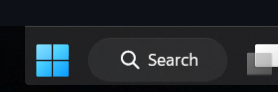 Confirming also, get the same issue.
After the latest win11 (beta) update "Cumulative Update for Windows 11 Insider Preview (10.0.22623.1028) (KB5021866)"
Confirming also, get the same issue.
After the latest win11 (beta) update "Cumulative Update for Windows 11 Insider Preview (10.0.22623.1028) (KB5021866)"

I found a workaround. Download vivetool GUI. I used version 1.62. In the top left box where it says select build just select the first build it shows. In my case it showed 25267. Vivetool GUI will start loading features. When its done type press F12 and type in 26008830. Now click on Perform action in vivetool GUI and select deactivate feature. Close all windows, reboot your computer and your task bar should be rounded again. That worked for me.
I found a workaround. Download vivetool GUI. I used version 1.62. In the top left box where it says select build just select the first build it shows. In my case it showed 25267. Vivetool GUI will start loading features. When its done type press F12 and type in 26008830. Now click on Perform action in vivetool GUI and select deactivate feature. Close all windows, reboot your computer and your task bar should be rounded again. That worked for me.
yeah its working in biuld 25272 ...muy issue got solved,,!!!