
calplot
 calplot copied to clipboard
 tomkwok
suptitle is truncated
Calplot version 0.1.7.2 / Windows 10:
Using a suptitle for a plot truncates it at the top:
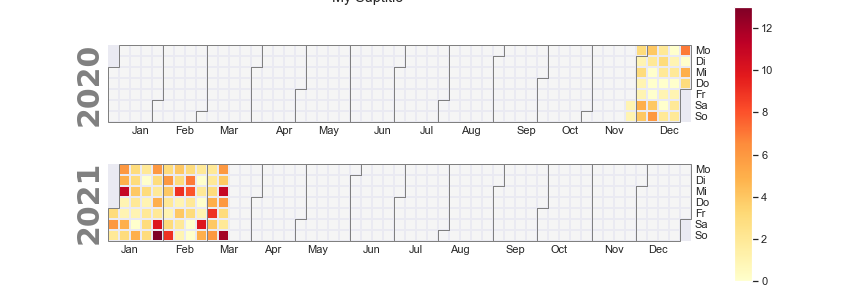
This is the code I use:
fig, ax = calplot.calplot(dfYear.squeeze(), cmap='YlOrRd', tight_layout=False, suptitle='My Suptitle', figsize=(12,4), daylabels= ['Mo', 'Di', 'Mi', 'Do', 'Fr', 'Sa', 'So'])
fig.patch.set_facecolor('xkcd:white')
fig.savefig(f'{img_path}/JahresBelegung.png')
(changing the figsize or tight_layout True/False has no effect)
What's strange: When I visualize the same plot directly in VSCode's Jupyter notebook, the suptitle is not truncated?

Update to the latest version 0.1.7.3. Your problem should now be fixed.
Furthermore, you can now specify suptitle parameters in suptitle_kws argument for calplot() to get your desired suptitle location. For example:
calplot.calplot(dataframe, suptitle_kws={'x': 0.5, 'y': 1.0})

Thanks for the quick response.
I see no difference unless I specify your suptitle_kws (not sure if it's intended that way) and there is 0 padding between the upper border of the suptitle and the upper edge of the canvas (all other sides are padded "better")?
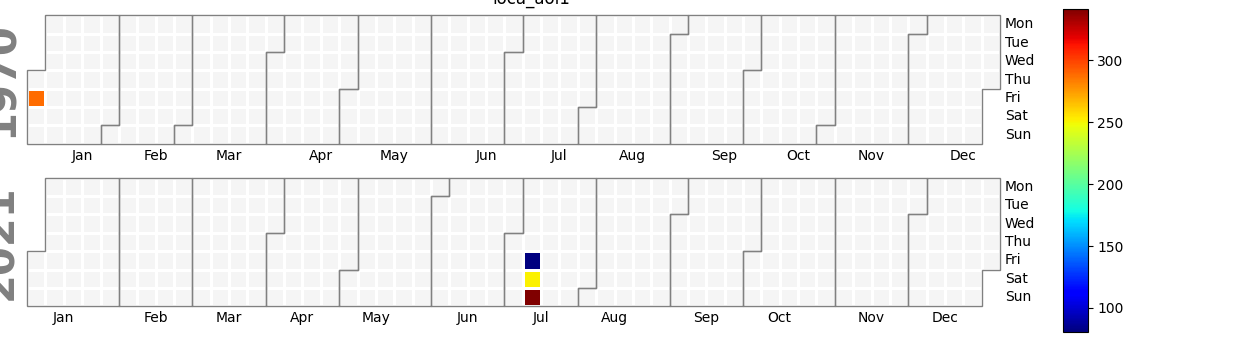

By changing the plot size I can correct the left side issue, drawing the title manually with PIL.
In my testing I configured matplotlib to output SVG so for now text alignments should work best in SVG output.
thought about this, but have not tried, thank you!
On Tue, Aug 3, 2021 at 10:32 AM Tom @.***> wrote:
In my testing I configured matplotlib to output SVG so for now text alignments should work best in SVG output.
— You are receiving this because you commented. Reply to this email directly, view it on GitHub https://github.com/tomkwok/calplot/issues/6#issuecomment-891733022, or unsubscribe https://github.com/notifications/unsubscribe-auth/AAK5KTJJ6GYPTNDARTODHWDT27ASZANCNFSM4ZGIGF7A . Triage notifications on the go with GitHub Mobile for iOS https://apps.apple.com/app/apple-store/id1477376905?ct=notification-email&mt=8&pt=524675 or Android https://play.google.com/store/apps/details?id=com.github.android&utm_campaign=notification-email .