

 tomcucinotta
Arduino not connecting with MuseScore
Hi,
My LEDs are not working with MS (Windows). Maybe it has something to do with serial device, but even after changing to ACM1 or number of my COM(5) port.
 Commands through Serial Monitor are working fine, MS discovers my midi device and responds to it (by waiting till I press the correct note).
When I press Wizard, then also nothing happens. I tried with 2 Arduinos and 2 computers. Newest version installed by .msi, but older bin\ ... .exe also don't seem to work with me (older version can't find my midi device and cmd is showing some warnings).
Every option seems to be changed just like you did, except maybe PortAudio
Commands through Serial Monitor are working fine, MS discovers my midi device and responds to it (by waiting till I press the correct note).
When I press Wizard, then also nothing happens. I tried with 2 Arduinos and 2 computers. Newest version installed by .msi, but older bin\ ... .exe also don't seem to work with me (older version can't find my midi device and cmd is showing some warnings).
Every option seems to be changed just like you did, except maybe PortAudio
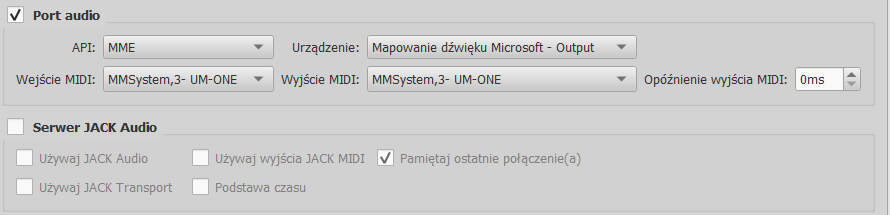 EDIT: I managed to start LEDs on one computer with older version, but then it doesn't see my MIDI device. Other computer, when I open the older version, does see MIDI, but doesn't launch my LEDs (just like the newest version on both computers).
Debug: Init midi driver failed (C:...\mscore\pa.cpp:145, virtual bool Ms::Portaudio::init(bool))
EDIT2: I reinstalled midi driver and now it's seen, but I got it working on 1 PC and with older version. It'd be still great to make it working on a laptop with the newest version, as the older one does not save setting (I have to set it up every time).
EDIT: I managed to start LEDs on one computer with older version, but then it doesn't see my MIDI device. Other computer, when I open the older version, does see MIDI, but doesn't launch my LEDs (just like the newest version on both computers).
Debug: Init midi driver failed (C:...\mscore\pa.cpp:145, virtual bool Ms::Portaudio::init(bool))
EDIT2: I reinstalled midi driver and now it's seen, but I got it working on 1 PC and with older version. It'd be still great to make it working on a laptop with the newest version, as the older one does not save setting (I have to set it up every time).
Also the bass key is also played as the right hand, left hand is playable only on 2 pianos files.

Me too, sending "h10202020" from de command windows (Serial Monitor of IDE Arduino) lights the led, but not working from MuseScore, any led lights on (but all other Midi functions are working
I suspect that the problem is the name of device in PianoTutorPanel(setup), when it says "/dev/ttyACM0" I don't think it's ok in Windows, but I don't know what to put (I've tried "COM4" - where my Arudino is connected - and other numbres.....nothing happens)
ED:Oh man, how stupid I am !!, this works perfectly, the problem was I hadn't activated in "PainoTutorPanel " the "Enable tutor" checkmark and in "Setup -> Serial Device" I've to put "COM4" (without quotes) because my Arduino is in port COM4 , you've to change the number port where your Arduino is connected.
By the way, excellent project, this was very similar to my final project of my engineer studies some time ago (27 years! all made with ICs , multiplexors, red/green leds., lots of wires... a PC486 with Sounblaster16 controlling all the hardware by the parallel port ), and now with an Arduino and a ledstrip it's done in a weekend!! Lot of thanks for sharing your project .
Now, I can learn piano definitely (another time) !

@3Duke - I am having a similar issue - and followed your recommendations - but still unable to connect to Arduino from MuseScore ( I am using MuseScore3.0dev-PianoTutor0.6 ). From separate serial terminal - there is no issue and Arduino UNO works as expected. Can you provide some instructions on how you got it working?

