

 tomcucinotta
LED does not light
https://youtu.be/i3Jkxh7oYpw I made the current state a video. What should I do? Thank you in advance.

Hi, I can't see it very clearly from your video, however I think you have your LEDs laid down from left to right, i.e., your Arduino board is on the left of your keyboard, isn't it ? In such a case, you need to turn OFF (leave unchecked) the "LEDs backwards" option. Please, try and let me know, thanks.

Thank you very much. I placed the arudino board on the right side of the keyboard. However, the LED does not light up. Please see the video of the current condition. Now you can see it clearly. https://youtu.be/5MaZ6xC6Dgg Thank you in advance.
what happens if you open the Arduino IDE serial monitor, and issue the basic commands eg: h10202020
FYI, the first 2-digits hex number is the LED number, with 00 being the closest LED to your Arduino, 01 being the next one, etc...
?
AFAICS, also from your prior video, the main problem here seems that the MIDI input has some problems as it detects you pressed a key, but it detects a completely absurd and impossible key number. This screws up all the calculations that should be done by the Wizard. As from what I'm seeing, you can leave default values in the PianoTutor options pane, no need to use the Wizard at all in your case.
Are you able to monitor MIDI events coming from the keyboard into your PC ? eg, the 1st one I just found: https://www.noterepeat.com/articles/pc-troubleshooting/794-using-a-midi-monitor-to-test-a-midi-device
If you can try with the keyboard attached, the MIDI monitor program and no MuseScore running. Try pressing the central C key and report what is reported by the tool (you should see Note On events). Thanks.
Thank you very much. https://www.noterepeat.com/articles/pc-troubleshooting/794-using-a-midi-monitor-to-test-a-midi-device ↑ I installed the above software on my computer.
https://youtu.be/sy0vyHKLp-Y I made a video of the current LED status and MIDI events. I opened arudino's serial monitor and tried some basic commands. Is there any problem with the video results?
Thanks.
Everything seems to be fine in this last video. Is there any option to change in the MuseScore MIDI input settings?
T.
Il mar 4 giu 2019, 01:50 kato777 [email protected] ha scritto:
Thank you very much.
https://www.noterepeat.com/articles/pc-troubleshooting/794-using-a-midi-monitor-to-test-a-midi-device ↑ I installed the above software on my computer.
https://youtu.be/sy0vyHKLp-Y http://url I made a video of the current LED status and MIDI events. I opened arudino's serial monitor and tried some basic commands. Is there any problem with the video results?
Thanks.
— You are receiving this because you commented. Reply to this email directly, view it on GitHub https://github.com/tomcucinotta/MuseScore/issues/18?email_source=notifications&email_token=AEQKIXDTN6MXJU6SKRTJ6NDPYWU57A5CNFSM4HSD2G4KYY3PNVWWK3TUL52HS4DFVREXG43VMVBW63LNMVXHJKTDN5WW2ZLOORPWSZGODW3AASA#issuecomment-498466888, or mute the thread https://github.com/notifications/unsubscribe-auth/AEQKIXCSLQT3HJF3UYCDKT3PYWU57ANCNFSM4HSD2G4A .
Hi.Thank you very much.
https://youtu.be/n39Sro1P_8U
I don't think there is any problem with the setting. What do you think? Regarding the Piano Tutor Panel's C -4 LED nuber, You recommend 71. If you press C4 on the MIDI keyboard, 71 will be input. The keyboard signal is reflected in the C -4 LED nuber entry. So far so good. There is no error. I tried to open wizard by changing 71 to 69. The LED lights in the C # 4 area. If you press C # 4 on the MIDI keyboard, 213 will be reflected in the C -4 LED nuber. I collected the data. Can I find a remedy here?
79(light up G#3)→-497(press key G#3) 78(light up G#3)→-498(press key G#3) 77(light up A3)→-355(press key A3) 76(light up A3)→-356(press key A3) 75(light up A#3)→-213(press key A#3) 74(light up A#3)→-214(press key A#3) 73(light up B3)→-71(press key B3) 72(light up B3)→-72(press key B3) 71(light up C4)→71(press key C4) 70(light up C4)→70(press key C4) 69(light up C#4)→213(press key C#4) 68(light up C#4)→212(press key C#4) 67(light up D4)→355(press key D4) 66(light up D4)→354(press key D4) 65(light up D#4)→497(press key D#4) 64(light up D#4)→496(press key D#4)
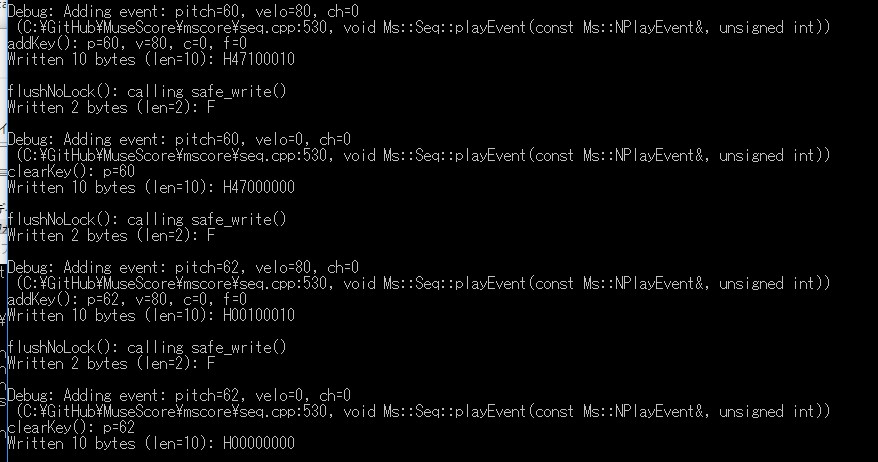 I understood the cause.
I changed MuseScore 3.0 dev-PianoTutor 0.5 to 0.1 and tested it.
C4 is H 47100010.
However, D4 is H00100010.
I think the connection between pitch and LED information is not working well.
Is there a solution?
I understood the cause.
I changed MuseScore 3.0 dev-PianoTutor 0.5 to 0.1 and tested it.
C4 is H 47100010.
However, D4 is H00100010.
I think the connection between pitch and LED information is not working well.
Is there a solution?
spotted: seems there's a regression bug in setC4Light(), an area of the code that didn't really require changes recently.... I need to amend, test and rebuild.
if it's where I think it is, it shows up when: 1) you use the wizard; 2) you change settings manually in the PianoTutor settings pane; 3) you load preferences from file. So, a temporary workaround might be to: 1) avoid the wizard; 2) keep default settings; 3) ensure no pianotutor* preferences are loaded. 3) is achieved by deleting any lines like these from your $HOME/.config/MuseScore3Development.ini:
pianotutor\autoSync=true
pianotutor\c4Light=71
pianotutor\coeff=-2
pianotutor\leftColor=#100010
pianotutor\litUntilRelease=false
pianotutor\lookAhead=true
pianotutor\rightColor=#001010
pianotutor\serialDevice=/dev/ttyACM0
pianotutor\wait=true
indeed, I use it with defaults which are OK for my LEDs layout (144, from right to left [Arduino on the right of the keyboard], C4 just on the right of the middle ":" separator in the middle of the LED stripe)
I've got some news: digged into my previously spotted "bug", finding out, it was just me not remembering the code, but the code was correct. Therefore, I watched again your 2 videos, and I think now I saw what the real problem is: you're setting the "LEDs per key" parameter to 144, but this is mistaken! With a 144 LEDs/m strip, you should use a "LEDs per key" of 2, namely you have 2 LEDs mapping onto each physical key of your keyboard, don't you ? This should be the default setting, as I have a 144 LEDs/m stripe as well! If it is not, then someway you've got wrong values saved as default.
Please, correct that 144 to 2, then push "Save as default"
Please, let me know.
Mr tomcucinotta. Thank you.
After changing the settings The LED is now on.
However, the mapping is incorrect. I don't know the cause. But it's okay.
About Mapping I think I can solve it by programming by myself. Thank you for your kindness. I appreciate it.