

 tomakita
Ugly Gradient On Mac OS
The gradient is not what's shown in the example and is quite ugly. So far, I've only tested on Mac OS, but this seems wrong.
I get this:
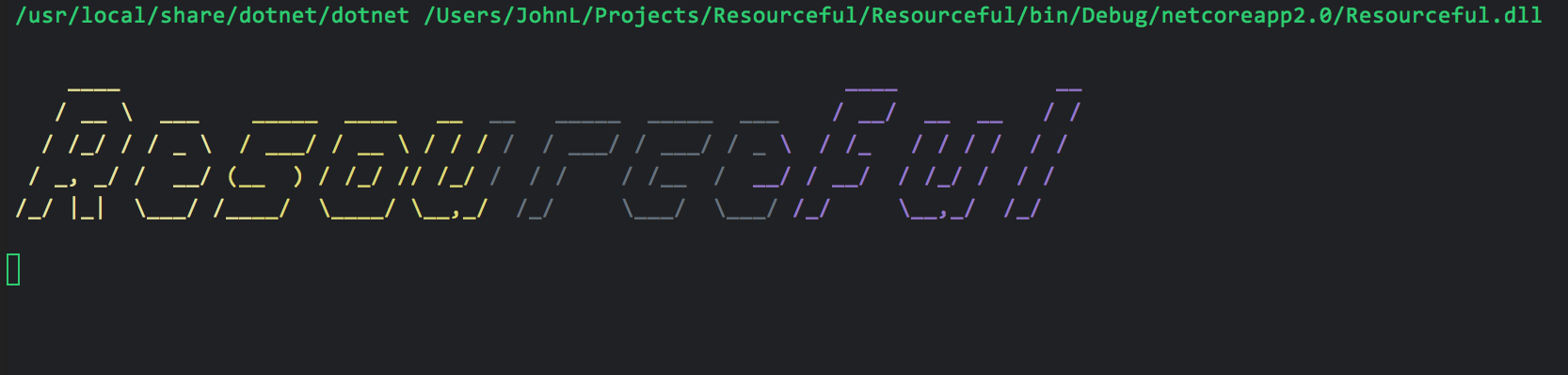
Given this:
    private static void WriteLogo() {
      var font = FigletFont.Load("Fonts/slant.flf");
      var figlet = new Figlet(font);

      for (var line = 0; line < figlet.ToAscii("Resourceful").CharacterGeometry.GetLength(0); line++) {
        var lineChars = figlet.ToAscii("Resourceful").CharacterGeometry;
        var rowChars = new List<char>();

        for (var col = 0; col < lineChars.GetLength(1); col++) {;
          rowChars.Add(lineChars[line, col]);
        }

        Console.WriteWithGradient(
          input: rowChars,
          startColor: Color.Yellow,
          endColor: Color.Fuchsia);

        Console.Write("\n");
      }
    }
EDIT: The above is in Rider's built in terminal. The gradient looks different yet in iTerm 2:


I confirm on Mac, with MacOS Mojave 10.14.3 beta, the gradients are not working. But is this project still maintained?

I get a similar issue on Windows 10 with cmder. Native console does seem OK.
Outputs Blue:
Colorful.Console.WriteLine("Test", Color.Red)
Outputs Red:
System.Console.ForegroundColor = ConsoleColor.Red;
System.Console.WriteLine("Test");
Clearly some issues going on with this library.

Unfortunately, I don't see any updates on this project for the past year; I don't know if the author is reading this anymore. That would be a pity because it's a great project.
This appears to be a bug in Colorful.Console's compatibility mode.
When Colorful.Console is run in an environment where it doesn't have access to the Windows console buffer (e.g. on Mac or, I'm guessing, on Cmder), it runs in compatibility mode, in which it will attempt to choose the ConsoleColor that's closest to the System.Drawing.Color that was requested. So, while I wouldn't expect gradients to look great when running in a non-Windows environment, their behavior should at least be deterministic, as opposed to the behavior that @JohnLouderback has reported.
Thanks for the reports in this thread! I'll add this to my to-do list.

@FizzBuzz791 I've just tested this with cmder, and I'm able to reproduce. It looks like this is not an issue with Colorful.Console's compatibility mode, but is instead due to some aspect of the way in which cmder (or maybe ConEmu) writes colors to the screen. I suspect a similar situation with Rider and iTerm 2, but am not able to confirm, as I don't have a Mac.
I confirm that on the Mac, the displayed colors, while wrong, are consistent. I am using both Rider and iTerm2 and the problem happens on both.