
mobile-use
 mobile-use copied to clipboard
Published
6 months ago
•
 tmahesh
tmahesh
let ai agents use mobile apps
mobile-use
Perform mobile tasks using natural language instructions.
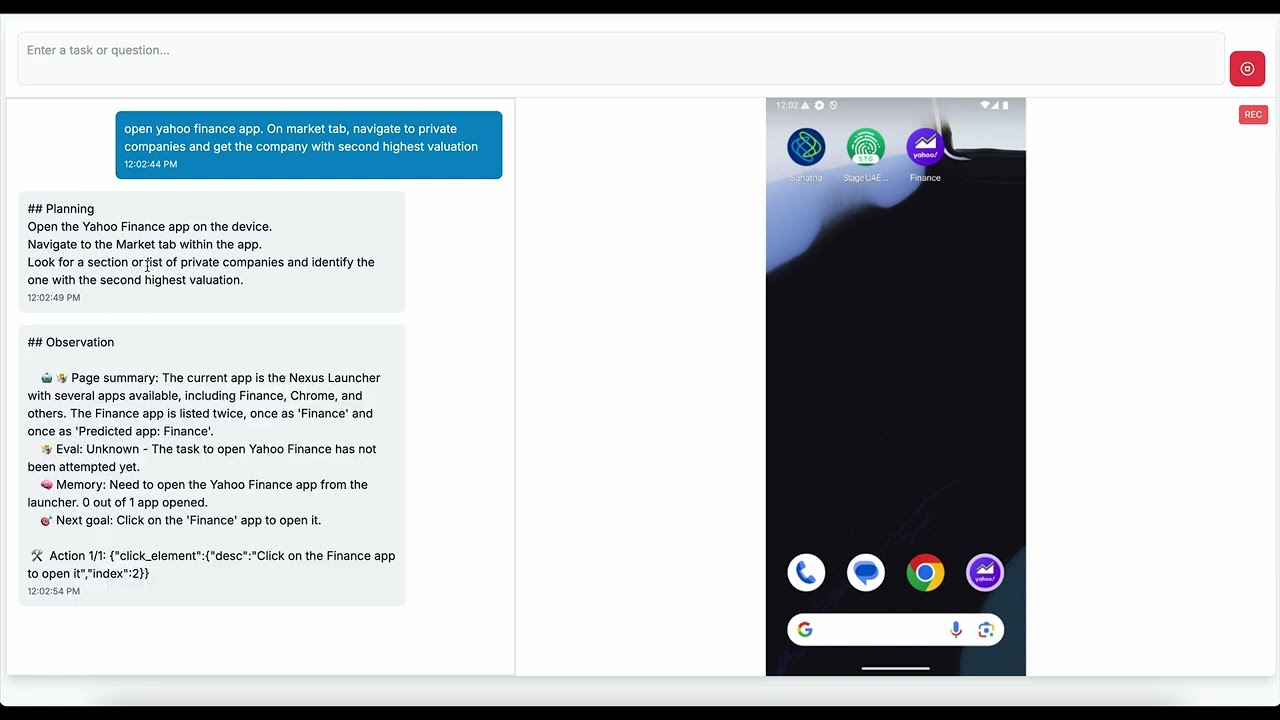
Features
- Multi-Agent System: Uses three specialized agents (Planner, Navigator, and Validator) to complete mobile tasks
- Mobile Automation: Integrates with Appium for reliable mobile device automation
- Streaming Responses: Provides real-time feedback as agents work on tasks
- Configurable Models: Allows different LLM models for each agent type
- Provider Support: Works with OpenAI, Anthropic, and other LLM providers
- Structured Logging: Comprehensive logging system with namespaces for debugging and monitoring
Architecture
Agents
- Planner Agent: Analyzes the user's task and creates a plan for completing it
- Navigator Agent: Executes mobile actions to complete the task
- Validator Agent: Verifies if the task has been completed successfully
Mobile Automation
The application uses Appium for mobile automation, providing these capabilities:
- App launching and navigation
- Tapping on UI elements
- Text input
- Scrolling
- Taking screenshots
Logging
The application includes a structured logging system that:
- Supports different log levels (debug, info, warning, error)
- Uses namespaces to organize logs by component
- Provides log grouping for related operations
- Automatically filters debug logs in production
- Helps with debugging and monitoring application behavior
Getting Started
Prerequisites
- Node.js 20+
- Appium server
- A connected mobile device or emulator/simulator to appium
Installation
-
Clone the repository
-
Install dependencies:
npm install -
Set up Appium:
npm run setup:appium -
Set up environment variables:
- Create a
.env.localfile in the root directory - Add your API keys and configuration:
# LLM API Keys OPENAI_API_KEY=your_openai_api_key_here OPENAI_BASE_URL=https://api.openai.com # Default LLM Provider and Model DEFAULT_LLM_PROVIDER=openai DEFAULT_MODEL_NAME=gpt-4o # Mobile Testing Configuration APPIUM_PORT=4723 APPIUM_HOST=localhost - Create a
-
Start Appium server:
npm run appium -
Start the development server:
npm run devFor debugging with logs:
# Show all debug logs npm run dev:debug # Show only agent-related logs npm run dev:agent # Custom debug namespaces npm run debug [namespace] # Examples: npm run debug # All logs (DEBUG=*) npm run debug agent # All agent logs (DEBUG=agent:*) npm run debug agent:navigator # Navigator agent logs (DEBUG=agent:navigator*) npm run debug mobile,api # Mobile and API logs (DEBUG=mobile*,api*) -
Open http://localhost:3000 in your browser
Configuration
- Click the settings icon in the top right corner
- Select your preferred provider and models
- Configure device capabilities
- Save your settings
Usage
- Enter a task in the input field (e.g., "Open the calculator app and calculate 2+2")
- Click "Submit" to start the task
- Watch as the agents work together to complete your task on the mobile device
- View the results in real-time
Examples
- "Open the Settings app and turn on Airplane mode"
- "Launch Chrome and search for the weather"
- "Open the contacts app and create a new contact"
- "Take a screenshot of the home screen"
Testing
To run tests:
npm test
Development
Logging
The application uses a structured logging system to help with debugging and monitoring:
import { createLogger } from '@/lib/utils/logger';

// Create a logger with a namespace
const logger = createLogger('MyComponent');

// Use different log levels
logger.debug('Detailed information for debugging');
logger.info('General information about application operation');
logger.warn('Warning about potential issues');
logger.error('Error information when something goes wrong');

// Group related logs
logger.group('Operation name');
logger.info('Step 1');
logger.info('Step 2');
logger.groupEnd();
Credits
Inspired by these github projects, arixv papers
Zurich, Dubai
 tmahesh