

 tinygo-org
debug: pyOCD support
This adds pyOCD support, rudimentary, uses existing openocd target definitions.
Tested to work with picoprobe debugging RP2040 board. Download picoprobe.uf2 file and flash it to any RP2040 board to convert it to a debugger.
Motivation:
This is the only straight way to debug RP2040 boards I was able to find.
openocd (0.11.0 or HEAD) would not work for me via cmsis-dap or jlink interfaces (and different debuggers, including Particle DAPLink, XIAO DAPLink and JLink EDU I've tried), while picoprobe interface is not available in official openocd, and pyOCD does have it.
To use pyocd, please specify --programmer=pyocd in tinygo gdb command.
--persist is there to keep pyOCD running when automatically launched gdb is detached by user to connect to pyOCD from another app, like an IDE.

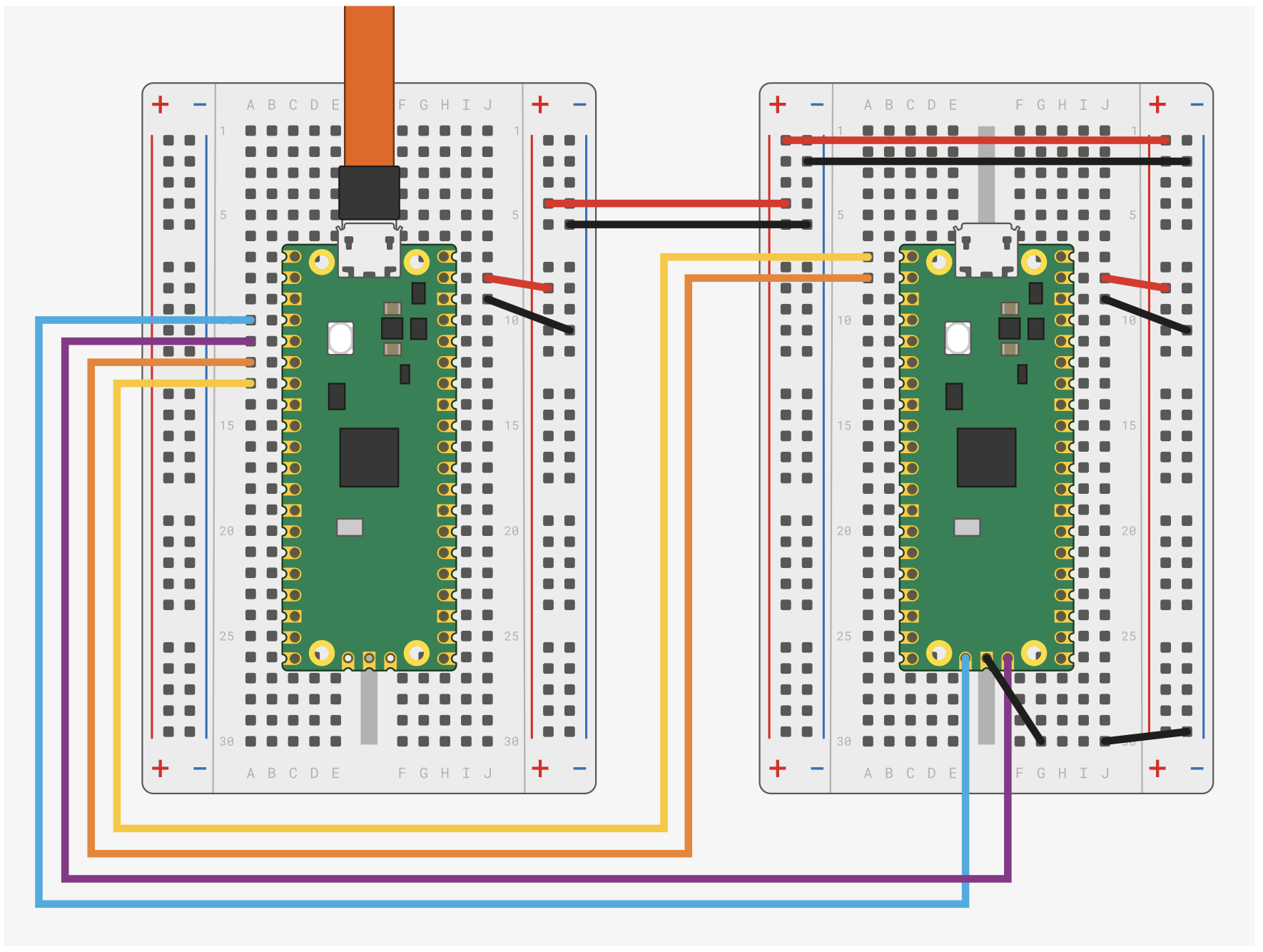
Pico A GND -> Pico B GND
Pico A GP2 -> Pico B SWCLK
Pico A GP3 -> Pico B SWDIO
Pico A GP4/UART1 TX -> Pico B GP1/UART0 RX
Pico A GP5/UART1 RX -> Pico B GP0/UART0 TX
Extracted from Getting Started with Pico
I haven't looked at it in detail, but I was able to gdb tinygo with feather-nrf52840-sense via pyocd. It would be nice if we could do tinygo flash as well.

I think it is difficult to combine with openocd-target to make it work. If the openocd configuration happens to match the pyocd name, it may work.
For nrf52840, the openocd-target setting of nrf51 is correct. However, for pyocd, the correct setting is nrf52840.
I think it is a bit of a maintenance challenge to get these things to live together. Do you have any good ideas? Maybe you're not thinking about anything other than the rp2040.
Thanks for looking, @sago35 Yes, I am mostly concerned about rp2040, other targets I can debug already now. As said, this is rudimentary support, i.e. minimal and PoC. I shall probably convert this PR to draft.