
helm-charts
 helm-charts copied to clipboard
 timescale
[ISSUE] Deployment Failed on Kubernetes (same to #140 isuue)
Hi,
I would like to test it by distributing it to Kubernetes local cluster using Helm chart. I followed 'Readme.txt'. but now that failing to start default pod with following logs.
Describe the bug
install: cannot change owner and permissions of ‘/var/lib/postgresql/data’: No such file or directory
install: cannot change owner and permissions of ‘/var/lib/postgresql/wal/pg_wal’: No such file or directory
To Reproduce
Steps to reproduce the behavior, including helm install or helm upgrade commands
./generate_kustomization.sh my-release
helm install --name my-release charts/timescaledb-single
Deployment
- What is in your
values.yaml
replicaCount: 1

  repository: timescaledev/timescaledb-ha
  tag: pg12-ts2.0-latest
  pullPolicy: Always
- What version of the Chart are you using? : Helm3
- What is your Kubernetes Environment : kubernetest 1.20 on CentOS 7.4
Logs
Events:
  Type     Reason            Age                    From               Message
  ----     ------            ----                   ----               -------
  Warning  FailedScheduling  33m                    default-scheduler  0/1 nodes are available: 1 pod has unbound immediate PersistentVolumeClaims.
  Warning  FailedScheduling  33m                    default-scheduler  0/1 nodes are available: 1 pod has unbound immediate PersistentVolumeClaims.
  Normal   Scheduled         33m                    default-scheduler  Successfully assigned acc-system/tcdb-timescaledb-0 to cluster3-master
  Normal   Pulled            33m                    kubelet            Container image "timescaledev/timescaledb-ha:pg12-ts2.0-latest" already present on machine
  Normal   Created           33m                    kubelet            Created container tstune
  Normal   Started           33m                    kubelet            Started container tstune
  Normal   Pulling           33m (x4 over 33m)      kubelet            Pulling image "timescaledev/timescaledb-ha:pg12-ts2.0-latest"
  Normal   Pulled            32m (x4 over 33m)      kubelet            Successfully pulled image "timescaledev/timescaledb-ha:pg12-ts2.0-latest"
  Normal   Created           32m (x4 over 33m)      kubelet            Created container timescaledb
  Normal   Started           32m (x4 over 33m)      kubelet            Started container timescaledb
  Warning  BackOff           3m46s (x139 over 33m)  kubelet            Back-off restarting failed container
somebody help me,
thanks.

hi, as the @stevetae93 say, I have the similar problem and not solved. to add some detail, here's my description of my-release-timescaledb-access-0
Name:         my-release-timescaledb-access-0
Namespace:    default
Priority:     0
Node:         master192.168.3.106/192.168.3.106
Start Time:   Thu, 25 Mar 2021 19:01:13 +0800
Labels:       app=my-release-timescaledb
              controller-revision-hash=my-release-timescaledb-access-69786684cc
              release=my-release
              statefulset.kubernetes.io/pod-name=my-release-timescaledb-access-0
              timescaleNodeType=access
Annotations:  cni.projectcalico.org/podIP: 100.88.181.230/32
Status:       Pending
IP:           100.88.181.230
IPs:
  IP:           100.88.181.230
Controlled By:  StatefulSet/my-release-timescaledb-access
Init Containers:
  initdb:
    Container ID:  docker://1ca6e0c1c5072321dbfd36e4047952f3f5a518fd3ada20e8f1ec7660305e4870
    Image:         timescaledev/timescaledb-ha:pg12.6-ts2.1.0-oss-p1
    Image ID:      docker-pullable://timescaledev/timescaledb-ha@sha256:75bb0a5b17f1c1161c055a7fc71eb1762099aef66d3a4989ae26308cc6247fe4
    Port:          <none>
    Host Port:     <none>
    Command:
      sh
      -c
      set -e
      install -o postgres -g postgres -m 0700 -d "${PGDATA}"
      /docker-entrypoint.sh postgres --single < /dev/null
      grep -qxF "include 'postgresql_helm_customizations.conf'" "${PGDATA}/postgresql.conf" \
          || echo "include 'postgresql_helm_customizations.conf'" >> "${PGDATA}/postgresql.conf"
      echo "Writing custom PostgreSQL Parameters to ${PGDATA}/postgresql_helm_customizations.conf"
      echo "cluster_name = '$(hostname)'" > "${PGDATA}/postgresql_helm_customizations.conf"
      echo "${POSTGRESQL_CUSTOM_PARAMETERS}" | sort >> "${PGDATA}/postgresql_helm_customizations.conf"
      echo "*:*:*:postgres:${POSTGRES_PASSWORD_DATA_NODE}" > "${PGDATA}/../.pgpass"
      chown postgres:postgres "${PGDATA}/../.pgpass" "${PGDATA}/postgresql_helm_customizations.conf"
      chmod 0600 "${PGDATA}/../.pgpass"

    State:          Terminated
      Reason:       Error
      Exit Code:    1
      Started:      Thu, 25 Mar 2021 19:01:32 +0800
      Finished:     Thu, 25 Mar 2021 19:01:32 +0800
    Last State:     Terminated
      Reason:       Error
      Exit Code:    1
      Started:      Thu, 25 Mar 2021 19:01:19 +0800
      Finished:     Thu, 25 Mar 2021 19:01:19 +0800
    Ready:          False
    Restart Count:  2
    Environment:
      POSTGRESQL_CUSTOM_PARAMETERS:  log_checkpoints = 'on'
                                     log_connections = 'on'
                                     log_line_prefix = '%t [%p]: [%c-%l] %u@%d,app=%a [%e] '
                                     log_lock_waits = 'on'
                                     log_min_duration_statement = '1s'
                                     log_statement = 'ddl'
                                     max_connections = '100'
                                     max_prepared_transactions = '150'
                                     max_wal_size = '512MB'
                                     min_wal_size = '256MB'
                                     shared_buffers = '300MB'
                                     temp_file_limit = '1GB'
                                     timescaledb.passfile = '../.pgpass'
                                     work_mem = '16MB'

      POSTGRES_PASSWORD:             <set to the key 'password-superuser' in secret 'my-release-timescaledb-access'>  Optional: false
      POSTGRES_PASSWORD_DATA_NODE:   <set to the key 'password-superuser' in secret 'my-release-timescaledb-data'>    Optional: false
      LC_ALL:                        C.UTF-8
      LANG:                          C.UTF-8
      PGDATA:                        /var/lib/postgresql/pgdata
    Mounts:
      /var/lib/postgresql from storage-volume (rw)
      /var/run/secrets/kubernetes.io/serviceaccount from my-release-timescaledb-token-cpgdn (ro)
Containers:
  timescaledb:
    Container ID:
    Image:         timescaledev/timescaledb-ha:pg12.6-ts2.1.0-oss-p1
    Image ID:
    Port:          5432/TCP
    Host Port:     0/TCP
    Command:
      sh
      -c
      exec env -i PGDATA="${PGDATA}" PATH="${PATH}" /docker-entrypoint.sh postgres
    State:          Waiting
      Reason:       PodInitializing
    Ready:          False
    Restart Count:  0
    Environment:
      POD_NAMESPACE:  default (v1:metadata.namespace)
      LC_ALL:         C.UTF-8
      LANG:           C.UTF-8
      PGDATA:         /var/lib/postgresql/pgdata
    Mounts:
      /var/lib/postgresql from storage-volume (rw)
      /var/run/secrets/kubernetes.io/serviceaccount from my-release-timescaledb-token-cpgdn (ro)
Conditions:
  Type              Status
  Initialized       False
  Ready             False
  ContainersReady   False
  PodScheduled      True
Volumes:
  storage-volume:
    Type:       PersistentVolumeClaim (a reference to a PersistentVolumeClaim in the same namespace)
    ClaimName:  storage-volume-my-release-timescaledb-access-0
    ReadOnly:   false
  my-release-timescaledb-token-cpgdn:
    Type:        Secret (a volume populated by a Secret)
    SecretName:  my-release-timescaledb-token-cpgdn
    Optional:    false
QoS Class:       BestEffort
Node-Selectors:  <none>
Tolerations:     node.kubernetes.io/not-ready:NoExecute op=Exists for 300s
                 node.kubernetes.io/unreachable:NoExecute op=Exists for 300s
Events:
  Type     Reason     Age               From                          Message
  ----     ------     ----              ----                          -------
  Normal   Scheduled  26s                                             Successfully assigned default/my-release-timescaledb-access-0 to master192.168.3.106
  Normal   Pulled     7s (x3 over 22s)  kubelet, master192.168.3.106  Container image "timescaledev/timescaledb-ha:pg12.6-ts2.1.0-oss-p1" already present on machine
  Normal   Created    7s (x3 over 22s)  kubelet, master192.168.3.106  Created container initdb
  Normal   Started    7s (x3 over 21s)  kubelet, master192.168.3.106  Started container initdb
  Warning  BackOff    7s (x2 over 19s)  kubelet, master192.168.3.106  Back-off restarting failed container
I saw the State is Terminated in the "Init Containers"."State", that makes me think the command may have some exec error, but I have no idea. I will try to parse the command and exec, if I have any progress, I will update.

and the logs:
[root@master ~]# kubectl logs my-release-timescaledb-access-0
Error from server (BadRequest): container "timescaledb" in pod "my-release-timescaledb-access-0" is waiting to start: PodInitializing
Hi, the new progress:> In my case, the error is because of the PV Read-Write error . After I build every PV the data node‘s PVC needs correctly, everything works well.
Here's the command I used in each of my node servers
mkdir /mnt/data1
# not recommend in Production Environment
chmod 777 /mnt/data1
and the pvs.yaml is like
apiVersion: v1
kind: PersistentVolume
metadata:
  name: pv1
  namespace: timescale-db
  labels:
    type: local
spec:
  storageClassName:
  capacity:
    storage: 10Gi
  accessModes:
    - ReadWriteOnce
  hostPath:
    path: "/mnt/data1"
---
apiVersion: v1
kind: PersistentVolume
metadata:
  name: pv2
  namespace: timescale-db
  labels:
    type: local
spec:
  storageClassName:
  capacity:
    storage: 10Gi
  accessModes:
    - ReadWriteOnce
  hostPath:
    path: "/mnt/data2"
---
......
I know the way to create these PV directories in every node is foolish, but that's good in my case. and the pods perform well finally.
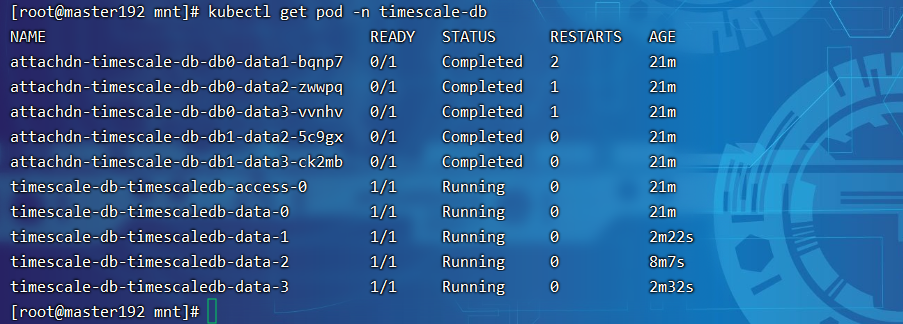 I'm new to k8s, ah, fortunately.
New to K8s as well, just wondering if you have something like this in your helm chart:
persistentVolumes:

  data:
    enabled: true
    size: 3Ti

    storageClass: "encrypted-gp2"
    subPath: ""
    mountPath: "/var/lib/postgresql"
    annotations: {}
    accessModes:
      - ReadWriteOnce

  wal:
    enabled: true
    size: 1Ti
    subPath: ""
    storageClass:

    mountPath: "/var/lib/postgresql/wal"
    annotations: {}
    accessModes:
      - ReadWriteOnce

New to K8s as well, just wondering if you have something like this in your helm chart:
persistentVolumes:

  data:
    enabled: true
    size: 3Ti

    storageClass: "encrypted-gp2"
    subPath: ""
    mountPath: "/var/lib/postgresql"
    annotations: {}
    accessModes:
      - ReadWriteOnce

  wal:
    enabled: true
    size: 1Ti
    subPath: ""
    storageClass:

    mountPath: "/var/lib/postgresql/wal"
    annotations: {}
    accessModes:
      - ReadWriteOnce
I think you may use the valuse.yaml file of the singlenode version. my version is just like https://github.com/timescale/timescaledb-kubernetes/blob/master/charts/timescaledb-multinode/values.yaml
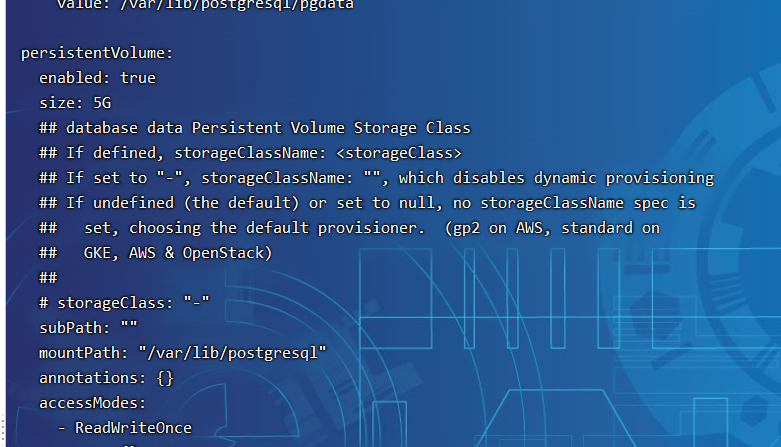 Inspired by your case,i will learn something about the wal,
I am closing this issue as TimescaleDB-Multinode helm chart is no longer maintained and deprecated. We are looking for potential community maintainers who could help us in getting that helm chart working again. If you wish to become a maintainer, please contact us on slack.
Keep in mind that TimescaleDB is not and will not be dropping multinode setup. Deprecation is only about helm chart.
