

 time4tea
GPX data out of sequence after joining multiple MP4s
Hi there.
I've successfully run overlay code on a a single timelapse GoPro video (thanks for the latest updates!). I've moved onto the next step of joining multiple timelapses and generating overlays. I've run into an issue where the GPX track is out of sequence, ie. the blue dot on the overlay jumps between seemingly random points on the track. Hopefully it's a silly mistake, but just in case I'm not the only one...
The root of the issue is related to something about how GPX data is extracted from the joined video file, but I'm not certain exactly what specifically
Here's what I've done & tested: Step 1) I joined the two mp4s using GoPro-join.py. I've compared the output to using ffmpeg (v 5.0) via CLI and it's the same. So all good. Step 2) I extract the gpx data from the concatenated video using exiftool. The gpx track is attached 'ExiftoolTrack.txt' Step 3) I repeat step 2 using goPro_to_gpx.py, noting that it's using the same modules/code that the overlay does. Attached as 'OverlayTrack.txt'
When I compare output from steps 2 and 3, I see that the timestamps from step 2 are in chronological order as you'd expect. This tells me the concatenating operation appears to be OK. And just in case exiftool corrects for a poorly concatenated video file, I read through ffmpeg output (in debug mode) for a while and the timestamps (PTS & DTS) are right. That leads me to believe the joined video streams are correct. However, when I look at the output from step 3 I notice some odd 'jumping around' in time and I think this is the cause of the odd overlay map.
When I look at the order of the timestamps in Step 3, I note that the first timestamp is the start time of the first video. The second timestamp is the start of the second video*. The third timestamp is the second point in the first video and so on
OverlayTrack.txt ExiftoolTrack.txt .


I have a theory about this: we use the STMP phrase within the gopro data stream to calculate the time offset from the start of the movie. When concatenating multiple files together, this will no longer be correct. It used to work (more or less) correctly with older versions of the code as we just guessed the offsets. Now we do it "correctly" - it no longer works for concatenated data streams. I'm not quite sure what the best way to fix this is. Perhaps concatenating MP4 files isn't the best way to make a movie from multiple segments. I wonder if perhaps it might make more sense to be able to supply multiple MP4 files to the dashboard program, and it makes a movie from that?
Thinking about this a bit more.. not sure about the above comment any more!
I realise it might not be possible, but it would help a lot if you were able to give me the MP4 files that demonstrate this issue. Please send link to "gopro-overlay (at) time4tea.net" if this is ok. I'll only use the files to diagnose the problem, then they will be deleted.
Hi - did you get the files by chance? Just want to check if you need me to try again.
Hiya, no sorry I didn't receive any files? If they are large it might be easier to use wetransfer or similar. Thanks!!
Thanks for the files. I'm not 100% sure they are files that demonstrate the problem you are having though. gopro-join will generate a single file from multiple files that are created from the same GoPro session. These are numbered GH01xxxx.MP4, GH02xxxx.MP4, GH03xxxx.MP4 etc. The files you sent me seem to be from different sessions - GH010053.MP4, GH010053.MP4, GH010054.MP4. Does that make sense? Sorry if I have misunderstood something
Hi - let me try renaming them and see what happens. My GoPro (for whatever reason) named these time lapse files like that.
I guess I'm just trying to make sure I understand what you did when you had the problem. I'm not saying you did anything wrong... I would just like to follow the same steps you did. It looks like, if you used gopro-join, you must have done something slightly different from using it with the files you sent me, as it won't join files from different recording sessions at the moment.
OK - so I spent a little bit of time re-creating the issue, but was able to.
I sent 3 videos, but I think you only need the first two for the purposes of below.
- Copied & renamed GH010052.mp4 to GH020051.mp4. I extracted GPX data from both original MP4s using gopro-to-gpx. Works well, no issues. Tracks look right. See attached.
- Then ran GoPro-join. Works well and I have a concatenated video with no issues.
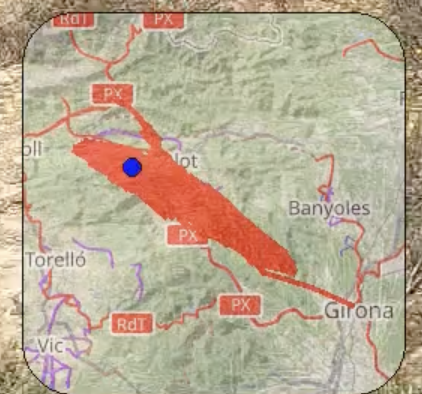
- Ran the merged video through the overlay script. Script runs well, but the results look garbled. See image below. That ought to be a smooth-ish red track, but it's a big blob. I get a lot of "data out of order?" warnings.
- To understand why, I check the GPX data in the merged file. I get different results when I extract the data using exiftool vs. gopro-to-gpx. The results from Exiftool look right. The other one is significantly shorter and I get a warning of "Request for data at time Timeunit ms=-521.703, before start of metadata, returning first item". This seems to be the issue causing the shortened gpx file and garbled plot.
- I get the same results no matter how I do step 2 (ie. using GoPro-Join or ffmpeg at the command line).
 [Joined_exiftool.txt](https://github.com/time4tea/gopro-dashboard-overlay/files/9278657/Joined_exiftool.txt)
[Joined_goprotogpx.txt](https://github.com/time4tea/gopro-dashboard-overlay/files/9278658/Joined_goprotogpx.txt)
[GH010052.txt](https://github.com/time4tea/gopro-dashboard-overlay/files/9278672/GH010052.txt)
[GH010051.txt](https://github.com/time4tea/gopro-dashboard-overlay/files/9278674/GH010051.txt)
[Joined_exiftool.txt](https://github.com/time4tea/gopro-dashboard-overlay/files/9278657/Joined_exiftool.txt)
[Joined_goprotogpx.txt](https://github.com/time4tea/gopro-dashboard-overlay/files/9278658/Joined_goprotogpx.txt)
[GH010052.txt](https://github.com/time4tea/gopro-dashboard-overlay/files/9278672/GH010052.txt)
[GH010051.txt](https://github.com/time4tea/gopro-dashboard-overlay/files/9278674/GH010051.txt)
Thoughts?
Thanks for supplying the files. Now I understand what is going on. I think I might need to rethink how to produce overlays from multiple videos.... the way that we parse the GoPro metadata isn't really compatible with the joined videos at the moment, as when the files are joined the metadata and the video doesn't align. We end up with metadata in the middle of the file that says "im right at the start of the file", and so everything is a bit of a mess. The overlay now does work for each of the individual timelapse/timewarp files you sent though, so thats some sort of improvement?
1000%!
Since exiftool worked, is there a way to incorporate it into the code like ffmpeg? This might fall under 'too hard' for now (and maybe it only fixes the GPS data but all the other metadata is still misaligned)
Anyway - it's great that it is working for timelapses!
This is fixed in 0.72.0 - the timings are not exact, but i am hoping they are "good enough".
Hi - I just want to say thanks for fixing the issue. It works like a dream now.