

 tiberiuzuld
Deleting a widget (GridsterItem) leaves a gridster-preview behind
Describe the bug
Deleting a widget (GridsterItem):
  public onDelete(item) {

    this.items.splice(this.items.indexOf(item), 1);
  }

Leaves a gridster-preview behind:
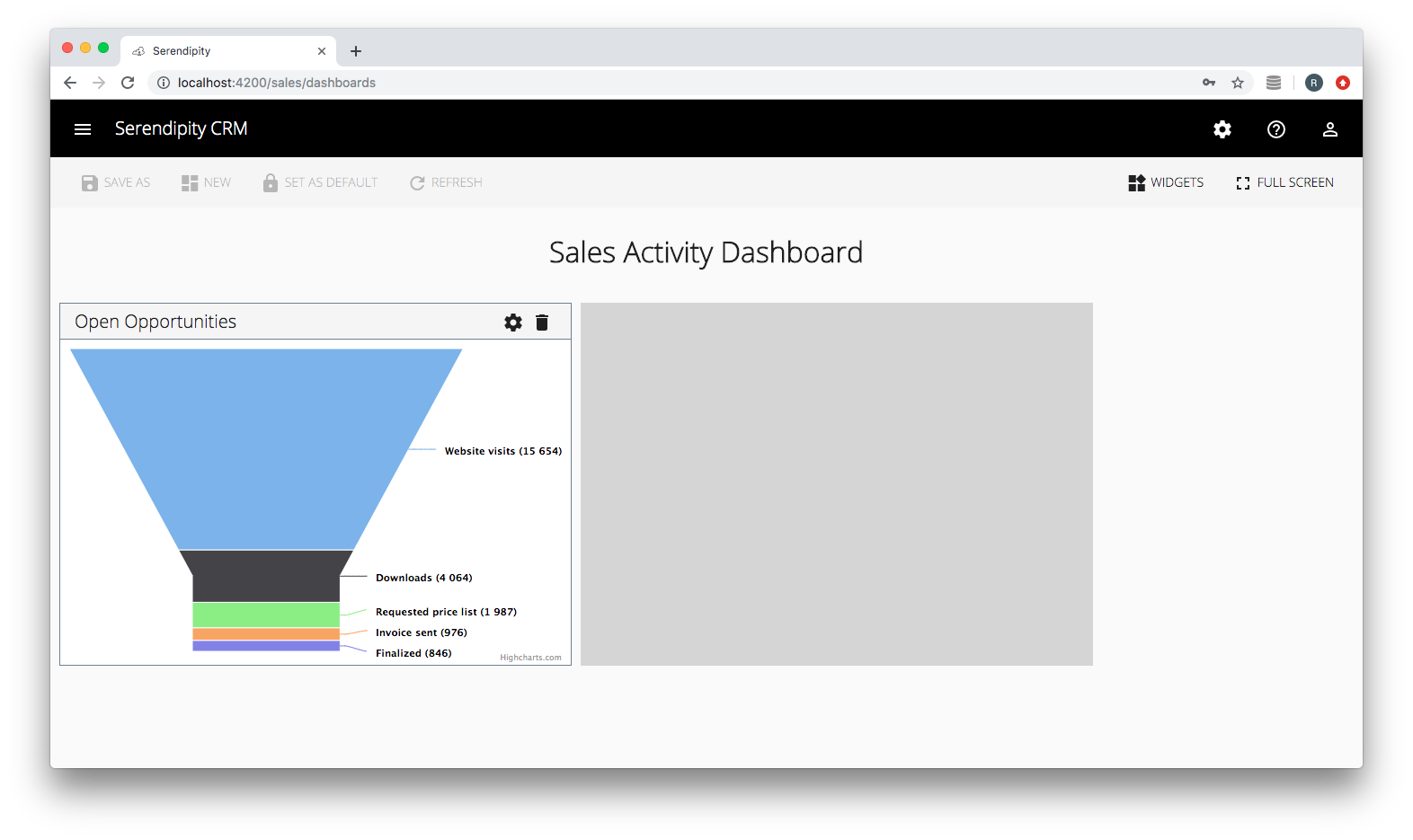

Demo
Firebase Hosting: Serendipity

Workaround
Element.style seems to be overriding the 'display' style so I had to toggle the elements ('gridster-preview') background:
  public onDelete(item) {

    this.logger.info('DashboardComponent: onDelete()');

    this.items.splice(this.items.indexOf(item), 1);

    const gridsterPreviewElements = this.elementRef.nativeElement.getElementsByTagName('gridster-preview');

    // this.renderer.setStyle(gridsterPreview[0], 'display', 'none');
    this.renderer.setStyle(gridsterPreviewElements[0], 'background', '#fafafa');

  }

  public onDragEnter(event) {

    this.logger.info('DashboardComponent: onDragEnter()');

    const gridsterPreviewElements = this.elementRef.nativeElement.getElementsByTagName('gridster-preview');

    // this.renderer.setStyle(gridsterPreview[0], 'display', 'block');
    this.renderer.setStyle(gridsterPreviewElements[0], 'background', 'rgba(0, 0, 0, .15)');

  }

This problem should be fixed by gridster itself. Both workarounds from @karloscode and @Robinyo aren't the final solution. Are there any plans to fix this in one of the next releases?
You can change the response to a click
<button (mousedown)="layoutService.deleteItem($event, item.id)">
  Delete Item
</button>

This problem should be fixed by gridster itself. Both workarounds from @karloscode and @Robinyo aren't the final solution. Are there any plans to fix this in one of the next releases?
Indeed they're not, in my case it won't only leave the preview behind, but also prevent the mouse right click. Using the suggested workarounds did not restore the desired behavior.
One thing I noticed, though, is that once you start dragging another item, the original (desired) state is restored. So I'm going to dig through the code to find out what's happening then and try to force that behavior on my app after deleting an item. It's an OS project and given the date of the issue and no response from its creator (not complaining, just stating the fact) it's safe to say this is not a priority.

Alright, so I've figured it out. When I clicked on my custom delete button the mousedown on gridster item was triggered, and thereafter the drag process started. Since on that process, I (and I'm assuming all of you as well) would correctly remove the item from the array of items, gridster didn't know the process was finished, because it was never "released".
The solution was pretty simple, I remove my item from within a settimeout:
setTimeout(() => {
    this.dashboardService.removeCard(card);
}, 0);
Now it's working properly, with no "left over" elements. Though it should be said that fixing this behavior, by maybe adding a delay to start the drag, would be the best solution.
Hello,
There is already an option to delay the drag.
But another simple option is to take the event on the button and call stopPropagation()
And the binding in html is on mousedown instead of click since the drag is bound to mousedown also.
You can see that in the demo app I do the same thing here: https://github.com/tiberiuzuld/angular-gridster2/blob/master/src/app/sections/home/home.component.ts#L92

Is it possible to have a solution for this? Because neither @eestein nor @tiberiuzuld solutions work for me. I would already be fine with a way of updating the gridster-preview (E.g. removing it)

The solution from @tiberiuzuld works for me, just make sure to replace (click) by (mousedown)
Thank you!

Thanks @tiberiuzuld, stopPropagation on the mousedown event worked for me...
E.g.
<button title="Delete Gridster Item" (mousedown)="$event.stopPropagation()" (click)="deleteWidget()"></button>

Hello,
this issue is related to this one
i found out that the issue is caused by the varaible movingItem inside the GridsterComponent
the display: block will stay while this variable is not null
you can see this here
I solved this issue by adding a viewChild on the gridster component and delete this item when the import from outside is done :
template: '<gridster [options]="options" #my-grid>
*** my code ***
</gridster>'

@ViewChild('my-grid', { static: true })
  grid: GridsterComponent;

   *** my code ***

  ngOnInit() {

    this.options = {
      ***
      emptyCellDropCallback: (item, dragItem) => this.dropWidgetIntoView(item, dragItem),
      enableEmptyCellDrop: true,
    };
  }

/**
   * Drop a new item from the menu
   * @param event - object dropped
   * @param dragItem - DragItem where i dropped my object
   */
dropWidgetIntoView(event, item: GridsterItem) {

    const componentType = Number(ev.dataTransfer.getData('widgetIdentifier'));
     // i set my new Item position to where I dropped it
    this._dashobardDragDropService.dropWidgetIntoView(componentType, dragItem.x, dragItem.y);

    if (this.grid) {
      this.grid.movingItem = null;
    }
  }
I hope this will help

The solution from @tiberiuzuld works for me, just make sure to replace
(click)by(mousedown)Thank you!
Why? Just why? What's wrong with "click"? 🤦
