

 tiavision
keep latest
Could you add a -keeplatest flag?
If specified, then the file/folder is not deleted completely, only the last version is kept, but it's history is gone....

If a file is in more than one branch, then it should not be deleted when it is the only version in one branch.. This is the default behaviour of bfg repo cleaner...
I want to have a binary folder in a git repo, were I only want to keep the latest versions of the files without the history.
Hey, thanks for the suggestion. This should be a relatively small change, but can you clarify the requirement a little? So when the file is not in any of the current refs, then delete it entirely and if it is in any ref do not touch the commits in these refs (except maybe rewriting their parents)? Keeplatest sounds like it should keep the latest version of the file, no matter if it was deleted from all current branches and tags already, therefore my question.

I don't have the time to test right now, but it could look something like in the branch issues/4
I tested issue/4. But it works not right at the moment. The file to delete is removed from the commit where the file was added originally to the repo. But then, at the next commit with a lightweight tag on it, the file is added back. And then again to be deleted at the very next commit. This goes on to HEAD. A commit with a lightweight tag on it adds the 'file to delete', the next commit deletes the 'file to delete'.
In the end there are still references to the old version of the 'file to delete'...
In the code you use Refs.ReadAll() to fill commitsToSkip. These are not the right commits to skip. The right commit to skip are those after the 'file to delete' was changed the last time...
I think I still don't really get your requirement. So on the one hand you write it should behave like the default behaviour of bfg, which will not modify the latest commits, but doesn't really care about when the commit was modified.
On the other hand you want to delete the file except the last change, which would be much harder to implement as the trees have to be processed twice.
Would it be an option to specify which branches latest commit not to touch? Or are the files not in any branch or tag anymore and you really just want to prune the history of a file?
Sorry for the confusion. After I read the documentation of bfg, you are right. bfg only removes a file when it is not referenced in the latest commit on the master branch ('HEAD'). GitRewrite skippes all references to commits referenced by branches and tags.
What I want it to do is the following scenario. My repo contains source code which changes daily and binary files which change only once or twice a year. Every time a binary file changes, that file is added to the repo. The repo is growing in size by those newly changed binaries and would become very large over time.
As I do not longer need the old versions and history of the binary files, their history should be deleted, by using the flag -keeplatest. After 'git gc' the repo will grow, but not so much.
Here I have a repo with two branches: 'master' and 'test'. The first version of the binary file is in 'master' the second version of the file is in branch 'test'. Both files are in a lot of tags. After running GitRewrite the binary file should not be deleted, because it is in both branches.
Now I merge branch 'test' into 'master and delete 'test'. Then, only the newer version of the binary file is referenced in 'HEAD'. Now after running GitRewrite -keeplatest .... I want to delete the history of the binary file, but not the latest version.
On the other hand you want to delete the file except the last change, which would be much harder to implement as the trees have to be processed twice.
GitRewrite is so fast, a second pass over the trees would hardly be noticed!
GitRewrite is so fast, a second pass over the trees would hardly be noticed!
Yay, one major goal achieved :)
In the meantime I added the --protect-refs option as I think this is useful as well. Be aware that with your proposal your tags might not build anymore as the files will be removed there as well if the file changed later. This would be solved by the protect-refs option (which would be pretty essential if I wanted to remove files from our productive repo that do not fall in the "shouldn't ever have been in the repo"-category, now that I think about this).
I will leave this open for now, but will think about it if I can manage this somehow without doing two passes over commits and trees. Even though it will be a little more complex I think I can implement this next week, one way or another, as I have some other use-cases in mind where it might make sense to use two passes.
My request is similar to fobrs, only I would like the option to keep only the last (3) commits. So I might only be interested in the most 3 recent changes to a binary file. But this might vary from project to project, so if you do find a clever way to achieve fobrs' request expanding that so a user could specify how many files the user would want to keep would be great.

Doing this allows some history to be maintained while still keeping a repo lean in size.
It should be possible without changing anything from an architecture point of view. We just have to remember the last three commits when traversing the tree to the root and then just not delete the files in these commits. That being said currently we traverse the tree for all branches, and the order which branch comes first is basically random. Depending on in which branches the files are results may vary... Any thoughts on this? Would it be sane to just always start with develop and go through the other branches after that?
Considering my request is in regards to date/time, it could look at the commit date/time and find out which ones are the last (3) chronologically (date/time). The branches do introduce some complexity, but if the rule is to look for the top (3) with the latest date/time stamps it should work as I would like for my use case.
Alternatively you could provide the option to "trim" just the branch the user is on. So if on the master branch it will only search through the master branch, but if on "specialFeature" branch it would only search and trim that branch.
Just one more thing, I only track which commits not to touch, not which files to delete in which commits. This means that if you are deleting multiple files at once this might lead to weird behavior. Your safest bet will be to just delete a single file at a time with this option enabled, otherwise the file might also be present in one of the commits that has to be kept for another file.
For my application it would be one file at a time, but your response leaves me confused a bit.
So say I have a file called "widget" that I want to remove from the GIT repo and it appears as the only file changed in 5 commits but in 3 commits it was changed along with a file called "gadget". The latest 3 commits only have "widget" as having changed.
How would GitRewrite handle this?
Well it would not touch gadget at all. So in the first step it would preprocess the tree and see in which commits widget appears. There it keeps the hashes of the last three commits with widget in memory.
Then in the next step it would delete widget from all commits except for those in the three commits.
In the first step I will implement this as a separate operation, so it will only work with exactly one file (should be nearly done) and at a later time I will check if I can integrate this into the normal delete mode where you can also use folder delete, wildcards and so on, but I don't have the time for it right now. So I expect a working --keeplatest in the next few days, but with the limitation on one file (specified by its filename, not a complete path)
Well let me know when you have it all wrapped up and I'll test it out. Thanks for investigating this so quickly!
@Nivvinabon Do you know how to compile a dotnet project (instruction are in the readme as well)? Then you can checkout branch issue/4 and start testing.
The commandline parameters you can use are
GitRewrite --keep-latest 3 widget /path/to/repo.git/
Be aware that this is highly untested, I just ran a quick check against a tiny repository and it seemed to do what I expected it to do, but especially the date handling might need some further tests. Further I have not checked the performance of --keep-latest, so just let me know if it works and if it does, if it is slow ^^
Haven't compiled a dotnet project before but if there are instructions I'm sure I can figure it out. I'll try it out today or tomorrow and see how it goes.
I'm currently helping @Nivvinabon with testing, but I can't get the project to compile using the method described in the readme. I've downloaded version 2.1.810 of the Microsoft .NET Core SDK, which may be causing this problem (idk, I've never compiled a dotnet project before). I was able to clone the repo fine, but when I tried the dotnet publish --self-contained -r win-x64 -c Release command, this error popped up:
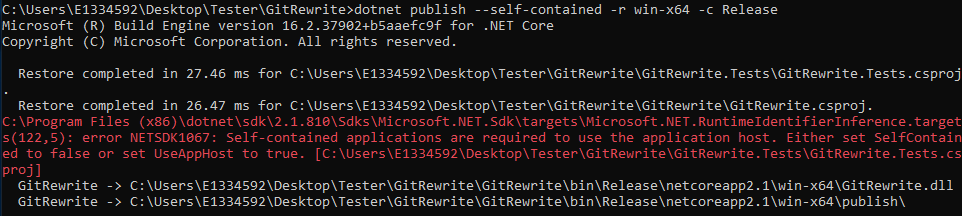
I tried looking up how to fix this error, and it was recommended to take off the --self-contained part, as it is supposedly assumed true. However, this resulted in an error with the version being used:
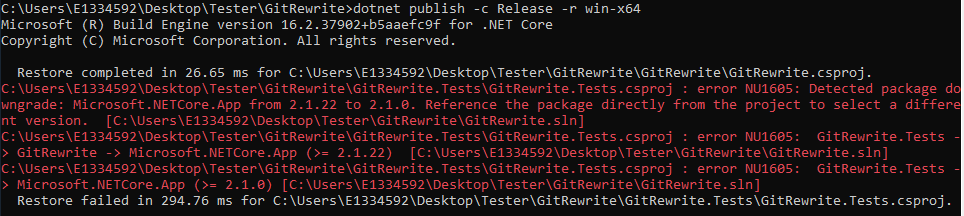
Do you have any idea on how to go about fixing this? Thanks.

Oh, sorry for that, it seems my documentation is kinda wrong, as it is not working for the test-project. This will skip the test project and therefore it should be working:
dotnet publish --self-contained -r win-x64 -c Release GitRewrite
If you contact me by email (see git log) I can also send you the compiled package, or upload it to a filehoster of your choice for testing
Thanks! It was able to publish the GitRewrite. A new issue I'm having is with running the app. If I click the .exe file, a new terminal window flashes, but it doesn't seem like anything happens besides that. I also tried to run it via the .dll file, but when I do, it gives me this error:

Double clicking the exe will not work, the .exe file can be run from the console by just typing GitRewrite.exe -h for instance.
Strange that you cannot run it with dotnet GitRewrite.dll, this is working for me. On what operating system are you? Win10 64bit or something else?
Anyway, I attached a zip file with the compiled version, please have a look at it if this is working for you issue#4.zip Just extract this and start the exe from the console.
Yeah, I'm on Win10 64bit. The .exe command worked, but not with the zip file. It seems to want another file included with it. The dotnet command doesn't work regardless. I continued with the version I got running and ran the --keep-latest command. It looks like it ran properly:

However, when I check the repo I referenced, it doesn't look like anything changed. For reference, my repo consists of four commits, where each commit consists of changes made to two files called Test.docx and Test2.docx. This line references the first commit I made. I called the command after the GitRewrite line ran.

I'm assuming that the GitRewrite command should've kept the file in all commits except the first in this scenario? Let me know if it looks like I did something wrong.
In the command the 3 is the number of versions to keep, so it will keep the file in the last 3 versions. If you change this to one only the last one will be kept
Alright, that's what I figured. However, I'm not seeing any changes being made to the repo despite running the command. For example, running the line
 results in no changed commit hashes or removed files in my whole repo. After running the command, the commit I call out here should have the file removed, but it doesn't.
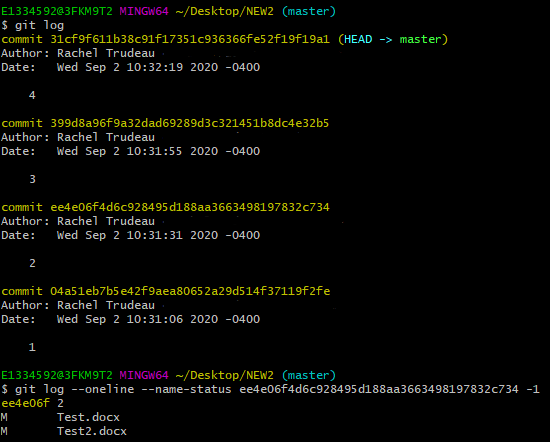
Am I referencing everything correctly in the call?
Well the file is called Test.docx, but you only specified the file as Test. Therefore it will not touch any commits, as there is no file called Test without extension
I've tried using Test.docx before, but it gave me this error that the input string wasn't in the correct format
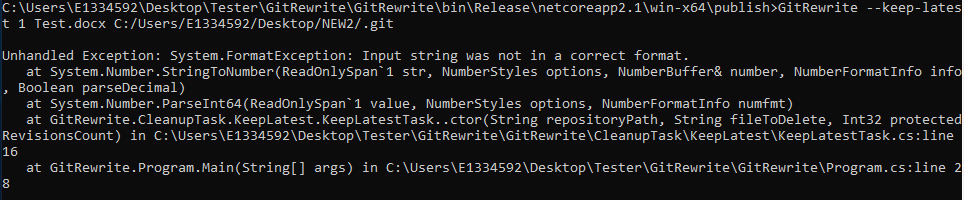
huh, seems that I messed up the datetime parsing, can you attach the test repository so I can reproduce it?