
thunder-client-support
 thunder-client-support copied to clipboard
 thunderclient
Need Proxy Support while making a Request...
Hey Rangav,
I am using you're extension and it was pretty impressive and powerful, but one thing that i want to ask with you, that will you add a proxy options in the menu , means we can make a request through proxy too... Coz it will help for debugging APIs too
Please implement it in next version if you like the suggestion hope you will find it what i want with you... Regards: Zaeem Technical

Hi @Zaeem20
Proxy is already support, please see docs below https://github.com/rangav/thunder-client-support#proxy

yeah i got it, but can you make it more reliable means adding an option in thunderclient
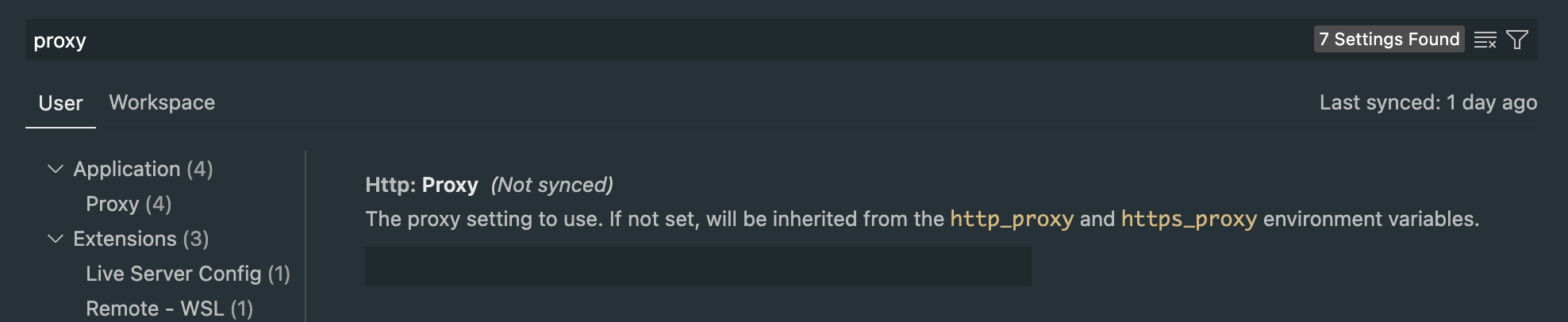
You need to enter the value above in this http://username:password@host:port
We can provide our own setting, then user has to change proxy in 2 places, which is more hassle.
What is your suggestion?
yeah i got it but can you add this in thunder client only as an option every time move to settings and change proxy is not much convenient
can you make it like postman
like this one
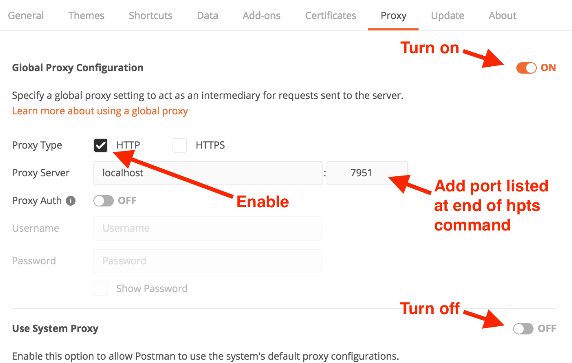
@Zaeem20 thanks got it.
What do you change frequently? will you turn it on/off or you change proxy values frequently?
@Zaeem20 thanks got it.
What do you change frequently? will you turn it on/off or you change proxy values frequently?
yep i think now you actually got it...
Hey @rangav
Can you add label of in_progress if you started working on it, so that i can confirm is my suggestion is helpful or not...
Can you please answer this, so I can think of a good solution
- will you turn proxy on/off frequently
- you change proxy server values frequently?
partly off topic
I did run into proxy issues.
From vs code settings
// The proxy setting to use. If not set, will be inherited from
// the `http_proxy` and `https_proxy` environment variables.
"http.proxy": "",
My user environment variables did include the variables HTTP_PROXY and HTTPS_PROXY and NO_PROXY. But in my case it seems that having them is counter productive.
After i renamed these variables to somehting like aa_HTTP_PROXY the proxy problem with thunder_client / vs code was solved.

@rangav, in my case, independent proxy setting – preferably configured per Thunder Client environment – would solve the problem of testing APIs in multiple environments (i.e. public and local):
During development, having multiple API microservices running in a local environment, I make them accessible under several localhost subdomains (e.g. http://api1.localhost, http://api2.localhost)[^1]. As normally, without any kind of a local DNS configuration, these domains are not resolved to the local network interface, I am configuring a proxy in VSC (http://localhost) which routes all requests to my machine. This solves the problem but is very inconvenient, as every time I want to use Thunder Client to test the publicly deployed instances of those API and/or use it in different scenarios/projects, I need to change global VSC proxy settings back and forth.
On the other hand, it is worth noticing that applications like Postman and Chrome are directing all *.localhost requests to the loopback interface – without any need to configure anything.
Thank you for your hard work. Regards.
[^1] I am using a local instance of Traefik proxy and domain based routing for that, but this is not the merits of the problem here...

Yeah, proxy setting via environment would be cool. HttpYac has per environment setting for proxy which is very useful for me.

I'm also having trouble with proxies. I need to configure a (global) proxy in VSCode's settings. But for certain requests I want to use from within Thunder I need to exclude several domains. I used the Thunder Client's settings for that (even "for all profiles") but the requests still didn't work. Only when I removed the VSCode global proxy setting the requests worked in Thunder. So for me the exclusion doesn't work currently. But, as I read here, it's a complicated problem!
