serverless-ide-vscode
 serverless-ide-vscode copied to clipboard
Published
20 hours ago •
 threadheap
threadheap
http.request.schemas shown as invalid key in serverless.yml
-
I'm submitting a ...
- [x] bug report
- [ ] feature request
- [ ] support request => Please do not submit support request here, see note at the top of this template.
-
Do you want to request a feature or report a bug?
bug. Regression issue.
- What is the current behavior?
Same as in https://github.com/threadheap/serverless-ide-vscode/issues/45.
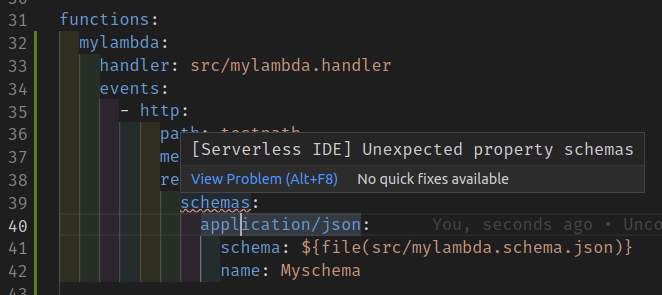
In serverless.yml, functions.mylambda.events.0.http.request.schemas displays
[Serverless IDE] Unexpected property schemas
- If the current behavior is a bug, please provide the steps to reproduce and if possible a minimal demo of the problem via https://plnkr.co or similar.
functions:
  mylambda:
    handler: src/mylambda.handler
    events:
      - http:
          path: testpath
          method: post
          request:
            schemas:
              application/json:
                schema: ${file(src/mylambda.schema.json)}
                name: Myschema
The line schemas: displays the error as shown in the image
- What is the expected behavior?
Should be an expected property
Docs https://www.serverless.com/framework/docs/providers/aws/events/apigateway/#request-schema-validators
-
Please tell us about your environment:
- Plugin version: v0.5.32
- VSCode version: 1.59.1
- Template type:
serverless.yml
PS: Thanks for the great plugin :)

I'm facing the same issue, is there a chance @pavelvlasov you will look into this?