
traefik-forward-auth
 traefik-forward-auth copied to clipboard
 thomseddon
Unable to Integrate With Nextcloud as Oauth2 Provider
Hello there,
I am currently on DAY 3 of trying to get my new server/networking setup working, and am very close to flat out losing it. Hopefully someone can help get this setup working!
Over the past week I've been migrating from a server dedicated to running Nextcloud (as a stand-alone web application) to a more containerized and extensible format. I've already gotten Nextcloud into a container and it looks as though everything is good on that end. I also opted to set up Traefik so I can constantly run various services and bring them up or down at will. This is working great!
One of the reasons I'm fiddling about with forward-auth is that I want to run a variety of services on my domain that do not support passwords themselves, like code-server. But at the same time I thought a more SSO approach would be nice. So after wasting 2 days trying to get Authelia to work as a SSO for Nextcloud and others, I decided that it would be okay if I could use the Nextcloud login as the SSO for services outside of nextcloud.
I've seen various posts about people who got this to work, so I know it's possible:
- https://help.nextcloud.com/t/nextcloud-as-oauth2-provider-for-any-traefik-forward-auth-possible/93565
- https://github.com/thomseddon/traefik-forward-auth/issues/189
I am unable to achieve a usable result though, not even considering decoding the user json. For my services that header doesn't matter, I just need to make sure randos can't access certain services because they are blocked by a nextcloud login.
I should note that I got this flow working with the Google Oauth services, and did not change the setup much to switch to Nextcloud. Here are the relevant files
/server/traefik/docker-compose:
version: "3.5"

services:
        traefik:
                image: "traefik:v2.6"
                container_name: "traefik"
                command:
                        - "--api.insecure=true"
                        - "--providers.docker=true"
                        - "--providers.docker.exposedbydefault=false"
                        - "--providers.file.directory=/etc/traefik/dynamic_conf"
                        - "--entrypoints.web.address=:80"
                        - "--entrypoints.websecure.address=:443"
                ports:
                        - "80:80"
                        - "443:443"
                        - "8080:8080"
                volumes:
                        - "/var/run/docker.sock:/var/run/docker.sock:ro"
                        - "./certs:/tools/certs"
                        - "./conf.yml:/etc/traefik/dynamic_conf/conf.yml:ro"
                networks:
                        - "traefik"
                restart: "unless-stopped"

        whoami:
                image: containous/whoami
                labels:
                        - "traefik.enable=true"
                        - "traefik.http.routers.whoami.rule=Host(`who.domain.com`)"
                        - "traefik.http.routers.whoami.entrypoints=web,websecure"
                        - 'traefik.http.routers.whoami.tls=true'
                        - "traefik.http.routers.whoami.middlewares=traefik-forward-auth"
                networks:
                        - "traefik"

networks:
        traefik:
                external: true
/server/nextcloud/docker-compose:
version: "3"

services:
        nextcloud:
                image: nextcloud:latest
                restart: unless-stopped
                environment:
                        - MYSQL_HOST=mysql
                        - MYSQL_DATABASE=nextcloud
                        - MYSQL_USER=nextcloud
                        - MYSQL_PASSWORD=<pass>
                volumes:
                        - ./html:/var/www/html
                labels:
                        - "traefik.enable=true"
                        - "traefik.http.routers.nextcloud.rule=Host(`cloud.domain.com`)"
                        - "traefik.http.routers.nextcloud.entrypoints=websecure"
                        - "traefik.http.routers.nextcloud.tls=true"
                networks:
                        - "traefik"

        mysql:
                image: mysql:8.0
                restart: unless-stopped
                environment:
                        - MYSQL_DATABASE=nextcloud
                        - MYSQL_USER=nextcloud
                        - MYSQL_PASSWORD=<pass>
                        - MYSQL_ROOT_PASSWORD=<pass>
                volumes:
                        - ./mysql:/var/lib/mysql
                networks:
                        - "traefik"

        traefik-forward-auth:
                image: thomseddon/traefik-forward-auth
                restart: unless-stopped
                environment:
                        - LOG_LEVEL=panic
                        - LOG_FORMAT=text
                        - COOKIE_DOMAIN=domain.com
                        - DEFAULT_PROVIDER=generic-oauth
                        - PROVIDERS_GENERIC_OAUTH_AUTH_URL=https://cloud.domain.com/index.php/apps/oauth2/authorize
                        - PROVIDERS_GENERIC_OAUTH_TOKEN_URL=https://cloud.domain.com/index.php/apps/oauth2/api/v1/token
                        - PROVIDERS_GENERIC_OAUTH_USER_URL=https://cloud.domain.com/index.php/ocs/v2.php/cloud/user?format=json
                        - PROVIDERS_GENERIC_OAUTH_CLIENT_ID=<nextcloud client id>
                        - PROVIDERS_GENERIC_OAUTH_CLIENT_SECRET=<nextcloud client secret>
                        - SECRET=randomthing
                        - INSECURE_COOKIE=false
                labels:
                        - "traefik.enable=true"
                        - "traefik.http.middlewares.traefik-forward-auth.forwardauth.address=http://traefik-forward-auth:4181"
                        - "traefik.http.middlewares.traefik-forward-auth.forwardauth.authResponseHeaders=X-Forwarded-User"
                        - "traefik.http.services.traefik-forward-auth.loadbalancer.server.port=4181"
                networks:
                        - "traefik"
networks:
        traefik:
                external: true
Expected behavior:
- Go to who.domain.com
- Redirected to nextcloud to grant access
- Redirected back to who.domain.com and access page
Actual behavior:
- Go to who.domain.com
- Redirected to nextcloud to grant access
- Redirected to the following url: https://who.domain.com/_oauth?state=7126511%3Ageneric-oauth%3Ahttps%3A%2F%2Fwho.domain.com%2F&code=0VVa3RwbTkyFfQx (numbers shortened)
- this page does not redirect to who.domain.com, but shows "Service unavailable" in the html.
- Using the networking tool, I was able to find this failed request (copied as curl)
curl 'https://who.domain.com/_oauth?state=fa47e5bd62fdc%3Ageneric-oauth%3Ahttps%3A%2F%2Fwho.domain.com%2F&code=0bXLndV9DBTzr' \
  -H 'authority: who.domain.com' \
  -H 'cache-control: max-age=0' \
  -H 'upgrade-insecure-requests: 1' \
  -H 'user-agent: Mozilla/5.0 (Windows NT 10.0; Win64; x64) AppleWebKit/537.36 (KHTML, like Gecko) Chrome/99.0.4844.51 Safari/537.36' \
  -H 'accept: text/html,application/xhtml+xml,application/xml;q=0.9,image/avif,image/webp,image/apng,*/*;q=0.8,application/signed-exchange;v=b3;q=0.9' \
  -H 'sec-gpc: 1' \
  -H 'sec-fetch-site: same-site' \
  -H 'sec-fetch-mode: navigate' \
  -H 'sec-fetch-user: ?1' \
  -H 'sec-fetch-dest: document' \
  -H 'accept-language: en-US,en;q=0.9' \
  -H 'cookie: _forward_auth_csrf_0ca605=0ca6054140b4f192abf7d227bb58cc77; _forward_auth_csrf_fa47e5=fa47e5bd630f3ea10a6cb62dc15a2fdc' \
  --compressed
It gets the following response:
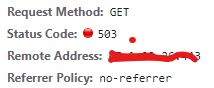

I have no idea where things are going wrong - if it's this proxy, if it's nextcloud, or even if it's something else. The behavior is repeatable in various browsers. Any help anyone can offer will be greatly appreciated, because I am well beyond wit's end.
There are two ways of setting this up (that I know of).
Edit: Since you have the forwardAuth set on the whoami service, this should not be needed at all. I needed this for a different deployment. Setting log level to DEBUG should help you understand why it failed. Always try in incognito to make sure.
First is that you direct all traffic on all domains with the path of /_oauth to the traefik-forward-auth container using the below labels. Then, the forward-auth generates dynamic redirect URIs as usual, which you need to add as valid redirect on your IdP (Nextcloud) and you are good to go. You do not have anything routing traffic to the traefik-forward-auth container. (Edit: We have the forwardAuth middleware doing this)
                   labels:
                        - "traefik.http.routers.fwd-auth.rule=PathPrefix(`/_oauth`)"
                        - "traefik.http.routers.fwd-auth.entrypoints=websecure"
                        - "traefik.http.routers.fwd-auth.tls=true"
Now, when the redirect happens, instead of getting a 503 from the whoami container (I am assuming), you should get redirected successfully.
The second is that you set this up in auth-host mode, where all the redirects happen to a single host, let's say sso.domain.com. You can add the below labels to achieve that, and you need to configure as shown https://github.com/thomseddon/traefik-forward-auth#auth-host-mode.
                   environment:
                        - AUTH_HOST=sso.domain.com
                   labels:
                        - "traefik.http.routers.fwd-auth.rule=Host(`sso.domain.com`)"
                        - "traefik.http.routers.fwd-auth.entrypoints=websecure"
                        - "traefik.http.routers.fwd-auth.tls=true"
Either way, set LOG_LEVEL=debug so that you can see if any error actually occurs on the traefik-forward-auth.

Also, Authelia is good, I've used it before. The problem is that Nextcloud does not do well with OAuth sign in. The only way I was able to get it to work is with SAML and Keycloak.
That is another recommendation, it can be a pain to set up once, but once up, it is a solid choice. I have had no issues, and all the services, even the cloud services I host/use integrate with Keycloak which in turn connects to Github/Google/Microsoft for easy login and Duo for 2FA. It also supports SAML for the weird outliers like Nextcloud.