

 thomasloven
Browser Mod Settings - Display problem
My Home Assistant version: 2022.8.7
What I am doing: Navigate to Browser Mod Settings with HA official application on my Samsung S21
What I expected to happen: A display adapted to the resolution of my phone
What happened instead:
The view is not adapted and scrolls vertically. The Browser ID field has a display problem.
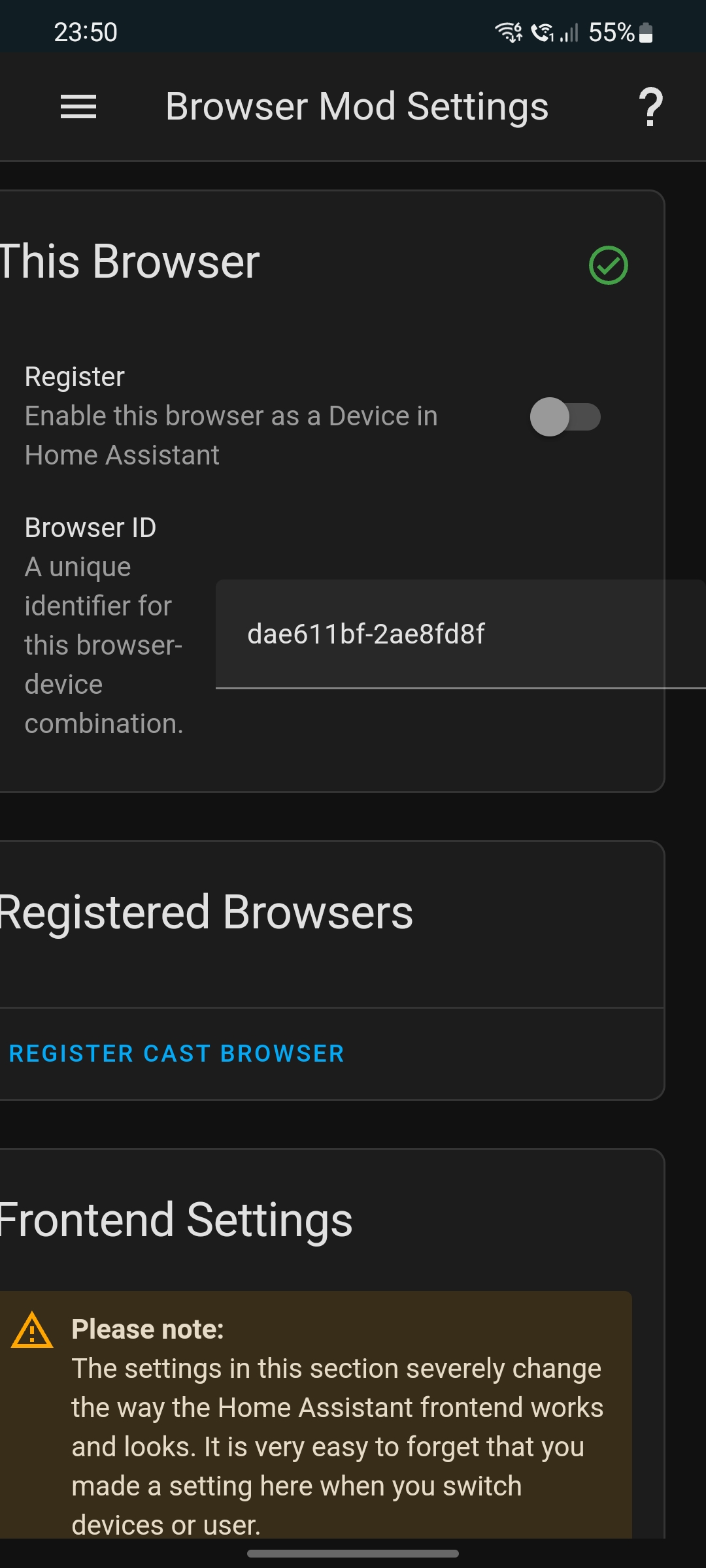
Minimal steps to reproduce: You can reproduce the problem using the Toggle Device Toolbar of Chrome and using an iPhone SE for example (resolution 375x667)
By replacing the space in the checkboxes ([ ]) with an X below, I indicate that I:
-
[X] Understand that this is a channel for reporting bugs, not a support forum (https://community.home-assistant.io/).
-
[X] Have made sure I am using the latest version of the plugin. --> Yes 2.0.1
-
[X] Have followed the troubleshooting steps of the "Common Problems" section of https://github.com/thomasloven/hass-config/wiki/Lovelace-Plugins.
-
[X] Understand that leaving one or more boxes unticked or failure to follow the template above may increase the time required to handle my bug-report, or cause it to be closed without further action.

@adrienvsj Can you pinch to zoom out? This sometimes happens on my smaller devices in the HA app.
I'm not sure if it's related, but i also have a small (iphone 5s) device that doesn't show anything on the browsermod screen. I suspect it may be because the display is too small, but it could be something else (I've tried clearing cache and resetting the HA mobile app)

@adrienvsj Can you pinch to zoom out? This sometimes happens on my smaller devices in the HA app.
I'm not sure if it's related, but i also have a small (iphone 5s) device that doesn't show anything on the browsermod screen. I suspect it may be because the display is too small, but it could be something else (I've tried clearing cache and resetting the HA mobile app)
No I can't pinch zoom out. I had a similar problem with https://github.com/nielsfaber/alarmo but it was quickly fixed
I have a similar problem to @adrienvsj except mine is not with a phone. Computer is manjaro OS with Chrome browser (google's not the open source one). Running HassOS, core, supervised all with the latest and most recent updates on RP4 B+ with 8GB ram and 128GB sd card. I have restarted HA several times. I get the "Browser Mod" in the sidebar. I click on it and I get a blank screen. Please help.

Magically this morning the config settings were there when I clicked on "browser mod" in the sidebar. I don't know what caused this. I first noticed when I checked through the Android Companion App on my Pixel 6. Note that it rendered properly to the screen width as you would expect. Then just checked on my desktop with Google's Chrome browser and it is there also. So you can ignore my previous comment. I haven't had a chance to try any of its other "services" but the config settings are now being displayed.
Regards
Kiosk Pro browsers only show a blank screen, too! So it seems to actually be a problem.

This issue has been automatically marked as stale because it has not had recent activity. It will be closed if no further activity occurs. Thank you for your contributions.
![stale[bot] avatar](https://avatars.githubusercontent.com/in/1724?v=4 "Published by a pub.dev verified publisher")
Found out what the problem was. I was using dark reader extension for Chrome and the browser_mod caused there to be an overlay which was changed to black. Setting HA as a exception in the plugin caused everything to work correctly again.
