

 thomasloupe
"The application did not respond"
Hi Thomas,
Thanks so much for your work on this project!
I frequently encounter the error message "The application did not respond". Do you perhaps have any suggestions/solutions?
--Lukas

Hello!
This usually means your connection is unstable. I believe I can defer the task to post messages so that it doesn't do this.

Hi Thomas,
Thanks for the helpful, swift response.
I do seem to get the message even when the bot is online. I seem to find that the error doesn't occur when I leave more time between parsing JSON files & using the bot to post on Discord. (The context being that I have 100s of JSON files to parse, so the 1-by-1 approach is a bit painful; so perhaps I was being too impatient.)
--Lukas
This issue exists because I am not using DeferAsync/FollowupAsync in the responses. When a user invokes the /Slackord slash command, commands must be executed within 3 seconds and an acknowledgement of the command being received and acted upon within 3 seconds or you will see this error. You will also get this error if the clock is out of sync on the system you are running.
The way it works is: /Slackord typed in channel DeferAsync() FollowUpAsync(PostMessages)
Deferring the task will allow additional time for the command to complete and will ignore the clock issue, solving both problems.
This issue is already fixed in an upcoming version for Linux/Mac, but Windows will be a bit more tricky. I should also point out that this error is absolutely harmless and for now should just be dismissed. Messages are still posting just fine, I'm just not deferring the task and sending a FollowUpAsync message post to let Discord know the application has followed up to the slash command execution.
I will still be adding code to remedy this, but this is intended behavior of the Discord.NET lib and Discord. Removed the bug label, since this really isn't a bug.
Looks like this is still an issue, only with mine, the messages are not posting. Slacklord_2 "opens" and displays them, but nothing is added in Discord.
Any thoughts? I read above and was quick about my slash command, and even tried one at a time rather than a folder at a time, and still no luck.
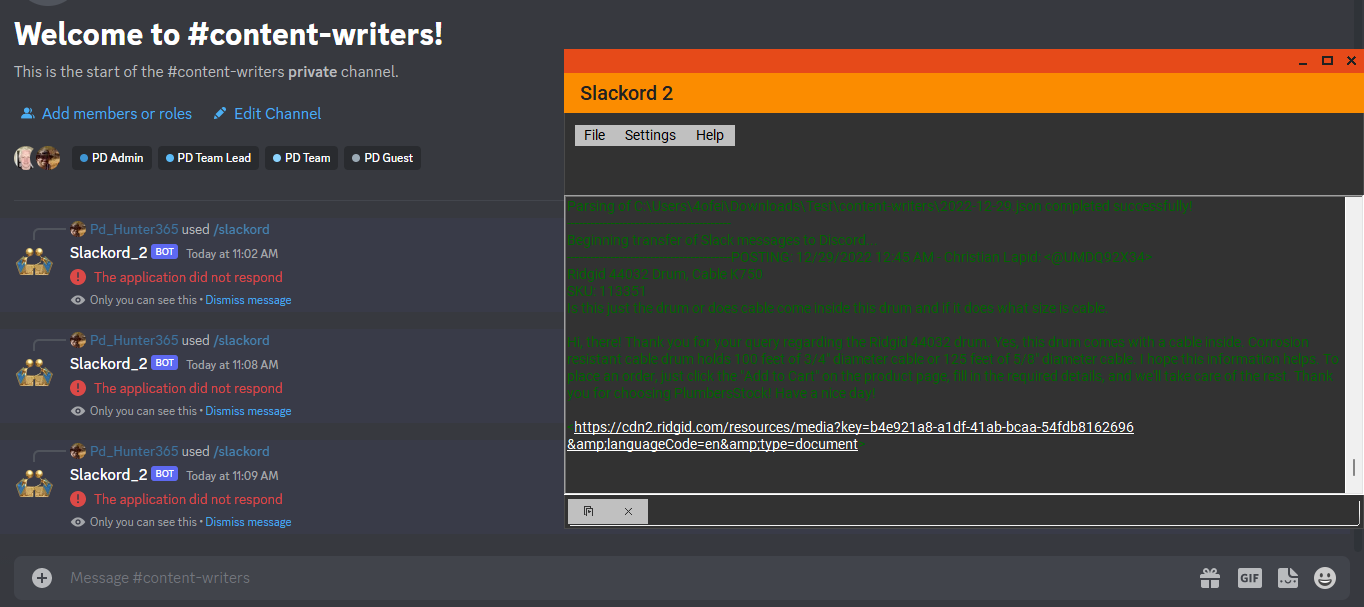

Hi @hunters365,
I believe your issue might be different, even though you're getting the same error. When a command is sent to Discord, typically after, there's an acknowledgement that the command was sent, received, and acted upon. If we don't ack the response, then we get "The application did not respond" error.
However, we'll also get this if the command to post in Discord didn't work at all. Could you please upload your JSON file here for me to test locally? You can also shoot me a Twitter DM with a link to the file if it contains sensitive data, or you can remove the sensitive data from the JSON file itself and replace it, though that might show different results.
Thanks!
thanks for the quick reply. I tried to attach one of the JSON files I am trying to load. These came from the Slack Export (Slackdump was taking hours lol lots of history to grab). I do not think the source matters, but it might. GitHub is telling me "they do not support this file type" though. I am not on Twitter so I simply opened and saved it as a .txt Hopefully it works and you can simply convert it back 2022-12-28a.txt
Hi @hunters365,
After having a look at your JSON file, I found that it contained a thread_ts entry in the first couple messages. This indicates that the message is a thread reply, but there's no previous thread entry, so we ended up with an object reference error for the thread ID to post to.
In normal Slack JSON entries the thread_ts only exists when it's part of a thread or thread reply.
In Slackdump, it looks like it's being added to every message in the JSON, regardless if it's a thread start or reply, so Slackord2 tries to post to a thread that doesn't exist.
I would create an issue with the developer of Slackdump (who is extremely kind and does a wonderful job making sure that Slackdump works with Slackord2 as best as possible) and explain this. I'd be willing to work with Slackdump's developer on the issue. If Slackdump's developer removes that timestamp from entries that aren't thread starts or thread replies, it will immediately resolve the issue. However, there's probably a good reason the developer has this entry on every message.
There are two other ways to fix this issue:
- I can catch the exception before it happens and just post it as a normal message when a thread doesn't exist.
- You can remove the
"thread_ts"entries from the JSON for messages that aren't actually thread starts or replies.
I have resolved this in the latest release using option 1, but you should still raise the issue with Slackdump. You can download the new release here: https://github.com/thomasloupe/Slackord2/releases/tag/v2.4.3.4
Please let me know if it resolved your issue. Thanks!