

 thomasjo
Default clean patterns cleans too many files
Description
The "clean" command cleans all files in the current directory which begin with the name of the current file and have an extension listed in the clean patterns setting. The MWE and the discussion under "Additional Information" should make it clear what is happening and why this is a bad problem.
Steps to Reproduce
- Install the latex package in atom, keep default options.
- Navigate to (or create) an empty directory.
- Create three files, save them as "test.tex", "testing.tex", and "other.tex".
- Write enough LaTeX in each file to build a pdf for each of these files. For instance, you could paste the following:
\documentclass{article}

\begin{document}
     Lorem ipsum dolor.
\end{document}
- Use the "Latex: Build" command on all three files (keyboard shortcut
ctrl-alt-b). - Place the cursor in the file "test.tex".
- Use the "Latex: Clean" command (keyboard shortcut
ctrl-alt-c). Make sure to only use this command once, and when the cursor is in the file "test.tex".
Expected behavior: The only files which are deleted are those which were created from using the "Latex: Build" command on the file "test.tex". In this MWE, the complete list of deleted files should be:
test.aux test.fdb_latexmk test.fls test.log test.pdf test.synctex.gz
All other files should remain intact and undeleted
Actual behavior: All files which start with "test" and have extensions in the clean patterns list are deleted. These include the following:
testing.aux testing.fdb_latexmk testing.fls testing.log testing.pdf testing.synctex.gz
Reproduces how often: 100%
Versions
Atom : 1.25.0 latex: 0.49.0 macOS: 10.13.2
Additional Information
Here are two example scenarios which show why this behavior is undesirable.
-
You write a math paper and save it as "My great paper.tex". It relies on an important graphic which you've spent hours perfecting, and is saved as "My great paper graphic.pdf" in the same directory. The file "My great paper.tex" isn't compiling and you can't figure out why, so you decide to clean the auxiliary files. To your great surprise, the all important "My great paper graphic.pdf" has disappeared!
-
(This is what happened to me, and is how this issue was brought to my attention.) You are teaching a calculus class. You write a review packet for the final exam, and save it as "Final Exam Review.tex". You print out a copy, hand-write solutions to all of the problems, scan it, and save the resulting pdf as "Final Exam Review Solutions.pdf". You decide to clean the auxiliary files. To your great surprise, the solutions pdf "Final Exam Review Solutions.pdf" has disappeared!

Since this has the "needs reproduction" tag, here's a gif of the behavior.
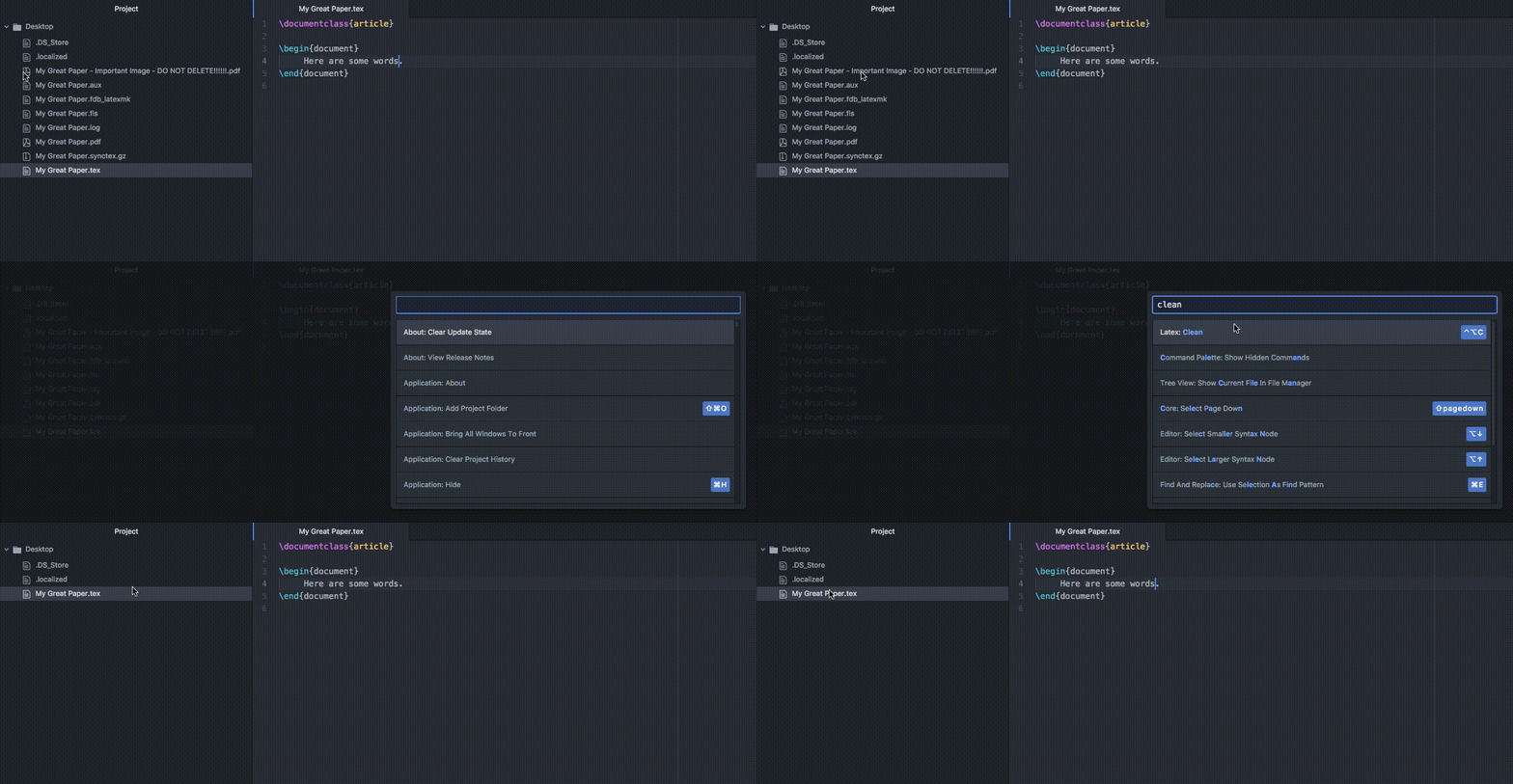
Let me know if there's information I can provide to help troubleshoot!
Thanks for the GIF. The label is mostly for "internal" use. It's practically speaking impossible to fix the problem until we've managed to reproduce the problem — ideally via a regression test (to guard against future regression of the undesired behavior).
I see what's going on here though; the way we've implemented the cleaning patterns is not relying on exact, stemmed file names, so as long as the file begins with the same name, it will be cleaned. This shouldn't be too hard to reproduce, and also should be an easy fix I think.

This issue has been marked as stale because due to inactivity. It will be closed in 7 days if no further activity occurs.
![stale[bot] avatar](https://avatars.githubusercontent.com/in/1724?v=4 "Published by a pub.dev verified publisher")