
elevate

elevate copied to clipboard
 thomaschampagne
[Desktop][Bug] Cannot enter values by typing in Zone Settings
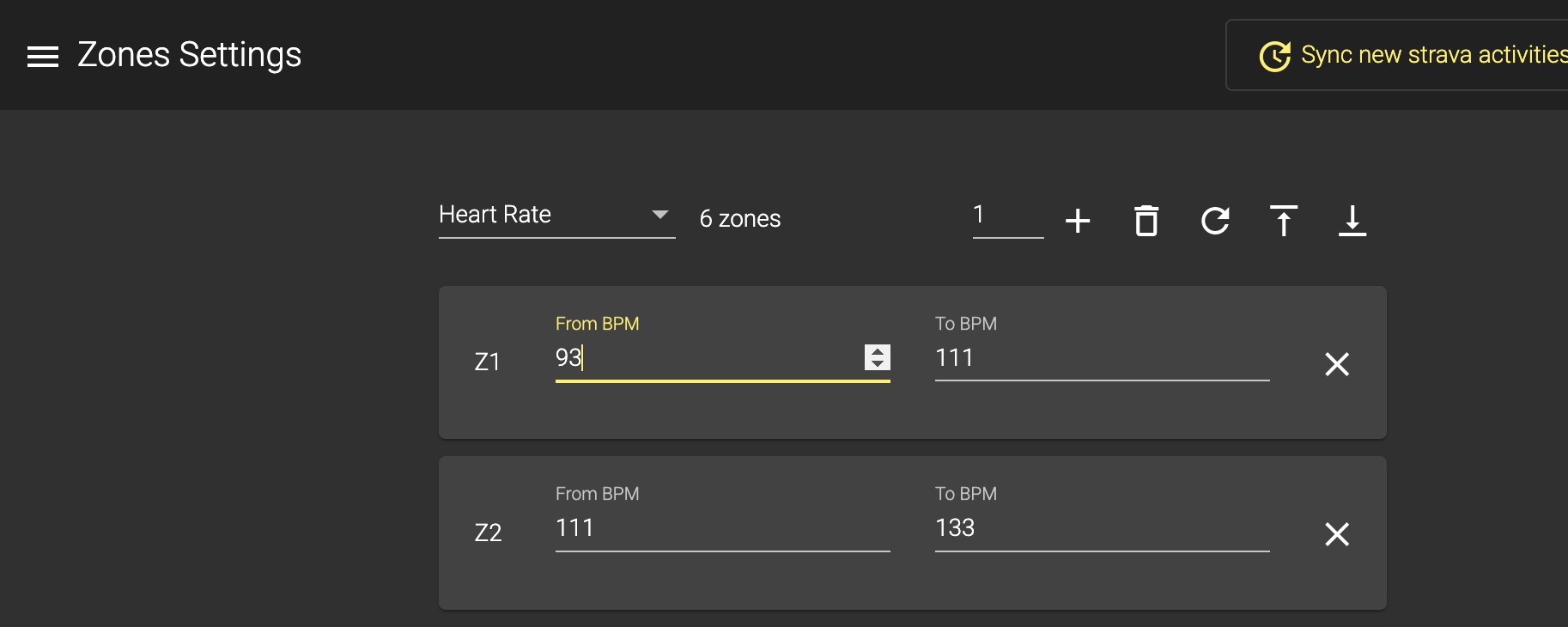
Describe the bug In the Zone Settings, I can set values only via the up/down arrows, but not by typing in the fields. This is despite the fact that the cursor seems to indicate typing is possible.
To Reproduce Steps to reproduce the behavior:
- Go to 'Zone Settings'
- Select 'Heart Rate' or 'Cycling Power' (have not tried the others)
- Click in any 'From BPM', 'To BPM', 'From Watts' or 'To Watts' input field
- The cursor appears next to the value, but entering a number or deleting the current value does not do anything
Expected behavior When performing the steps above, I expect to be able to delete the current values and enter new ones
Screenshots
Environment
- OS: MacOS 12.3.1
- Desktop app version 7.0.0-beta-4
Additional context None

This issue has been automatically marked as stale because it has not had recent activity. It will be closed if no further activity occurs. Thank you for your contributions.
![stale[bot] avatar](https://avatars.githubusercontent.com/in/1724?v=4 "Published by a pub.dev verified publisher")