

 thomaschampagne
[Web-Ext][Bug] Settings don't save, activities deleted
Describe the bug I had the chrome extension open and added a target to the yearly progression tab. When I added it chrome just closed and when I opened it again the extension had updated. All of my activities are gone, which is not that big of a deal since I can just sync again, but the athlete settings do not save when I try to update them for the sync. At one point a JSON error popped up in the "Athlete settings" page when I was trying to update it, but I can't reproduce that error message now and did not save the message. In my chrome "local extension settings" folder there is an "ldb" file that was updated the last time I synced, so I assume that has the activities in it, but since it is not in the JSON format expected by the "restore profile" button I can't use it.
Changes made to the global settings and zone settings do not save as well. The only setting that seems to save between closing and reopening is the dark mode vs light mode.
To Reproduce Change any setting, close the browser and reopen.
Environment
- OS: Linux
- Browser name and version: Chrome v99
- Web extension version 7.0.0-beta.2

Indeed some others users have experienced the issue too while upgrading to v7. It wasn't supposed to happen ofc...
If you have some issues to save settings, I suggest you to uninstall/install back the extension from here: https://chrome.google.com/webstore/detail/elevate-for-strava/dhiaggccakkgdfcadnklkbljcgicpckn
Sorry for that !

I imported a backup in the end and resynced recent activities. Worked fine, but now they've all gone again, and it's insiting on syncing all from scratch... not sure if it's to do with the new update (colours have changed?)

@A1Dan75 You experienced also the "activities wipe" during the update to v7. You have to re-sync all your activities unfortunatly.
I'm still trying to understand what happened :/ I'm sorry
Looks like it, it says my last backup isn't compatible.
Managed 400 then died, guess I'll have to do it over a few days.
Happened to me as well, however I had backup of my whole chrome directory, so I reverted it. If you need some help with debugging let me know, however I restrain myself from running it again, since the update will overwrite again my data.

Happened to me as well, however I had backup of my whole chrome directory, so I reverted it. If you need some help with debugging let me know, however I restrain myself from running it again, since the update will overwrite again my data.
So have you reverted to V6?
Will it not automatically try and upgrade itself to 7 again?
It will, therefore I can only run it without Internet. My main browser is Firefox, therefore I am waiting for a fix to open chrome again and have elevate update being less buggy with new release.
Apparently you can disable automatic updates https://stackoverflow.com/questions/27657617/how-to-disable-google-chrome-extension-autoupdate
I just did
Indeed some others users have experienced the issue too while upgrading to v7. It wasn't supposed to happen ofc...
If you have some issues to save settings, I suggest you to uninstall/install back the extension from here: https://chrome.google.com/webstore/detail/elevate-for-strava/dhiaggccakkgdfcadnklkbljcgicpckn
Sorry for that !
Reinstalling fixed the problem with saving the settings. Thanks for the work you do on this.
I see this screen. It syncs some activities, get the message to wait 4-5hours and the tab does not close itself and does not continue where it left off on my next attempt to continue the sync. I have re-synced the same initial batch 3 times now. Each sync starts off at zero activities.
That's normal. Just let it go further. I'm aware that's not perfect. Strava set the limits...
Answered my own question from earlier, but have no idea where to find this "File Connector". Anyone? Regular peice-meal sync over days is not working for me, this seems like the better option if I can get some clarity.
The File connector is just above the strava one:
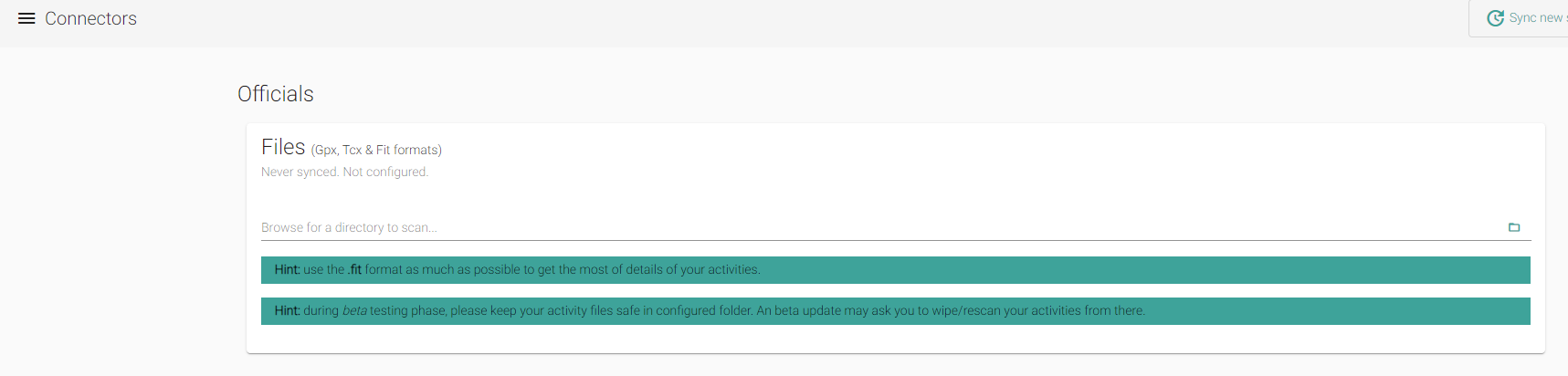
What a nightmare
- Opened elevate and got asked to recalculate
- Clicked it without realising what this meant - all activities dropped
- Sync starts again, takes basically an entire day
- Reopen, add some more details like age and practice level
- Get prompted to calculate again which I absentmindedly click without realising this is what caused my activities to be dropped and resynced in the first place
- Re-sync starts again
- In frustration, come onto this thread and see the recommendation to uninstall/reinstall, which I do
- Reopen elevate and realise my entire FTP history is now gone which I put together from TrainerRoad, which I no longer have
- Uninstall elevate
- Load intervals.icu and click the donate button

I cannot sync All Activities. I think the problem was due to a system reboot due to critical Dirty Pipe patch while activities were being imported Tried several times to resync all activities -all attempts failed to sync any activities- looks like Strava have banned me - cannot sync any activities.
.The I uninstalled and reinstalled extension - logged out of Strava for about an hour then trued to sync all activities and got 0 imported band 4-5 hour wait.
OS Linux Extensuon 7.0.0-beta2 Chromium Version 100.0.4896.88 (Official Build) snap (64-bit) Kernel 5.13.0-39-generic
What is the CORRECT method to resync all activities - it seems different from the prior version. Does it continue the sync automatically?

Does it continue the sync automatically?
Yes. Just let it go. It scan existing activites at the beginning then sync the new ones until the end.
Thomas - I am having trouble syncing all activities (about 1800) . I have disabled suspend on my laptop and after 2 days it has done 580. The reason I disabled suspend was my concern about the connection between Elevate and Strava.
Trying the MacOS version on an iMac it has done 923 in the same period - I have disabled power saving / suspend on the iMac. Just checked the iMac it has processed 1353 activities.
I had little trouble with version 6 but can only remember doing 2 full sync of activities.
I think your app is very popular and you are over worked. I will donate next week.
Update -iMac all activities synced - it took 3 days.
Question does the iMac app auto update?
This issue has been automatically marked as stale because it has not had recent activity. It will be closed if no further activity occurs. Thank you for your contributions.
![stale[bot] avatar](https://avatars.githubusercontent.com/in/1724?v=4 "Published by a pub.dev verified publisher")