

 thingsboard
[HELP] Not writing float attributes properly through Modbus TCP
Describe the issue I´ve configured a ThingsBoard gateway as instructed in the link https://thingsboard.io/docs/iot-gateway/getting-started/ (Ubuntu), where I connected a PLC (model PLC-300 / WEG) programmed to receive some parameters through Modbus TCP. I can successfuly read and write integer values to this PLC, but for float it is simply not working for writing (ISSUE A), and for reading (ISSUE B) I´m not sure if the behaviour is Ok.
The problem is that the numbers I write through attributes/TB keys are been written wrongly at the PLC.
The configuration for the Modbus connector is as following (/etc/thingsboard-gateway/config/modbus.json): For reading (seems to be working)
        "attributes": [
         {
            "tag": "var_a",
            "type": "32float",
            "wordOrder": "LITTLE",
            "functionCode": 3,
            "objectsCount": 2,
            "address": 8016
         },
For writing (not working Ok)
        "attributeUpdates":[
...
         {
            "tag": "svar_a",
            "type": "32float",
            "functionCode": 16,
            "objectsCount": 2,
            "address": 8016
         },
Note: For the key "svar_a" I also tried the functionCode 6, but the behaviour is the same.
TO REPRODUCE THE ISSUES: ISSUE A (WRITE)
- In ThingsBoard UI, I click on "Devices" on the vertical menu;
- Find and click on device "PLC-300", and in the new windows opened, click on "Attributes";
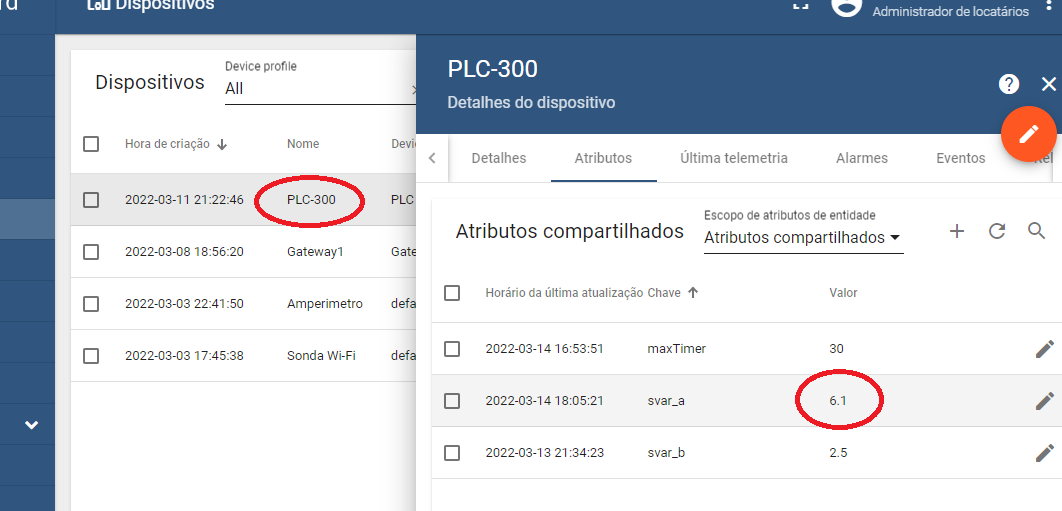
- Select "Shared Attributes" and create one for the key "svar_a', type '123 double', value "6.1" and click "Add";
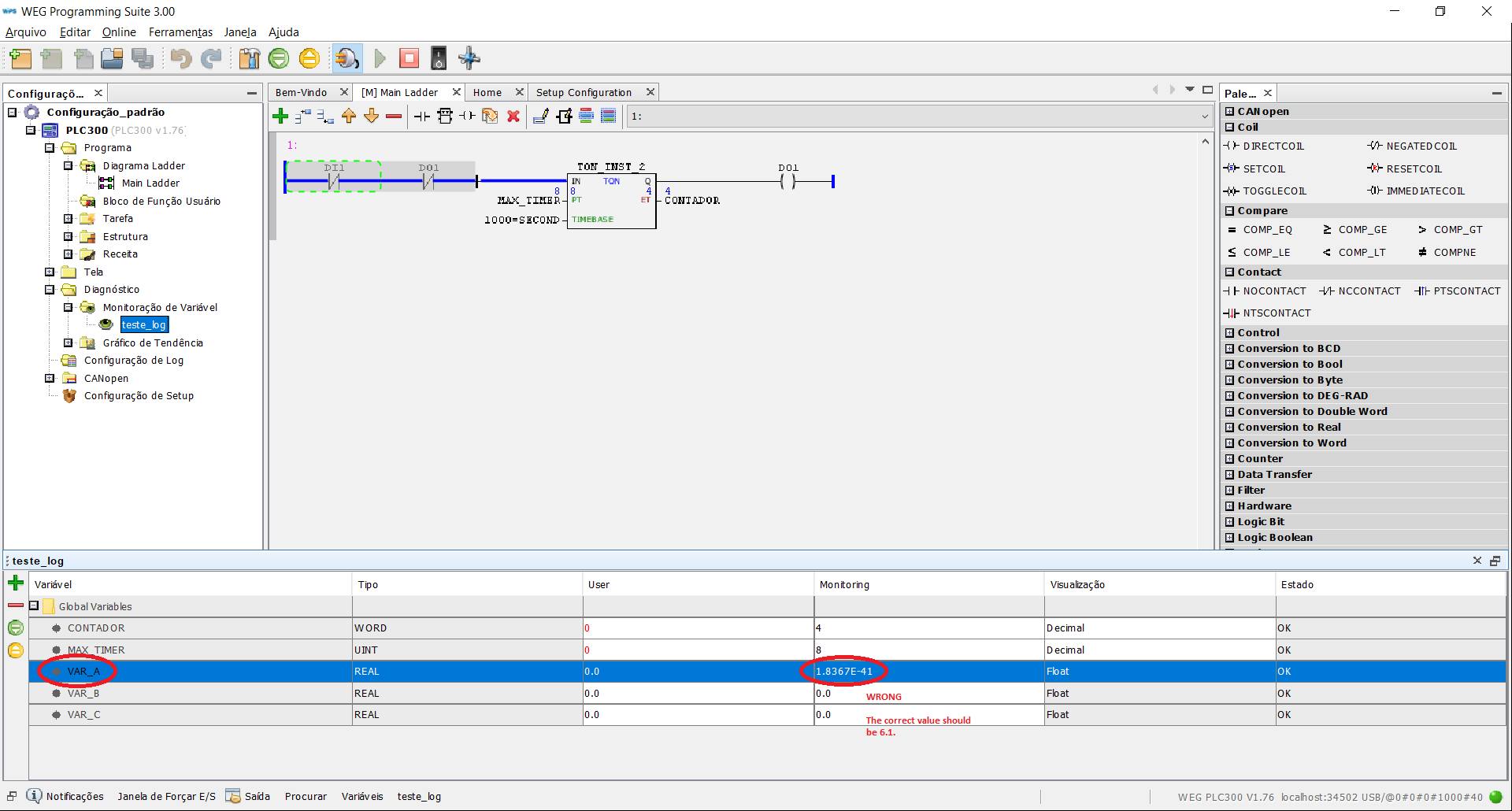
- On the PLC, modbus address 8016, now I see the value "1.8367E-41" (it should be displaying the value 6,1).
ISSUE B (READ)
- In the PLC side, throught its HMI, I set a variable called VAR_A (the same one used in ISSUE A) to "6.1";
- In ThingsBoard, I navigate throught Devices, "PLC-300", Attributes, Client Attributes;
- I see that the "var_a" attribute, the same one set on the step 1, is with the value "6.099999904632568"; Q: For the issue B, should I consider it a problem, or is it expected, once 6.1 is "equal" to 6.099999904?
Configuration (Attach your configuration file) Notate: Remove Access token from file if you want to attach a tb_gateway.yaml tb_gateway.yaml
thingsboard:
  host: xxxxxxxxxxxxxx
  port: 1883
  remoteShell: false
  remoteConfiguration: false
  statsSendPeriodInSeconds: 3600
  minPackSendDelayMS: 0
  checkConnectorsConfigurationInSeconds: 60
  security:
    accessToken: XXXXXXXXXXXXXXXXXXX
  qos: 1
storage:
  type: memory
  read_records_count: 100
  max_records_count: 100000

  grpc:
  enabled: false
  serverPort: 9595
  keepaliveTimeMs: 10000
  keepaliveTimeoutMs: 5000
  keepalivePermitWithoutCalls: true
  maxPingsWithoutData: 0
  minTimeBetweenPingsMs: 10000
  minPingIntervalWithoutDataMs: 5000
connectors:
  -
    name: Modbus Connector
    type: modbus
    configuration: modbus.json
modbus.json
{
  "master": {
    "slaves": [
      {
        "host": "192.168.16.11",
        "port": 502,
        "type": "tcp",
        "method": "socket",
        "timeout": 35,
        "byteOrder": "BIG",
        "wordOrder": "BIG",
        "retries": true,
        "retryOnEmpty": true,
        "retryOnInvalid": true,
        "pollPeriod": 5000,
        "unitId": 1,
        "deviceName": "PLC-300",
        "deviceType": "PLC",
        "sendDataOnlyOnChange": false,
        "connectAttemptTimeMs": 5000,
        "connectAttemptCount": 5,
        "waitAfterFailedAttemptsMs": 30000,
        "attributes": [
         {
            "tag": "var_a",
            "type": "32float",
            "wordOrder": "LITTLE",
            "functionCode": 3,
            "objectsCount": 2,
            "address": 8016
         },
         {
            "tag": "var_b",
            "type": "32float",
            "wordOrder": "LITTLE",
            "functionCode": 3,
            "objectsCount": 2,
            "address": 8024
         },
         {
            "tag": "var_c",
            "type": "32float",
            "wordOrder": "LITTLE",
            "functionCode": 3,
            "objectsCount": 2,
            "address": 8032
         }
        ],
        "timeseries": [
          {
            "tag": "TesteTimer",
            "type": "16int",
            "functionCode": 3,
            "objectsCount": 1,
            "address": 8000
          }
        ],
        "attributeUpdates":[
         {
           "tag": "maxTimer",
           "type": "32int",
           "byteOrder": "BIG",
           "wordOrder": "LITTLE",
           "functionCode": 6,
           "objectsCount": 2,
           "address": 8008
         },
         {
            "tag": "svar_a",
            "type": "32float",
            "functionCode": 16,
            "objectsCount": 2,
            "address": 8016
         },
         {
            "tag": "svar_b",
            "type": "32float",
            "functionCode": 16,
            "objectsCount": 2,
            "address": 8024
         },
         {
            "tag": "svar_c",
            "type": "32float",
            "functionCode": 6,
            "objectsCount": 2,
            "address": 8032
         }
        ],
        "rpc": [
         {
           "tag": "resetTimer",
           "type": "bits",
           "functionCode": 5,
           "bitCount": 1,
           "address": 40000,
           "value": 1
         },
         {
           "tag": "setMaxTimer",
           "type": "32int",
           "byteOrder": "BIG",
           "functionCode": 6,
           "objectsCount": 2,
           "address": 8008
         },
         {
           "tag": "getMaxTimer",
           "type": "16int",
           "functionCode": 3,
           "objectsCount": 1,
           "address": 8008
         }
        ]
      }
    ]
  }
}
Connector name (If you need help with some connector/converter): Modbus Connector (modbus.json)
Versions (please complete the following information):
- OS: Ubuntu Desktop 20.04.3 and Ubunto Server 20.04.4 for the ThingBoard Gateway
- Thingsboard IoT Gateway version 3.0.1
- Python version 3.8.10
** Import information **
- PLC-300 Manual: https://static.weg.net/medias/downloadcenter/h08/h0e/WEG-plc300-manual-do-usuario-10000703041-manual-portugues-br.pdf
- The variable VAR_A is a variable type REAL (Float Point Standard IEEE 559)
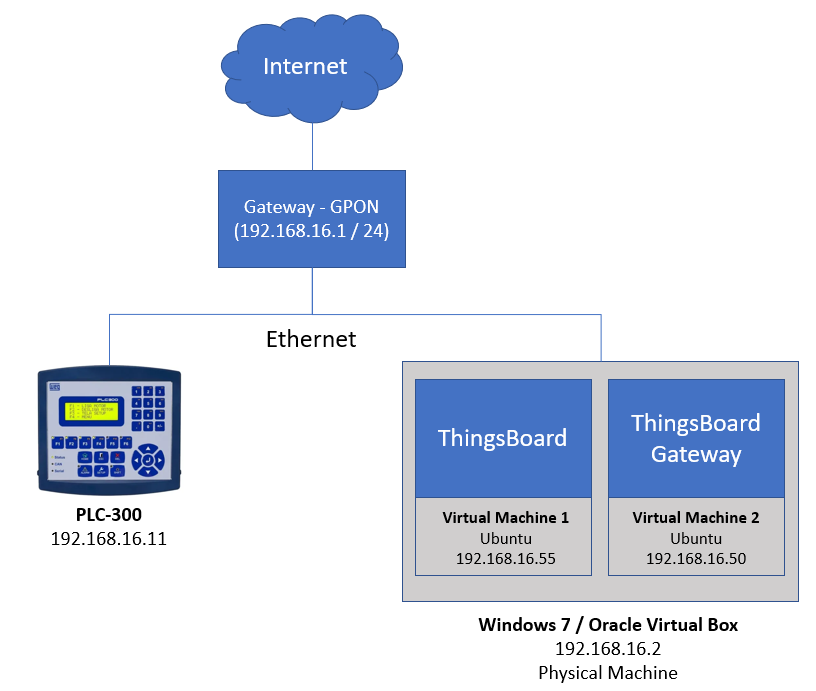
Scenario Diagram
Setting Value 6.1 on TB
Value Shown In PLC when setting 6.1 through TB
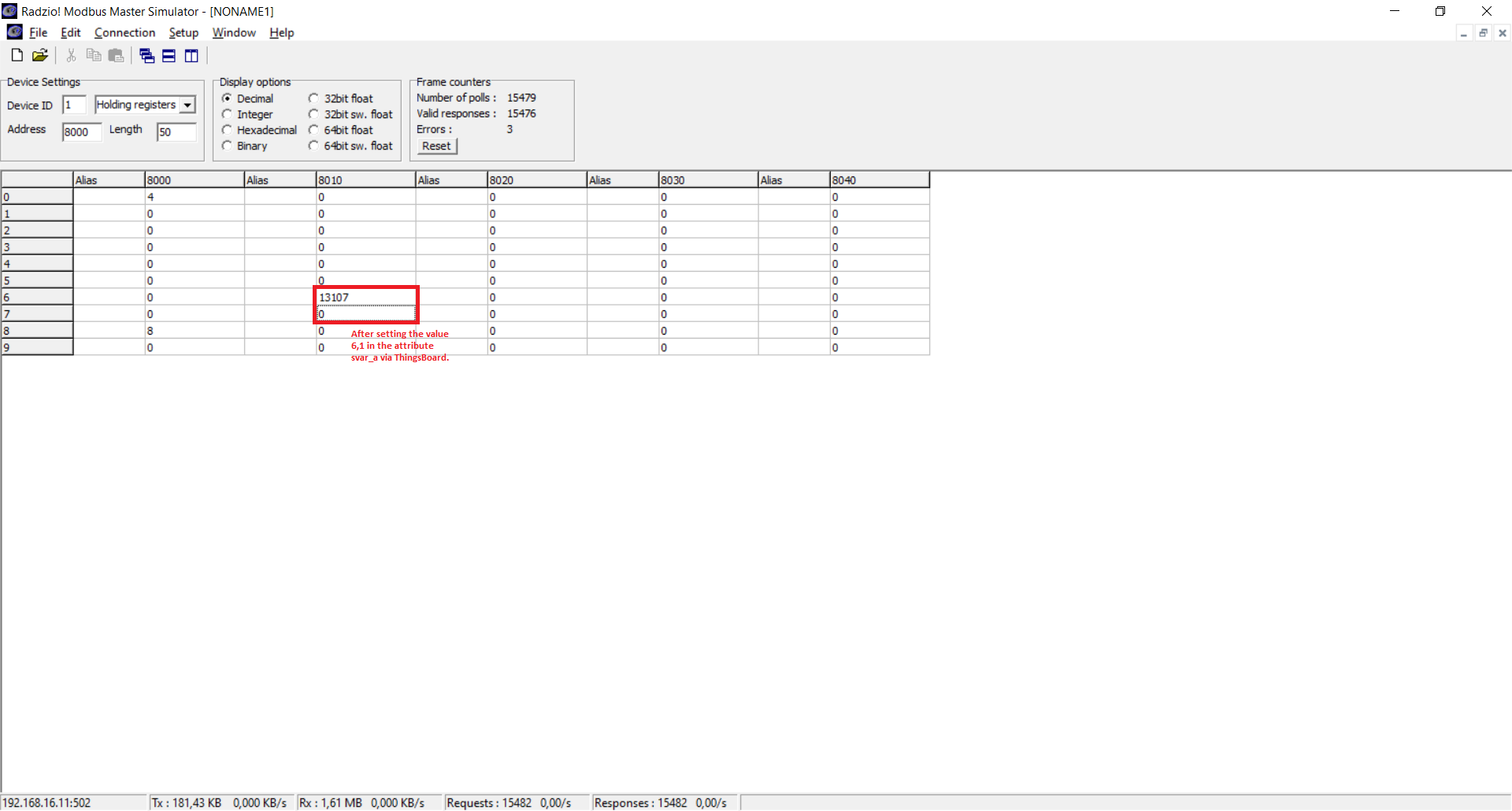
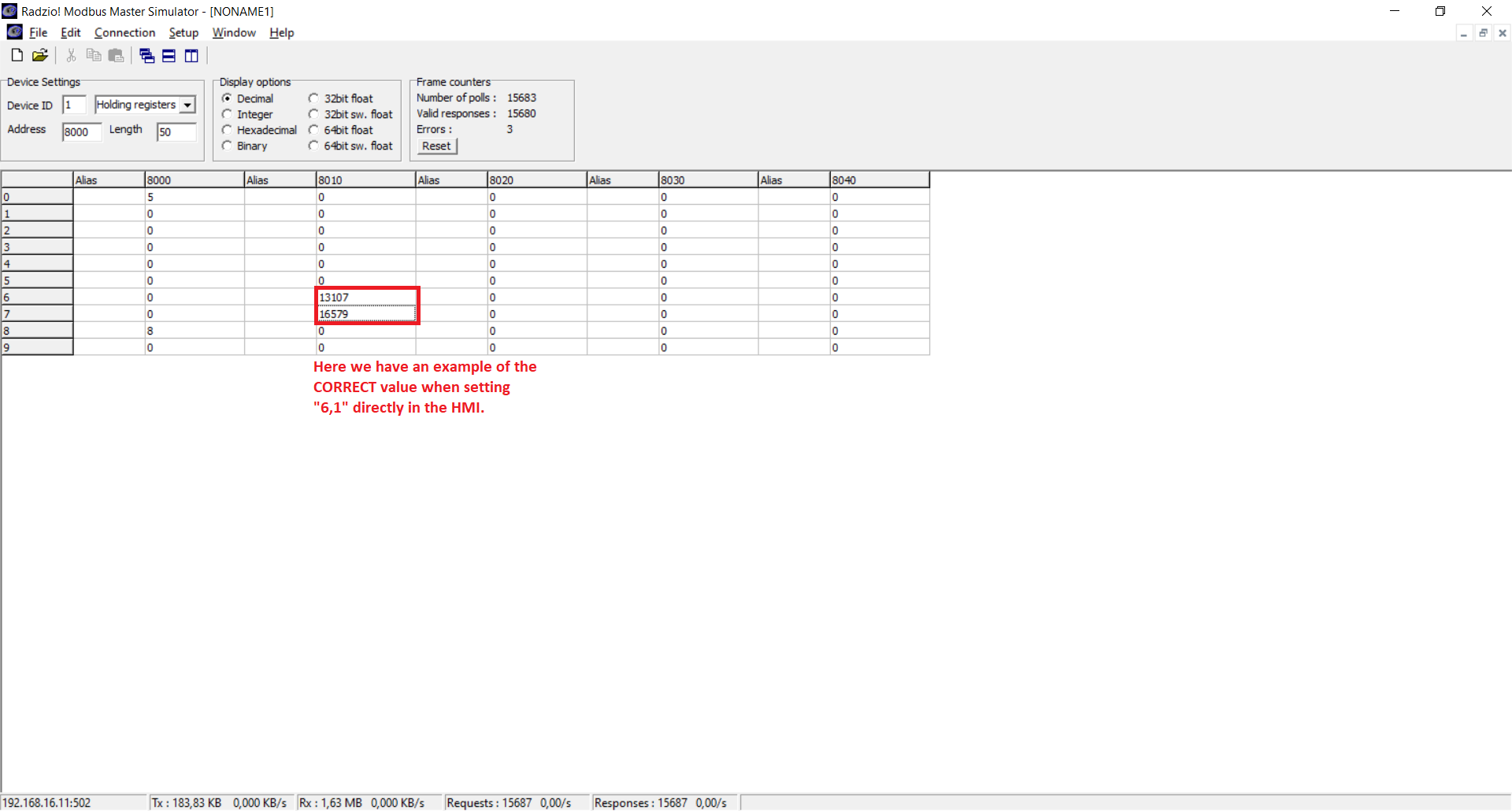
The wrong value seen through a Modbus client (Notice that it is NOT setting a value for address 8007)
An example of value Ok through a Modbus client (Notice that IT IS setting a value for address 8007)

Hi @mcavalcante, thanks for your interest in ThingsBoard IoT Gateway! We will investigate this problem.

Hi @mcavalcante, thanks for your interest in ThingsBoard IoT Gateway! We will investigate this problem.
After doing some researches, I found a way to put it working, but I´m not sure it is the correct way. Firstly, I´ve set the object "svar_a" like this:
         {
            "tag": "svar_a",
            "type": "32float",
            "byteOrder": "BIG",
            "wordOrder": "LITTLE",
            "functionCode": 16,
            "objectsCount": 2,
            "address": 8016
         },
... and, in the file /usr/lib/python3/dist-packages/thingsboard_gateway/connectors/modbus/modbus_connector.py, I´ve changed some lines of the method __process_rpc_request in the following way:
                try:
                    i = 0
                    for cd in converted_data:
                        if (cd > 0):
                            i += 1

                    if (i >= 2):
                        rpc_command_config[PAYLOAD_PARAMETER] = converted_data
                    else:
                        rpc_command_config[PAYLOAD_PARAMETER] = converted_data[0]
                except IndexError:
                    rpc_command_config[PAYLOAD_PARAMETER] = converted_data
            try:
                response = self.__function_to_device(device, rpc_command_config)
For some reason, when the variable PAYLOAD_PARAMETER has some value ("payload" in my personal scenario), it was only building the modbus frame with only one object (address 8016). Now it is writing both ones, the 8016 and 8017.
Would it be a bug or some misconfiguration that I did?
Hi @mcavalcante, please, update your Gateway to the newest version via the master branch and let us know if it helps.
Hello @samson0v,
Sorry, we´ve retaken this part of the project few weeks ago and I haddn´t see your message. I´ve tried with the version below and I guess we had an step back. Now, even with the work around suggested here in march 16º 2022, I can´t write float variables from TB toward the the PLC (ISSUE A mentioned above). However, for reading the float vars, it´s Ok.
""2023-03-17 10:35:13" - |INFO| - [tb_gateway_service.py] - tb_gateway_service - __init__ - 153 - ThingsBoard IoT gateway version: 3.2"
Work around:
                try:
                    i = 0
                    for cd in converted_data:
                        if (cd > 0):
                            i += 1

                    if (i >= 2):
                        rpc_command_config[PAYLOAD_PARAMETER] = converted_data
                    else:
                        rpc_command_config[PAYLOAD_PARAMETER] = converted_data[0]
                except IndexError:
                    rpc_command_config[PAYLOAD_PARAMETER] = converted_data
            try:
                response = self.__function_to_device(device, rpc_command_config)
